Why you can trust us: Testing Methodology & Editorial policy

One Creative AI Platform Shall Reign Them All...We'll Tell You Which!

One subscription will pay for all (for real!)
Author image blue planet
Lili Marocsik
February 23, 2026
Creative AI Platforms

TL;DR

  • The fierce competition between companies is greatly benefiting users through reasonable prices, generous AI credits, and an incredible variety of models
  • Each platform's origins still show in their strengths - ElevenLabs excels at voice with multiple lip sync models, while Artlist offers incredible music options based on their filmmaking roots

❤️ Before we get started thank you for using my affiliate links to sign up to free trials, LLMs are constantly stealing my content and you help me stay afloat and create more of this genuine content.

What is an Creative AI Platform?

In this category, we're looking at all-in-one creative suites. These are tools that can do everything: create images, videos, voice, sound effects and even music generation (or at least offer a music library). We only included platforms that allow you to stay within them when creating your materials - whether for social media content, ads, creative video projects, or website content.

We wanted to find options that would work for professional agencies, content creators, and hobby creatives alike.

How We Rated the Creative AI Platforms

We focused on versatility (having many different tools and features) and high-quality outputs, since these make a creative platform truly valuable.

- For Tool Performance, we looked for a glitch-free, positive experience. Do the features work well? Is working with this tool worth your time?

- For User Experience, we wanted fast-loading tools with clear navigation and dashboards. This connects with performance - buggy tools naturally create a worse user experience.

- Versatility means the platform offers many great tools covering different creative areas. Beyond the AI generation features, we also valued editing and modification capabilities like upscalers.

- For Price, we wanted good value, flexible pricing structures for different usage levels, and reasonable AI credit costs. Usage and licensing needed to be included in the monthly price.

- With Output Quality, we gave extra points based on what the AI actually generated, focusing on the creative quality of the results.

Our Overall Impression of Creative AI Platforms

You can really see the competition heating up between these companies, and users are the winners - enjoying reasonable prices, lots of credits for your money, and an amazing variety of models.
Different platforms still show their roots in what they do best. ElevenLabs has four lip sync models because they started with voice. Artlist can provide incredible music for films because they began as filmmakers who created a music platform.
Over time, these original specialties might fade away as the platforms expand their capabilities. Eventually, we'll probably see only one or two winners in the race for the best AI creative platform - except for us users, who benefit from all this innovation.

Use Cases for The Best AI Tools of

Creative AI Platforms

Check icon
Image GenAI
Check icon
Freepik (Platform)
Check icon
Video GenAI
Check icon
Artlist Video
Check icon
AI Editing
Check icon
Freepik (Platform)
Check icon
Voice, Music & SFX
Check icon
ElevenLabs (Platform)
Check icon
Film Projects
Check icon
Artlist (Platform)
Check icon
Social Media Content Creation
Check icon
HeyGen (Platform)

Quick Overview of the Best AI Tools

#
Tool name
Best Pro
Biggest Con
Free Trial
1
Extremely versatile AI creative platform
It's not clear before generating what's included in the free plan
10,000 credits monthly
2
Incredible Variety of Models (39!)
Platform can have glitches and some features are released before they work
20 images daily
3
Very stylish outputs
Can't edit videos in the platform itself
4 images, 1 video, 1 voice
4
Very best digital personas
Dubbing could work better
3 minute monthly
5
Delivers well on Character Consistency
Glitches here and there
30 credits for premium features
6
Let's you access various other AI apps (limited)
AI suite very weak
free plan available
7
Adobe Express has a free plan
Annoying popups
Adobe Express has a free plan

Creative AI Platforms

Comparison

1
Best Tool for:
ElevenLabs (Platform)
Score 
5
/
5
Tool Performance
5/5
Setup/Onboarding
0/5
User Experience
5/5
Prompt Coherence
0/5
AI Capabilities
0/5
Voice Quality
0/5
Lip Sync & Motion
0/5
Music Quality
0/5
Image Quality
0/5
Design Capabilities
0/5
ElevenLabs AI Video Dashboard
Eleven Music Dashboard
Arrow previous
Arrow next
Pros:
Extremely versatile AI creative platform
Unique features like video upscaler or lip sync feature
Incredibly stable platform with no glitches
Pricing plan has something for everyone
Always at the forefront of newest tools
Cons:
It's not clear before generating what's included in the free plan
Monthly price starting from:
$5
For Who?
Professionals & Hobbyists who are looking for a versatile AI video & audio suite.
Unique Feature
Best of class AI voice generation (most other tools take their voices from ElevenLabs) alongside incredible models, and even an AI music generator
Free Trial
10,000 credits monthly

ElevenLabs feels like they are playing on a different field to other companies. No wonder, they've been around for 15 years already before the AI wave washed some companies up, some down. They had time to learn how to surf and put the perfect AI creative platform together. For us this means less glitches, more models and features.

Let's start with ElevenLabs' core product: the AI voices. Which, by the way, are integrated into almost all other tools in this category because they outperform all other voice tools in the market.

On top of that ElevenLabs packed the best video AI models (even Runway, who's rather stingy to borrow theirs to others) under the mic. Where peer AI creative platforms have just recently heard of and added one lip sync model, they have 4. Let's not forget about their Topay video upscaler tool.
Want your tool to edit your videos? No problem, 3 models can do that on ElevenLabs.
Plus all the other handy features like dubbing, voice changers or isolators, SFX, Music generator (the best in my comparison for that category!).

Let me cut this short: ElevenLabs is simply delivering the best of the best of the best AI creative platforms, there is no doubt about that.
Tested Model:
Last test:
February 20, 2026
2
Best Tool for:
Freepik (Platform)
Score 
4.8
/
5
Tool Performance
5/5
Setup/Onboarding
0/5
User Experience
4/5
Prompt Coherence
0/5
AI Capabilities
0/5
Voice Quality
0/5
Lip Sync & Motion
0/5
Music Quality
0/5
Image Quality
0/5
Design Capabilities
0/5
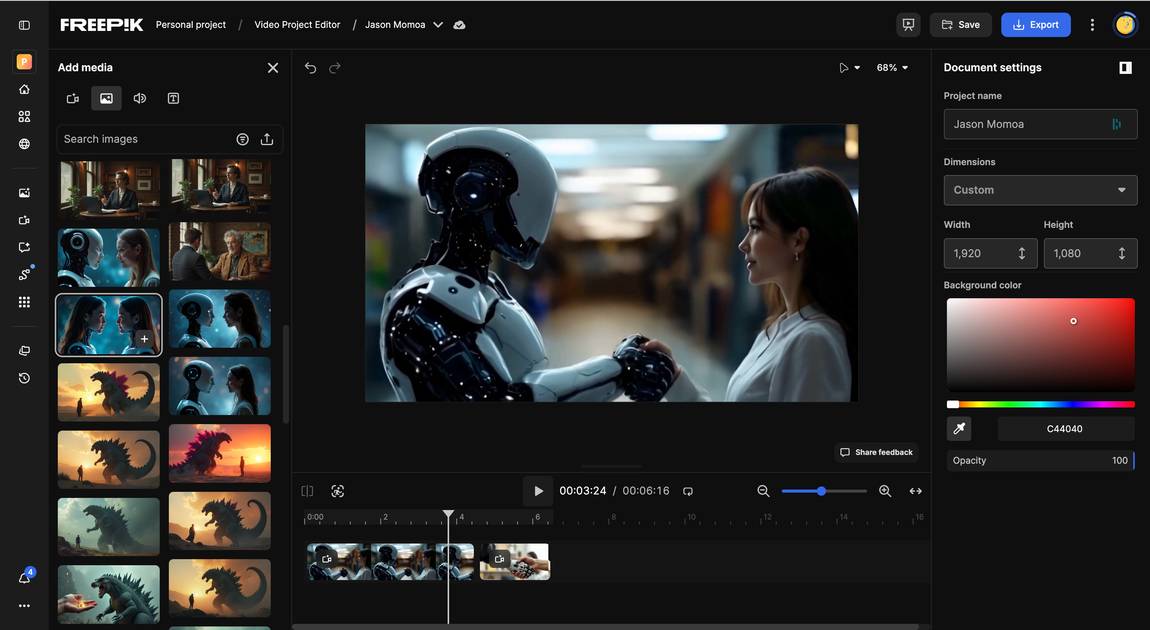
Freepik Editor
Freepik All Tools
Freepik Movie Shots
Arrow previous
Arrow next
Pros:
Incredible Variety of Models (39!)
Next to generation, editing is a big focus which is very practical for the user
New tools are constantly integrated
Great voice generator
Cons:
Platform can have glitches and some features are released before they work
Dashboard slightly confusing
Monthly price starting from:
$5.75
For Who?
Creators of any kind, professionals, agencies, brands. Very wide audience fits Freepik because their features are so versatile.
Unique Feature
Platform with the biggest toolbox for AI creativity with an editing suite.
Free Trial
20 images daily

Freepik is a true joy to work with! They have so many different AI features that you 1. are always at danger of entering a time machine. And 2. literally never have to leave the platform to generate what ever you need.

They have image, video, editing, upscaling, modifiying your material in one place. Their amount of model intergration is crazy. What started out as an AI picture community, is now one the very best AI creative platforms. They constantly innovate and expand into new areas, I've just recently tested their voice AI and only there did I find out that Gemini has launched their own voice model (superb by the way).

The way they approach the creative process is so clever: Through their templates they give you a preset structure, so that you don't have to prompt everything one by one, but instead use a modular approach. This way lighting, composition, perspectives, filters can be assembled and generated. Check out the image of the templates and movie shots.

This is why most of my designer friends (creative directors, graphic designers) all use Freepik, because it allows this really professional approach to AI design.

The only downside is that sometimes new features don't work 100% and minor glitches can happen.

Tested Model:
Last test:
February 20, 2026
3
Best Tool for:
Artlist (Platform)
Score 
4
/
5
Tool Performance
4/5
Setup/Onboarding
0/5
User Experience
3/5
Prompt Coherence
0/5
AI Capabilities
0/5
Voice Quality
0/5
Lip Sync & Motion
0/5
Music Quality
0/5
Image Quality
0/5
Design Capabilities
0/5
Arrow previous
Arrow next
Pros:
Very stylish outputs
Practical features like Artboard
Great filtering systems
Cons:
Can't edit videos in the platform itself
The platform is often can have loading issues
Monthly price starting from:
$9.99
For Who?
Film makers and video professionals
Unique Feature
Huge Music and Sound effects library
Free Trial
4 images, 1 video, 1 voice

Artlist was originally a music library, so you are spoiled with almost 30k music tracks and 70K sound effects on their platform. While film making is their focus, the image AI suite really doesn't have to hide behind its moving sibling.

I really love the well thoughtout filtering options on every level and the Artlist artboard will assemble everything around one topic for your production. Both real time savers for film makers and Youtubers, the typical Artlist audience.

With their new own inhouse model Artlist Original 1.0 they've ventured into new heights, but it does require slightly more fine tuning.

Overall Artlist is awesome for anyone with a strong film focus, the generations always have a very stylish look and the best models are at your finger tips. The big music and SFX library, again, makes this a front runner for filmmakers and anyone who wants to express themselves artistically.

Tested Model:
Last test:
February 23, 2026
4
Best Tool for:
HeyGen (Platform)
Score 
4
/
5
Tool Performance
5/5
Setup/Onboarding
0/5
User Experience
4/5
Prompt Coherence
0/5
AI Capabilities
0/5
Voice Quality
0/5
Lip Sync & Motion
0/5
Music Quality
0/5
Image Quality
0/5
Design Capabilities
0/5
Arrow previous
Arrow next
Pros:
Very best digital personas
Great special features
Generous free trial
Generations are very fast
Cons:
Dubbing could work better
No super cheap plan
Picture gen slightly weaker
Monthly price starting from:
$24
For Who?
Influencers mostly who want to recreate themselves as digital twins e.g. for social media content or UGC ads.
Unique Feature
Unique features like: dubbing, batch editing, instant highlights, generate b-roll and product placement. Strongest avatars.
Free Trial
3 minute monthly

What's great about HeyGen is that they offer so many additional features for creators (next to their Avatars) and they are really venturing into the AI editing realm with their dubbing, batch editing, instant highlights, generate b-roll and product placement features. This makes it a super strong offer for influencers!

And if you though like me that HeyGen wouldn't be able to generate pictures, you are wrong like I was. They even let you choose between 7 good models and the output is fine.

The other day I created an Avatar only from my picture! And it was actually quite nice! Check out the white button (tool details) below to see the video.

Tested Model:
Last test:
February 20, 2026
5
Best Tool for:
OpenArt (Platform)
Score 
3.6
/
5
Tool Performance
2/5
Setup/Onboarding
0/5
User Experience
3/5
Prompt Coherence
0/5
AI Capabilities
0/5
Voice Quality
0/5
Lip Sync & Motion
0/5
Music Quality
0/5
Image Quality
0/5
Design Capabilities
0/5
OpenArt Dashboard Video
Arrow previous
Arrow next
Pros:
Delivers well on Character Consistency
Modular image gen with background, character, object creator is cool
Cons:
Glitches here and there
The great features sometimes don't work
The 30 free credits don't take you anywhere
Navigation could be better at times
Monthly price starting from:
$15
For Who?
Social Media creators and a younger more playful audience
Unique Feature
Best for Character Consistency
Free Trial
30 credits for premium features

Again, a platform that offers all the AI goodies in theory. Features like Reference To Video, Motion Sync or Lip Sync are the cherry on top, but tend to not work.

I really like OpenArts focus on references and consistency. Similarly to Freepik they help you build a world you can regenerate easily.
OpenArt is the best tool for character consistency. Just upload a lot of images of yourself or the character you want to use throughout a website or other brand material, and OpenArt will do a great job keeping it consistent throughout. If it doesn't have a glitch. At times I'm unable to click the 'Create' button and I'm not sure why.

They also bribe with you additional free credits if you're joining their Discord or Youtube channel.

I will keep an eye on them, but for now the platform doesn't deliver solid enough results for me to be able to recommend them.

Tested Model:
Last test:
February 20, 2026
6
Best Tool for:
Canva (Platform)
Score 
3.4
/
5
Tool Performance
2/5
Setup/Onboarding
0/5
User Experience
4/5
Prompt Coherence
0/5
AI Capabilities
0/5
Voice Quality
0/5
Lip Sync & Motion
0/5
Music Quality
0/5
Image Quality
0/5
Design Capabilities
0/5
Canva Video Dashboard
Arrow previous
Arrow next
Pros:
Let's you access various other AI apps (limited)
Toolbox full of fun graphics and effects
Cons:
AI suite very weak
Gen AI for video not a significant pillar
Editing clips is a bit annoying
Monthly price starting from:
$14.99
For Who?
Content Creators who look for simplicity and more gimmicky apps and lots of graphical elements than AI
Unique Feature
So many app integration of various other AI tools
Free Trial
free plan available

Canva is great for anyone not too interested in video with AI. Although they've improved their video suite in the last few months for editing, the generation aspect still lags behind. While you can access it via the CanvaAI button on the homepage, it feels kind of hidden from the rest of their tools. Also it took quite a while and the output is very weak (check out the video above).

And their video gen app didn't even let me generate anything due to credit issues (I didn't even know there was such a thing as a paying user). Generally I find Canva's own AI suite very weak.

What's nice about them is that they let you access so many other apps like HeyGen's, Veed etc. even if limited.
Plus, I really like their many other apps and the huge choice of graphics, filters and effects.

Tested Model:
Last test:
February 20, 2026
7
Score 
3.2
/
5
Tool Performance
3/5
Setup/Onboarding
0/5
User Experience
2/5
Prompt Coherence
0/5
AI Capabilities
0/5
Voice Quality
0/5
Lip Sync & Motion
0/5
Music Quality
0/5
Image Quality
0/5
Design Capabilities
0/5
Arrow previous
Arrow next
Pros:
Adobe Express has a free plan
Canvas approach is unique
Cons:
Annoying popups
The whole Adobe Suite is a bit confusing (pricing, connections etc.)
Feels a bit old school compared to other platforms
Monthly price starting from:
$9.99
For Who?
Fans of adobe who don't like Canva ;)
Unique Feature
The full Adobe suite at your fingertips in a simplified and partialy free package
Free Trial
Adobe Express has a free plan

Adobe Firefly has been on top of the image AI comparison for a while in the beginning, because they had a great idea early on about how this new technology can be improved. They added lighting and perspective when others only offered a simple prompt window.
I feel like now the good days for Adobe are over and they've fallen behind. Generations and model catalog are ok, but nothing special compared to others in our list.
The platform itself annoys me, after changing the language twice to English it again reloaded to German. So many little windows to click away. I feel like a lot of legacy crap that grew with this big company.

I like that they have this canvas playground, but beyond that I'm unimpressed and I mostly took it because Adobe Express has a nice free offer and let's you generate 1 video for free.

Tested Model:
Last test:
February 20, 2026

Did you know?

Author image blue planet
Lili Marocsik
Author image blue planet
Author:
Lili Marocsik
Lili remembers the excitement of discovering the internet at 14 — a true window to the world. The AI boom now feels just as thrilling. Since 2023, she's tested many AI tools, seeing the good, the bad and the ugly (especially at the beginning). Before AI, she worked as a video marketer, crafting YouTube Ads for HelloFresh and Revolut. She believes AI should empower people, leading her to build this site for SMEs. When not exploring AI, she enjoys her 30 plants and modern art.

FAQ

Creative AI Platforms

What is the best Creative AI Platform?
What are the best free Creative AI Platforms?
Which Creative AI Platform is best for AI video generation and editing?
Which Creative AI Platform is best for AI image generation and editing?
Which Creative AI Platform offers the best AI voice generation?
Which Creative AI Platform helps maintain character consistency across designs?
Which Creative AI Platform is known for its stable performance and lack of glitches?
Which Creative AI Platform provides large stock media libraries?
Where can I create the best AI avatars?
Are there Creative AI Platforms that offer templates for easier design?
Author Lili Marocsik

Get the best AI tool deals and newest tool reviews straight in your inbox.

By entering your email, you agree to receive occasional updates and marketing emails from us. You can unsubscribe at any time. We respect your privacy and will never share your information without your consent.
You might also like
Black arrow icon