AI Content Creation Platforms - True Game Changers for Content Creation
How To Find The Best




AI content creation platforms can be real game changers for creators and small business owners, or a sadly they can also be complete waste of time if they don't work properly.
I've tested the top tools in this area since I first started reviewing AI tools. In the beginning tools were mostly focusing on one area only: they could create ad banners, videos or images. Nowadays, we're getting a more complete package.
Still, many platforms have good intentions but still provide a terrible output. Let me guide you through this jungle, so that you don't have to waste time experimenting around and getting frustrated. After all, AI is supposed to save us time, not cost more of it.
To onboard you to AI content creation platforms, I will use my favorite video creative platform, Artlist, as the example, to make the topic more tangible and easy to follow. With this we will focus on video content creation, because this is the most popular content format for social media and it's also what Artlist so clearly masters.
Let's discuss the following 4 core questions:
Small Business Owners and Solopreneurs who need to maintain a consistent social media presence and, in the case of Artlist, are focusing on video as their preferred format.
Marketers and marketing teams who need to produce high-volume, high-quality video ads and social media content quickly. Tools like AI Ad Generator platforms help automate ad creatives, scripts, and visuals, making campaign production much faster
Video Creators and Filmmakers who need quick B-roll, storyboards for client pitches, or stylized visual effects without investing hours in traditional VFX work.
Anyone Who Values Time Over Manual Execution - if you'd rather spend time on strategy and creativity than searching through stock video material, these platforms are for you.
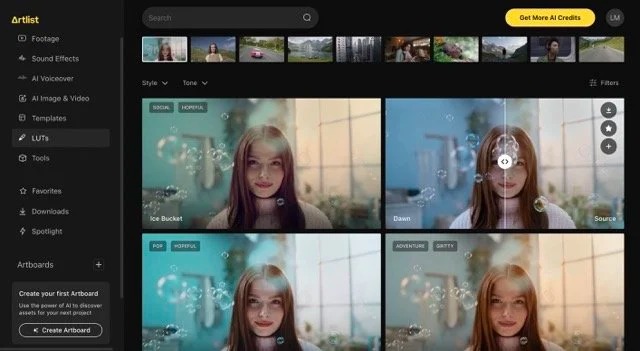


How this streamlined process would work within Artlist:
Text-to-Image Generation: You input a text prompt describing what you want (e.g., "a superhero in a black mask"), and Artlist's AI generates high-quality images in various styles—cinematic, 3D clay, abstract, realistic. Add fonts and overlays with Nano Banana, especially if you want to animate these later on. For standalone image needs, an AI Image Generator can also help you craft visuals before importing them into Artlist. Add fonts and overlays with Nano Banana, especially if you want to animate these later on. Choose the right format right away, Artlist can create in 16x9, 9x16 or 1x1.
Image-to-Video Animation: Once you have an image (either AI-generated, uploaded or from their big content library), you can animate it into a 5-10 second video. Artlist automatically suggests video prompts and creates camera movements, character actions, and environmental effects. You can generate videos in 720p or 1080p, depending on your credit allocation.
AI Voice-Over Generation: Need narration for your video? Artlist's text-to-speech feature lets you generate professional voice-overs directly within the platform. Simply type your script, choose from multiple voice options and languages, and the AI creates natural-sounding narration that you can immediately add to your video timeline. This eliminates the need for expensive voice talent or recording equipment. Also check out the voice effects like upstairs neighbor or monster which could give our content an extra twist.
Integrated Audio Library: In the next step add audio, you can choose between 700,000+ royalty-free music tracks, sound effects, and audio assets. After generating your video, you can immediately browse and pair it with professional soundtracks.
Native Audio Generation: Sora 2 (now integrated into Artlist) can generate synchronized audio natively with the video, creating a more cohesive starting point that you can then enhance with Artlist's curated music library.
I should also mention that there are AI-powered content creation tools focusing more on the written content, often hiding ChatGPT under their hood. This type of content creation software will offer a scheduling tool for social posts, ai writing tools and other social media marketing levers. Check out our comparison for social media management tools for more details on those.
Because:
Bullshit in = Bullshit out
To be fair, if you don't give your AI models enough context, it will not be able to generate good marketing content for you. So give it as much input as possible, for example the style you want to go for, give context about the background, characters or fonts you want to include. You can even specify the social media platform you are generating for, allowing you to optimize your template.
Newest models: If your unsure about which AI models are currently the best, just check out my comparisons for video, image and voice generators. Artlist for example always integrates the newest models for video and image generations, right away after their release. You can still experiment around with older models within the platform, especially if you're still developing your content idea and want to use less credits. What disappoints me with Canva, for example, is that their image generator integration seems to be Dall E 2. I could never verify this, but looking at the generations, I think this is true.
More than one model so that you can experiment: Imagine you were a kid in a candy store that only offers chocolate. In this day and age there are so many exciting models released every day, you should not just settle for one. Different models have different strengths, and especially for content marketing for various clients, you should have choices.
Look for various tools in one: Maybe you are looking for the best AI tool for SEO content. Don't settle just for a copywriter tool for SEO optimization which is able to write landing page copy, blog content or to generate an article. It should also have an AI writer for newsletters and social media posts, copywriting services for ads, and social media competitor analysis tools to help refine your strategy.
Clear Licensing Model: You should always choose a platform that has your back regarding all licensing and rights. You don't want to create marketing campaigns with AI, only to have to take the whole thing down again. All AI-generated content on Artlist comes with straightforward, royalty-free licensing, giving you the freedom to use your videos in commercial projects, client work, and social media without legal complications. You can add all your social media channels to Artlist, so that it can clear all rights issues that might come up from the platforms.




