AI for Accounting: What It Can Do for Small Businesses
Tested With Xero


I've been testing AI accounting tools for three years now. When I made my very first video course on AI for small businesses, AI accounting software was already one of the categories. That was the early days of LLMs, when ChatGPT's language still sounded swollen and a bit weird, and some AI categories didn't even have a name yet. I called that category AI accounting software, but most of the features worked more in theory than in practice, so it didn't really deserve the name.
Today I'd say it does. I recently tested Xero very thoroughly, so I'll use it as my example and go through the areas where AI for accounting really works and saves you time as a small business owner. I'll also tell you how far you can actually rely on it.
❤️ Before we get started I'd like to thank you for using my affiliate links to sign up for Xero. If you do, I earn a small commission at no extra cost to you. Opinions are my own. ❤️
For me, the nicest change and the biggest advancement in AI accounting software are the AI agents. They made my work a lot easier, because you can ask them directly and they answer based on your own business data. You don't have to search through help articles or ask ChatGPT where in the dashboard you can find a certain setting. You just ask right inside your accounting software, or let the agent do it for you, which made my workflow a lot faster.
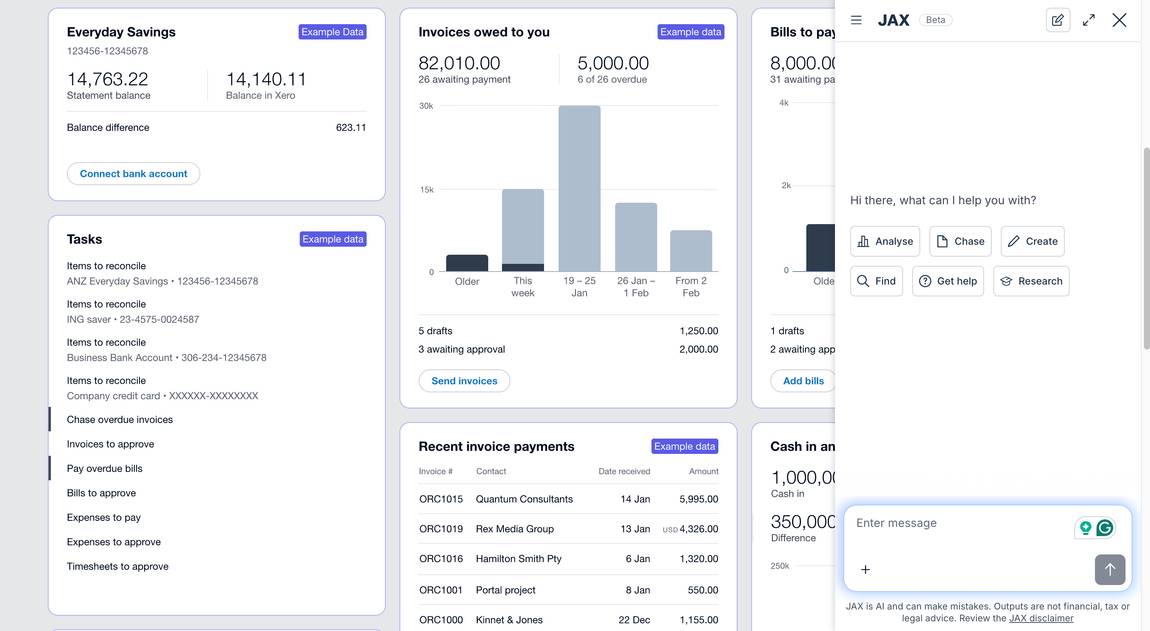
In my example with Xero, the agent is called JAX. When I asked it what it could do for me, this is what it listed (in its own words, just shortened):
The agent was still in beta when I tested it, so keep that in mind. One example of how I tested it was to create a new contact for a client, and I really liked that it did that straight from the chat. The full address was missing, but it still saved me some time. Then I asked it to create an invoice for that contact, only giving it the details in the chat, and it created the invoice and saved it as a draft. Small tweaks like adding the address might still be on you, but in general it's pretty cool.
To be fair, these tools develop really fast, so it's worth checking what JAX can do by the time you read this.


This is where AI for accounting gets really interesting, because the AI actually reconciles transactions on its own when it's confident, while you stay in control. With normal bank reconciliation, the tool suggests a match and you confirm every line (more on that further down). In Xero, auto-reconciliation is also done by the AI agent. It was still in beta when I tested Xero in August 2026, so I'll explain what it does rather than give it a grade.
With auto-reconciliation turned on, the agent reconciles bank transactions where it has high confidence, as they arrive. If it isn't confident enough, it still suggests a match or category but leaves the line for you to review.
It uses four methods for this: Rule, Match, Memory and Prediction. Rule means it uses the bank rules you set up, and Prediction means it compares the transaction with how other Xero users reconciled similar ones.
You stay in control. You turn it on yourself, for each bank account or for all of them at once. A Method column shows which lines were auto-reconciled and how, and a "remove and redo" option lets you fix any mistake right away.
It learns from your corrections over time, and that's the part I'd keep an eye on. In the US it's available on the Growing plan and above.
When I started testing AI tools in late 2023, I tried the receipt and invoice capture of a couple of tools, and they simply didn't work. Even when a receipt was perfectly clear and everything on it was easy to read, they still made mistakes. In the end I had to fix so much by hand that it was easier to type everything in myself.
This is one of the biggest changes I've seen. In Xero, I take a picture of a receipt with the mobile app, Xero reads out the details like supplier, date and total, and I just check and confirm it. Xero also checks if a matching transaction already exists, so you don't end up booking things twice.
For me as a busy small business owner, this is one of the areas where AI for accounting really pays off, because receipts are exactly the kind of small task that piles up.
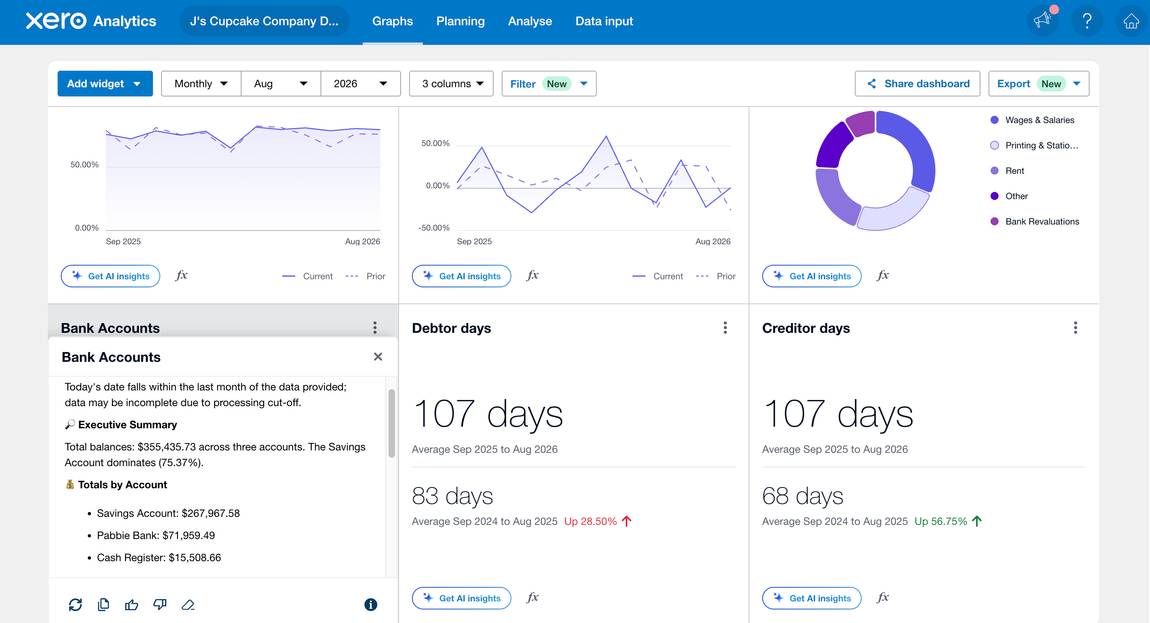
Reporting is another area where AI for accounting has made a big jump. Xero Analytics generates performance insights with AI. I didn't want to display my own business data, so I used Xero's demo data in Analytics. I got an executive summary of how the year went, a breakdown of what's working and what isn't, and a short list of concrete actions, like tightening payment terms and chasing invoices at set intervals. You can also request AI insights on every level, for example total income, total expenses or each bank account.
I don't have an accountant because my business doesn't need one. I do have a feel for how things are going, but I'm not an accountant and don't have the professional view on my numbers, and that's where the AI really helps me get a better overview.
The one thing I noticed: the insights use quite technical accounting language, with terms like debtor days and creditor days, which is a bit out of my realm. That's where I love the AI agents, because they can translate it into something I can actually digest.
Bank rules are more of an automation feature that you set up yourself, and it's very simple. You create rules like: whenever Webflow is the payee, the description is "Website subscription." Xero splits them into spend money, receive money and transfer money rules.
This might not be the high art of AI, but it's the golden lever and the real time saver. Most small businesses have lots of recurring payments. In my case it's mostly AI services and software subscriptions, so a big part of my accounting could be highly automated. Thinking back at doing my taxes recently, this alone would have saved me so much time I don't even want to think about it. And with auto-reconciliation turned on, the AI uses your bank rules too.
Bank reconciliation means matching the transactions from your bank with the invoices, bills and payments you've uploaded. If there's an invoice or bill behind a transaction, Xero suggests the match and you confirm it. If there isn't, like a subscription charge or a bank fee, you assign it directly to an account such as "Software fee." If there's no transaction in Xero yet, you can also create one right from the bank line.
This isn't the high art of AI either. It's basically number matching with a bit of sense checking, and you're still the last instance who checks it one more time. The good news is that in my test it was very reliable and worked really well, though I still checked every match before confirming it. What I liked most is that Xero shows me many transactions in one overview, so I don't have to click through each one. Values that repeat I can copy and paste, and if I make a mistake, like a wrong tax rate, I can fix it much quicker than going into every file one by one.
If you want to set this up yourself, my Xero setup guide walks you through it step by step.
Chasing unpaid invoices is one of those tasks nobody likes. With automatic payment reminders, the tool follows up with your clients when an invoice is overdue, without you writing a single email. It fits nicely with what the AI insights recommended in my test, like following up on invoices at 7, 14 and 30 days. You can set up to five reminders and choose when each one goes out, before or after the due date.
A lot of small business owners start with AI for accounting without using an accounting tool at all. They paste their bank export into ChatGPT or Claude and work through it there. I did the same when I wanted help with my taxes, before I signed up for an accounting tool.
And it was partly fine. My expenses were spread across my bank account and PayPal, so a lot of transactions showed up twice. Claude helped me filter through them and clean out the duplicates, which was really helpful.
But it only got me halfway. Everything it found still came back to me: checking it, deciding what to do with it, putting it in the right place and starting the next task. As a solopreneur, everything ends up on my desk anyway, and being the decision maker for every little detail on top of that is just too much.
That's also my problem with building your own AI agents for accounting. Every thread and every insight lands back with you, and you're the one who has to restart the next agent task. A tool like Xero has these automations built in, like bank rules and suggested matches, so a big part of that work happens in the background and you only review what the tool isn't sure about.
And compared to the time they save me, these tools aren't expensive. I only have limited time, so why would I be too stingy to spend a little money on a tool that's made exactly for my use case? The money I'd save by building my own AI accounting setup is so small that it's not a good trade-off.
General AI is still great for quick questions, like "how do I book this?" or explaining a tax term. For the actual bookkeeping, I'd go with the tool. If you want to compare your options, check out my comparison of the best AI accounting software.
After testing Xero, I'm really impressed by how far AI for accounting has come. The suggested matches, bank rules and the AI agent saved me a lot of clicking, and the AI insights were specific and actually helpful. Overall, I found it quite reliable, though I still check its suggestions.
It's also still very new, and these tools are improving incredibly fast. Small gaps like the missing address on my contact are easy to fix by hand in the meantime. And when the insights come in heavy accounting language, the agent can already translate them for you today.
But as always with AI, you are the judge and the last instance. The tool has your data, and your data holds a lot of information, but it doesn't have the full context you have. It doesn't know that one client always pays late but always pays, or that a big expense this month was a one-off investment. So when it gives you insights and recommendations, use your common sense and your experience. And if you don't have much experience yet, don't blindly trust the tool, even though it's very powerful.
For routine tasks like matching transactions and reading receipts, it was quite reliable in my test, but I'd still check its suggestions before you confirm them. For insights and recommendations, you're still the last instance who checks them against your own context.
It's an assistant built into your accounting software that you command through a chat window. You ask in plain language and it answers for your individual situation. It can also analyze your business data and take actions for you, like creating invoices or adding contacts.
Not completely, at least not yet. AI already handles a big part of the routine work, like matching bank transactions and reading receipts, and some tools reconcile transactions on their own when they're confident. But you're still the last instance who checks the results and makes the judgment calls.
For simple businesses like mine, AI accounting tools can handle a lot of the routine bookkeeping. My business is simple enough that I don't have an accountant, and the AI insights give me a more professional view on my numbers. If your taxes or business setup are more complex, a professional is still worth it, and working with them gets easier when your books are up to date and they can work in them with you in real time.
For single tasks, yes, like cleaning out duplicate transactions or explaining a tax term. But ChatGPT only sees what you paste in and can't act in your books. A tool built for accounting does the job right where your data lives, and for the time it saves, it doesn't cost much.
Automation follows rules you set up yourself, like "Webflow as a payee always means Website subscription." AI works with patterns, for example reading the details from a receipt or suggesting which invoice belongs to a payment, and you review what it suggests. Most tools combine both, and the automation part is often the biggest time saver.
Yes, and I find this one of the most useful features. AI insights often come in technical accounting language with terms like debtor days. You can simply ask the AI agent to break it down and make the action points easier to follow.