I Tested Canva Craft, Canva's First Own Image Model
5 test prompts, the Dream Lab workflow and one thing it can't do yet



I use Canva a lot. Over the years I've gotten so used to it that it's become my go-to toolbox, and for about 12 a month you get a crazy amount of tools in one subscription. And no, I'm not an affiliate, so I'm not saying this for the commission.
On the AI side though, I've been a little disappointed so far. The built-in image generator never really convinced me. The AI editing tools are a different story. Canva was early with those and they were very good right away, from the background remover to Magic Edit, Magic Expand and the background generator. Lately I've also noticed that Canva AI has gotten quite good. Whenever I make a banner or something design-related, I ask it how my design could look better. In about half the cases the suggestion isn't great, but in the other half it's much better than what I came up with myself.
So when Canva launched Canva Craft, its first image model built in-house, I got pretty excited. I ran it through my usual 5 test prompts to see if the image side can finally keep up.
From there you can download your favorite straight away or keep working on it. Canva asks what you'd like to change, so you can edit the image with a simple text instruction, and you can boost the resolution right inside Canva without a separate upscaler. You can even turn the image into an Instagram post with Canva AI, which by the way has gotten pretty good.
How many generations do you get for free? Craft uses the normal Dream Lab allowance. Free accounts get 20 Dream Lab uses in total, while paid plans get up to 500 per month. Since every use creates four images, that's 80 images to play with on the free plan.
As always, I used my standard test prompts with default settings.
The whole scene is also overloaded. The background and everything around it lean way too much into fantasy, even though I never asked for a surreal look or style. The tool filled the room for interpretation with a lot of things I didn't need.
> Create an image of 2 people looking at each other and shaking hands, one being an AI robot, the other a woman. The background is space and the mood is friendly.
That said, it's still a beautiful image, and Craft follows the detailed prompt well. There's just something about it that doesn't fully click for me. But I can't say it's bad. It's pretty good.
> Create an image of an older lady with natural wrinkles and grey hair laying tarot cards. We see her from the front as she holds one card up. Her look is mysterious, she is wearing a veil and the background is a dark blue velvet curtain with golden stitchings of stars, the moon and star constellations. The style is somewhat between Dune (the movie) and Aladdin, with a shiny gloss on it.


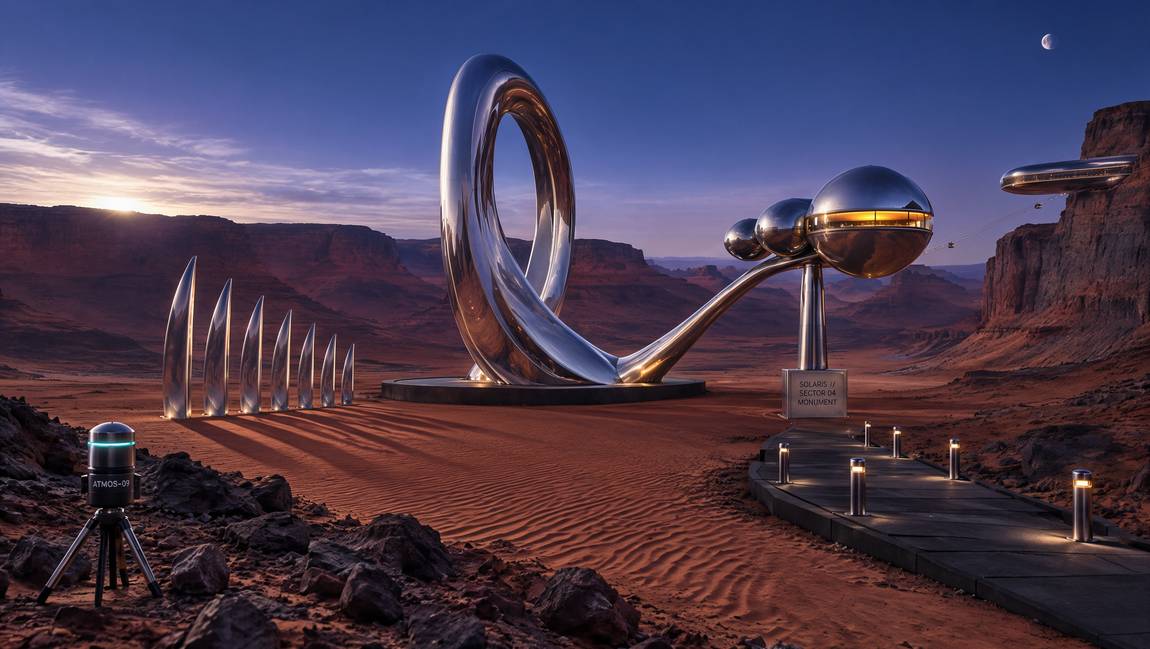
It did add a strange camera device in the foreground that I never asked for. But this prompt is super simple and leaves a lot of room, so I can't hold that against it too much. Not every element is strictly a chrome design element either, but the overall result is sharp and harmonious, and it looks very, very cool.
> Create a mars landscape with chrome design elements.
> Create an image of a modern still life with various modern objects like cell phones, vape devices and other modern day objects in this style: Ethereal futuristic scene, with highly iridescent surfaces, light pastel vaporwave colors, soft glowing lighting, dreamlike atmosphere, holographic highlights, calm surreal mood, cyberpunk and fantasy elements, soft pink and slightly apricot gradients, luminous mist, glossy and shimmering aesthetic similar to a moon stone.

I switched from "Match style" to "Edit image" mode to give it another chance, but the result was the same. Craft added me to a random Mars landscape instead of the one I uploaded. The image itself is still usable, but it doesn't do what I asked for.
> Add me to the mars landscape image, I'm standing in the middle of the landscape, wearing a space suit without the head piece. I'm looking into the camera, looking excited.
What makes it interesting for small businesses is the workflow around it. You generate, edit, upscale and turn your image into an Instagram post without ever leaving Canva, and that convenience counts for a lot if Canva is already your go-to design tool.