Xero AI: How to Automate Your Accounting and Save Time
Especially Great For Small Business Owners!



The most useful automation isn't always the most impressive. It's the one that actually saves me, as a small business owner, a noticeable amount of time. And that's what I wanted to find out when testing Xero AI: how much of my accounting can it actually take off my plate?
Accounting isn't exactly the most exciting part of running a business, and it involves so many obvious, repetitive actions. Categorizing the same subscription every month, matching payments, chasing clients for money, or entering receipt data - why would I want to keep clicking through all of that manually in 2026 when software can take over a good chunk of it?
As non-developers, the word "automation" might sometimes scare us off because it sounds like we'd have to set up complicated workflows or have technical expertise. But remember that tools like Xero are made for everyday users like you and me, so the learning curve is super flat. You don't have to build complex workflows yourself - the tool does almost everything for you, and you might just have to trigger it here and there.
So for this blog, I tested Xero AI specifically with its time-saving features in mind. We'll work our way from the simplest ones to the more advanced options.
This is probably where Xero can save small business owners the most time.
Most businesses have plenty of recurring transactions. In my case, a large part of my monthly spending goes toward software subscriptions and AI tools, and that is exactly where bank rules come in handy.
Bank rules let you teach Xero how to treat certain recurring transactions. For example, I pay Webflow every month for my website. Instead of categorizing that payment over and over again, I can create a rule that tells Xero that when Webflow appears as the payee, it should be treated as a website subscription and categorized accordingly.
Xero offers Spend Money, Receive Money and Transfer Money rules, so you can use the same principle for recurring expenses, incoming payments or transfers between accounts. You can define conditions based on things like the payee, reference or transaction description and decide how Xero should categorize the transaction.
This is one of those small features that doesn't sound particularly exciting until you think about how often you repeat the same bookkeeping tasks. Once you've created rules for your most common transactions, much of this repetitive work simply disappears.
By the way with my link you can get 80% off for the first 6 months, just click the pink button below!


Bank reconciliation basically means checking that the transactions in your bank account match the corresponding bills, invoices and other transactions recorded in Xero. If a client pays you, for example, Xero needs to connect that payment with the corresponding record you've already created.
Xero can suggest matches when it recognizes that a bank transaction corresponds to an existing bill or customer payment request. If there isn't an existing record behind the payment, you can categorize it directly or create a new transaction from the reconciliation screen.
What I particularly like is that Xero lets me work through several transactions relatively quickly. In the accounting software I used before, I often had to open entries one by one. If I realized later that I'd used the wrong tax rate or categorized something incorrectly, correcting multiple transactions could become annoyingly time-consuming because I'd have to open each entry separately. Having everything together in Xero makes reconciliation much less tedious.
Xero is also taking this one step further with AI-powered automatic bank reconciliation, currently available as a beta feature for some users.
Normally, Xero suggests how a transaction should be reconciled, and you approve it. With auto-reconciliation, AI can reconcile certain transactions when Xero has a high level of confidence about what they are, based on things like previous activity, bank rules or matching information. You can still review, edit or undo the result afterward.
Billing customers is another area where you can get rid of a lot of repetitive work.
If you regularly charge the same client for the same service, Xero lets you create a repeating template. You set the schedule once and decide whether the resulting documents should be created as drafts, approved automatically or approved and sent directly to the customer.
So if, for example, you charge a client €1,500 every month for an ongoing service, you don't have to remember to create it manually every month. Xero will be your digital bookkeeper and handle it for you.
Xero can also take care of one of the least enjoyable parts of getting paid: chasing people for money. This is one of my favorite features because it frees up so much headspace, and it's also crucial.
You can set up automatic reminders based on when a payment is due or overdue and customize the message customers receive. Instead of keeping a mental list of who still owes you money, Xero can send those reminders for you.
You can also set default payment terms, so details such as due dates are added to new documents instead of being entered manually every time.
Another task I would happily get rid of completely is typing information from receipts.
Xero integrates with Hubdoc, which can extract information from uploaded or photographed receipts and bills, such as the supplier, date and amount. The document can then be published into Xero and attached to the relevant transaction.
This isn't the flashiest form of AI, and admittedly most accounting tools offer something similar now, but when I first tested AI accounting software in 2023, this absolutely didn't work yet. The tools I tested couldn't reliably read the data. Great to see that three years later, Xero really kills it here.
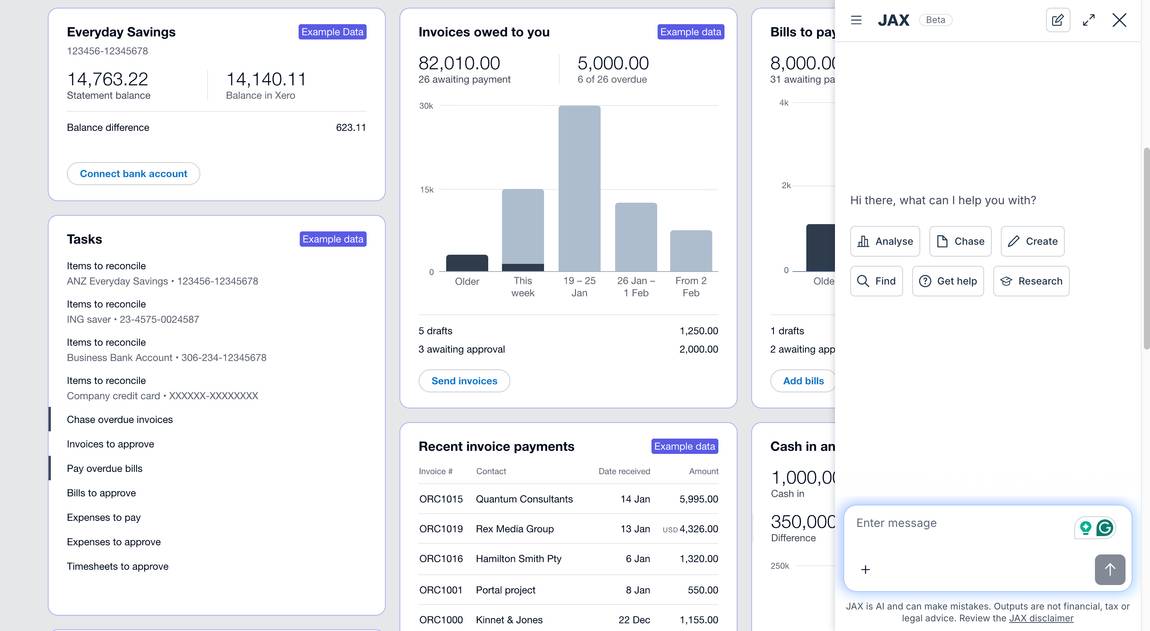
Xero also has its own AI assistant called JAX. I've written a separate article specifically about it, so I won't dive too deeply into it here.
From an efficiency perspective, though, it is worth mentioning because it allows you to complete certain tasks through natural language instead of manually clicking through Xero.
For example, I asked JAX to create a bill for a client and simply entered the information in the chat. It created the document and saved it as a draft. It can also help create contacts, work with quotes and analyze your business performance, which connects really well to the next part.
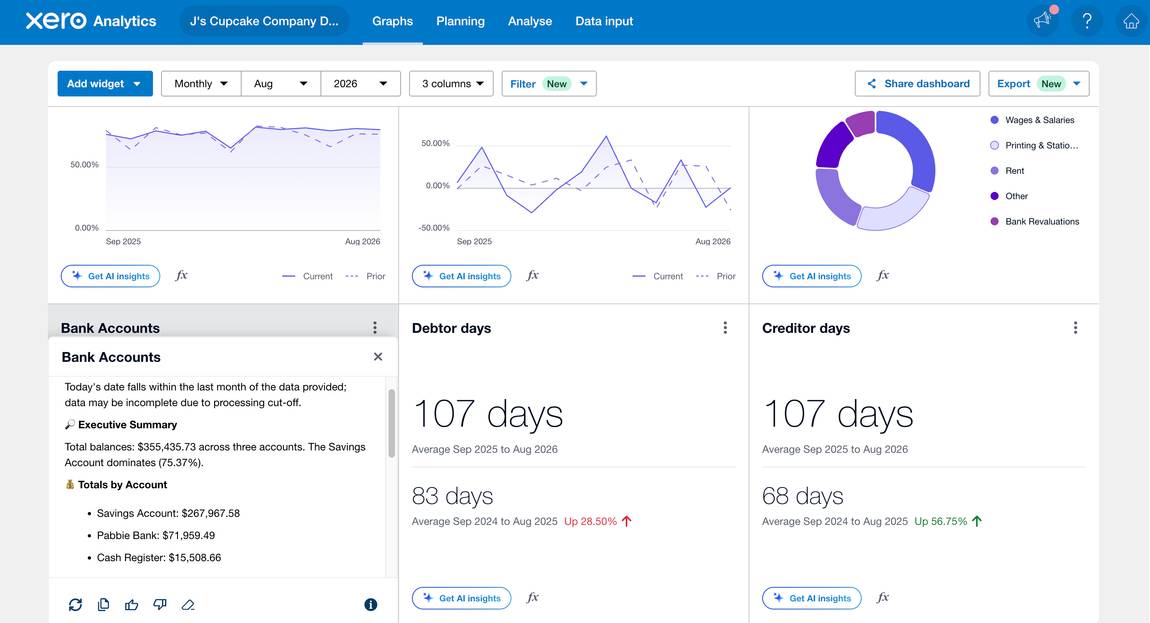
Xero Analytics can turn your transaction data into financial insights, forecasts and visualizations. It can highlight changes in areas such as revenue, expenses and cash flow and surface things that might otherwise be easy to miss.
It can also analyze previous cash movements and use recurring patterns to help forecast future cash flow. I find this particularly useful because historical reports only tell you what has already happened. Cash flow forecasting is much more interesting if it can warn you that your current spending or payment patterns could create a problem a few months from now.
Especially as a small business owner, I often feel like a lone ranger, and I love having a dashboard that helps me make more informed financial decisions. Of course, I'm still the one making the decisions, but it helps me understand what to look at and how to interpret it.
I wouldn't try to streamline absolutely everything from day one.
For most small businesses, I'd start with bank rules for recurring transactions and automatic payment reminders, because I think these two will save the most time and are super easy to set up.
Then I'd start playing around with JAX: ask it questions and treat it as an AI assistant that can help you understand your financial data. Ask it to create customer bills and add contacts for you. Once you trust it more and have a feel for how it works, you can extend your collaboration.
Some of Xero's AI features require you to actively set them up, while others do most of the work for you. Hubdoc, for example, extracts the relevant information once you upload a receipt, while Xero Analytics can generate AI insights from your financial data with just a click.
As I promised in the beginning, accounting automation isn't difficult and doesn't require you to build anything yourself. Even with these simple Xero AI features, the amount of manual accounting you have to do starts shrinking. Thank god!
Does Xero use AI?
Yes. Xero uses AI in areas such as JAX, financial analysis and bank reconciliation. However, some of its most useful time-saving features are more traditional, such as bank rules, repeating billing and automatic payment reminders.
What can Xero AI do?
Xero AI can help with tasks such as analyzing financial data, bank reconciliation and completing accounting tasks through JAX. Xero also combines these AI capabilities with more traditional time-saving features such as bank rules and payment reminders.
Can Xero automatically categorize transactions?
Yes, to a degree. Bank rules can apply predefined treatment to recurring transactions, while Xero can also suggest categories during reconciliation based on the information available.
Can Xero automatically reconcile bank transactions?
Xero normally suggests matches and categorizations for you to approve. With JAX-powered auto-reconciliation, which is currently a beta feature for some users, certain high-confidence transactions can also be reconciled automatically.
Can Xero automatically create invoices?
Yes. You can create repeating templates that generate them according to a schedule. Depending on your settings, they can be saved as drafts, approved automatically or approved and sent.
Can Xero automatically send payment reminders?
Yes. You can set up reminders based on when payment is due or overdue and customize the message customers receive.
Can Xero handle recurring bills?
Yes. Repeating bill templates can generate predictable recurring bills according to a schedule you define.
Can Xero automatically read receipts?
Yes. Hubdoc can extract information from receipts and bills so you don't have to enter everything manually.
Which Xero AI feature saves small businesses the most time?
For many small businesses, bank rules are probably the quickest win because recurring software subscriptions, supplier payments and similar transactions can be categorized much faster. Automatic payment reminders and JAX are also worth exploring if you want Xero to take more work off your plate.
Do I need coding skills to use Xero AI?
No. The features covered here can be used directly inside Xero and don't require coding, which is exactly why I find them useful for small businesses.