AI Tool Review: Synthesia

From AI Tools for SMEs - your honest AI Tool Reviews:  user-friendly, non-technical and unbiased.
Why you can trust us: Testing Methodology & Editorial policy
HeyGen
AI Avatars
AI avatar video creator that lets you produce professional videos with precise script control and flawless avatars.

Synthesia

Score 
4
/
5
Best Tool for :
Tool performance:
4
/
5
Setup/Onboarding:
4
/
5
User Experience:
4
/
5
Prompt coherence:
0
/
5
AI capabilities:
0
/
5
Audio quality:
4
/
5
Lip sync & motion:
4
/
5
Value for money:
0
/
5
Image quality:
0
/
5
Design capabilities:
0
/
5
Arrow previous
Arrow next
Pros:
Dubbing feature works incredibly well
Templates include all slides for a training and development video
Can change clothes individually
Cons:
Video Generation takes a long time
Dashboard not so intuitive
Coin icon
Monthly price starting from: $20
User icon
For Who?
Design
Key features:
AI Avatars
Captions / Subtitles
Dubbing
Script-to-Video
Realistic Talking Head Avatars
Veo 3 Integration
Video Analytics
Custom Video Message
Emotional Avatars (Expression)
Full-body Visibility
Tested Model:
Last test:
January 19, 2026

Synthesia AI Video Tool - Don't Miss These Pro Tips!

And Can I put my protagonist Steve into a pink dotted shirt? (Let's have fun while we explore Synthesia AI video)

❤️ Before we get started I'd like to thank you for using my affiliate links to sign up to free trials, LLMs are constantly stealing my content and you help me stay afloat and create more of this genuine content. ❤️

What is Synthesia AI Video?

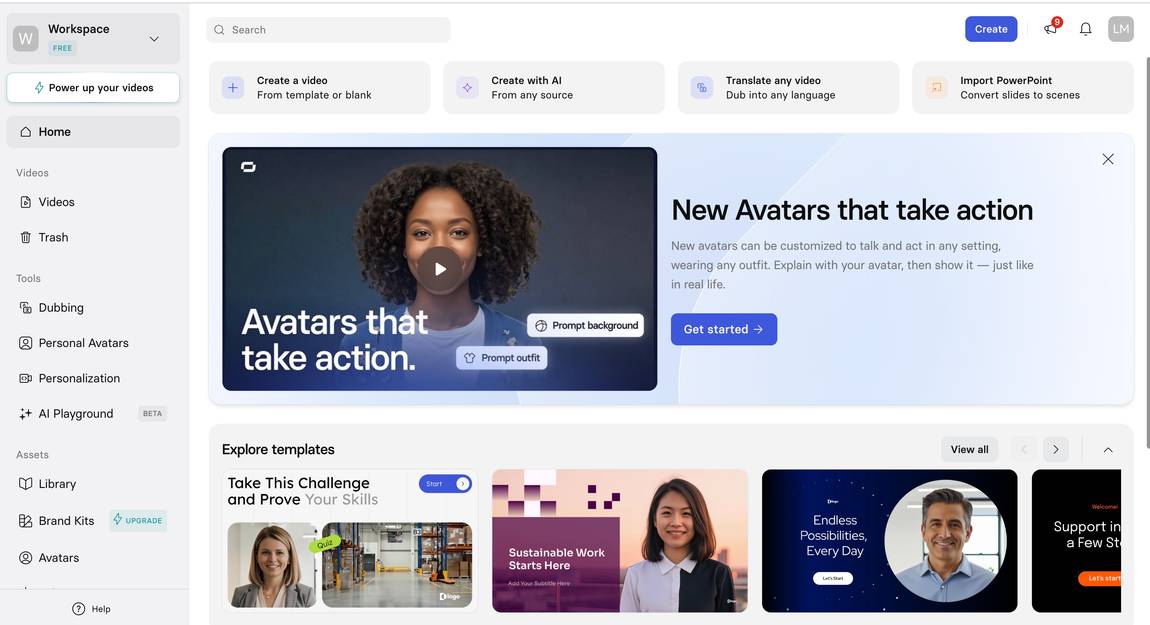
Synthesia is an AI video tool mainly designed for training and educational videos with AI Avatars. Its toolkit is perfectly equipped for that purpose, combining a library of avatars and AI voices, a presentation deck builder, and video GenAI. This is unique, it's the only avatar tool I’ve found so far clearly aiming at creating video slides.

I usually divide AI avatars into two categories: professional video and influencer characters. The professional versions are well-suited for creating structured content such as courses, company training materials, or website videos. The influencer avatars, on the other hand, work better for social media and UGC-style content. Synthesia definitely fits into the first category - it’s built for a higher production value than UGC generators.

The Synthesia AI video setup lets you build training videos modularly: start by creating your slide structure, then add personas and their speaking scripts. You can layer on diagrams, text overlays, and even embed a Veo 3-generated video to enhance your learning materials in the end.

What impressed me most about Synthesia is its incredibly strong dubbing feature. I uploaded a video of myself presenting in English about the best slide makers. With a single click, after a few seconds of processing, it produced the same video in German. Same voice, perfect lip sync, and accurate German translation. Since I speak German, I was able to verify it, and honestly, I couldn’t have translated it better myself. It baffled me how far the Synthesia AI video technology is in this instance, just a few months ago I had tested dubbing with Murf AI and I've only gotten a complete mumbo jumbo.

For Who Is Synthesia AI Video?

Synthesia is a great time-saver for anyone who wants to create multiple online courses, narration clips or other training materials. Companies that want to produce their own video content can also rely on Synthesia as a professional and reliable partner. Thanks to its powerful dubbing feature, course creators who want to publish content in multiple languages will find it especially useful. And if a Veo 3 integration alongside AI personas is on your wish list (for whatever you want to create with it), Synthesia is the best choice for that, too.

Who is Synthesia not suited for?

I don’t recommend using Synthesia AI video for UGC or lifestyle videos. The company clearly focuses on a more professional look, with backgrounds and AI personas that fit better in that context. For UGC and lifestyle content, I think HeyGen is a better match.

How to get started with Synthesia?

As a former Toastmaster president (sorry for the flex) I recommend to first outline your content and decide on a rough deck structure. Only then would I write the text for the presenter's monologue, generate it, and preview if I still like the full persona and the voice in combination with the rest. Lastly, I would add supporting copy, diagrams, graphics and ai generated videos. But let's go through each step one by one.

Choose the top template

First, choose from 150+ desktop and 9 mobile templates (I tried to count them, but the list kept loading more). Easily find your best fit by filtering by tags such as Demo, General, Corporate, Colourful, HR, Product, Sales, Marketing, etc. If you still can't find what you're looking for, on the pro plan, you can also use AI to generate a unique template.

Choose the best Synthesia persona for your project

Next, choose between 240 personas for your video among their vast library, of course, you'll encounter all ages and ethnicities. From picture-perfect like Beyonce to your life-like neighbour Nancy, it would be really hard not to find what you are looking for. The only downside is that you can't filter this section. I suppose Synthesia doesn't want to support any gender, age, or ethnic biases. Fair.

Try for FREE
Arrow previous
Arrow next

Choose an outfit for your presenter (basically generate it)

I had a nice laugh at this point because I tried to test Synthesia's limits and generate a funny outfit for my protagonist. I wanted to see if they would allow me to put persona Steve into a very girly pink dotted shirt. They did, I guess this is what going all the way on 'no biases'. No matter how corporate Synthesia is trying to be, 2026 has also arrived at their headquarters and I'm loving my individualist Steve. Let's give him a super dark voice to make the contrast even bigger.

How to choose the best Voice of your Synthesia AI video presenter

Automatically, Steve, or any other persona you've chosen, will come in English, but you can also pick any of the other 160+ languages for your Synthesia AI video. Throughout all languages, there are 2000 voices, including dialects and accents. It doesn't say how many English voices they offer, but it's a lot, and it's a bit of a pity that there is no filtering system beyond language (biases all the way). So, looking for a dark voice for Steve takes too much time, and I give up on this woke mission. Let's get back to proper AI tool reviewing.

Pro Tip for longer Online courses or Training & Development videos

Now that we've assembled everything we need to create the Synthesia AI video, let's test if we're happy with it. Especially if this is a big project, you want to make sure the final video and Steve will represent your cause well. He's the base we want to build up on.  Let's add the welcome/intro script or at least the first 2 sentences. The lip-sync will only be visible after the video is generated, so if you're not tight on credits, I recommend generating a test scene for a proper review. Simply duplicate the project, delete all other scenes except for the first, generate the video, and review it.

Only now, and if you're happy, would I recommend building the scenes with all other details like overlay copy, scripts, graphics, changing backgrounds, diagrams, and music.

Synthesia for generating videos with Veo3 

Yes, Synthesia's AI video capabilities let you generate videos with Veo3, but that doesn't mean that the output is always good. In my first example video for the AI avatar comparison, the prompt asked for a lady in a plush pink office (pink seems to be my thing).

The setting was perfect, but the limbs of the lady reminded me of early video generation: always one too many or slightly mutated. If you have the patience and no other possibility for video creation with AI, go for it. Otherwise, see this as a fun gimmick but not a must. If you're signing up to Synthesia purely as an AI video generator, you're doing it wrong, because there are better tools for that (like Artlist or Freepik for example).

Synthesia for dubbing your existing video

On the other hand, if you're signing up for Synthesia AI video for dubbing, you're exactly right. 100%. I haven't found another tool that can perform dubbing at the same perfect level as Synthesia. Check out the video below and thank me later for this good advice. After reviewing it first, I called my office roommate, Theo, over so he could see this perfection. This is how impressed I was, because it covers voice preservation (my voice was cloned), lip-sync, and subtitles. If you have friends working as voice actors, call them now and help them find a new job (yes, I'm sorry too).

Synthesia’s AI dubbing supports translation into 130+ languages and accents, including popular ones like English, Spanish, French, German, Portuguese, Italian, and many more (such as Arabic, Hindi, Chinese Mandarin, Japanese, and regional variants). In my example the original language was English and the dubbed video German.

Try For FREE

What are the strengths of Synthesia?

For me, Synthesia has two incredible big strengths.
  1. The video dubbing feature (shown above) is a total game-changer. Synthesia nails it so well that I’m happy to overlook smaller imperfections, and you should too.
  2. It’s the only AI avatar tool I know that integrates a video generator with Veo 3. In my test video, the lady avatar looked obviously AI-generated with some weird limbs, but since the Synthesia team is super sharp, I expect them to fix this soon.

But also beyond that, their toolbox provides all the essential elements a corporate video needs. Their huge selection of personas, voices, backgrounds, and AI tools like the outfit generator is best in class. The third spot in my AI avatar comparison is well deserved.

What are the weaknesses of Synthesia?

Here’s my wishlist for the Synthesia product team: A filter option would be so helpful at times, especially when searching for the right voice among hundreds of options. The navigation also isn’t always 100% intuitive. For example, I still haven’t figured out where to simply change an outfit instead of generating a new one (which takes extra time).

Speaking of time, video generations can take quite a while. They turn out really good in the end, but this is a wishlist, not a realism list. When I first started with Synthesia, I didn’t find it as intuitive as other AI avatar platforms like Colossyan. My onboarding took a bit longer, and it was trickier to find certain standard settings.

Early on, I generated a video where the AI avatar didn’t lip-sync, and I couldn’t figure out why. It turned out I had two video layers stacked, with the lower one lip-syncing and the visible layer using a preset avatar. These little issues are easy to overcome once you know.

Do I still recommend Synthesia for training videos? Absolutely. I’m just being real here. You must be tired of all those AI-generated reviews chasing affiliate commissions, so consider me your little beacon of hope. (I’d still love it if you used my affiliate link, even beacons float on money.)

How does Synthesia compare to its competitors?

In my AI Avatar comparison, they made 3rd place, slightly behind HeyGen and Mirage (formerly called Captions). Both competitors are very strong in the lifestyle/UGC category, so not the direct competition of Synthesia AI video because their focus is a business use case.

All three companies offer very life-like characters, so I'd look more at all other factors when choosing my video production tool. If you're looking for an online persona for a brand with more polish, Synthesia is a better fit for you, because the features are absolutely tailored to training videos. 
But let's compare them head-to-head:

Synthesia AI Video vs. HeyGen

As mentioned before, both tools focus on a completely different target group: Synthesia clearly built their platform with a business clientele in mind; they want to create high-quality videos for tutorials, courses, and brand publications. Their visuals, characters and backgrounds look more professional. HeyGen seems to be going more for the UGC (user generated content) audience, features like "Product Placement" fit this mold perfectly.

You could call them a bit more fun with their Motion Designer, Video Podcast, and Instant Highlights features, which let you edit pretty much anything into a video clip mostly for social media.

How does Synthesia compare price-wise with competitors?

Synthesia offers competitive pricing across the AI video generator market. Here's how the paid plans compare:

Starter/Creator Entry Plans:
  • Synthesia Starter (€16/mo) - 3 personal creations, downloads, AI dubbing, 140+ languages
  • HeyGen Creator (€20/mo) - unlimited videos, latest models access, 170+ AI personalities, 10 custom creations
  • Colossyan Starter ($19/mo) - 15 min/month, 70+ personalities, 3 custom + 1 voice
Mid-Tier Business Plans:
  • Synthesia Creator (€58/mo) - 5 personal creations, AI dubbing, interactive videos, branded pages, up to 360 min/year
  • HeyGen Pro (€68/mo) - everything in Creator plus 10x premium usage, faster processing, 4K export
  • Colossyan Business ($70/mo) - unlimited minutes, 170+ personalities, 10 custom + 2 voices, 10 auto translations/month
Try For FREE

What does the free trial for Synthesia include?

Synthesia offers a free plan (not a traditional free trial) that includes: Free Plan Features:
  • 3 minutes of video per month
  • Access to 9 free characters
  • 160+ languages and voices for voiceovers
  • 60+ video templates to choose from
  • Full editor access with customization options
Limitations:
  • Videos include a watermark
  • Limited to 1 editor seat
  • Cannot download videos in full HD (must upgrade to download)

Additionally, Synthesia lets you create a free demo video without even signing up—just enter text on their demo page, select a template, provide your email, and they'll send you the generated video to see how it works.

How realistic are the characters of Synthesia AI video?

The characters are pretty close to humans in my opinion, their motions are very good, lip sync is perfect. It's getting harder and harder to distinguish the AI characters from real humans, especially because companies like Synthesia added less picture-perfect personas. Check out the video above, which is from my first test and includes an AI generated clip by Veo3 in the background. The protagonist is so realisitc, don't you think?

How good are the voices of Synthesia AI video? 

Synthesia voices are great, they sound extremely human and are super hard to distinguish from real presenters. AI generated voices used to sound very static and robotic, but those days are gone. Again, check out the first video on top and see for yourself.

How good is the lip-sync of Synthesia AI video?

The lip-sync capabilities of Synthesia is really incredible, they movements are super on point. In the videos I generated with Synthesia you really can't tell that this is a lip-sync and not a human speaking. Even in the dubbing video I find it really impressive how it timed the script perfectly to fit my mouth in another language.

Final Conclusion about Synthesia AI Video

I wholeheartedly recommend Synthesia as an AI video tool for anyone creating tutorials, training materials, online courses, or any business-related video content that needs a professional touch. This AI video creation platform excels at producing professional-quality videos with lifelike AI protagonists and voiceovers that genuinely sound human. Yes, the navigation can feel a bit confusing at times, and the video generation process takes longer than you'd hope for, but honestly, these are minor inconveniences when you see how incredibly realistic the characters perform with perfect lip-sync.

The dubbing feature is absolute perfection, making it super easy to create and share content across multiple languages without the need for re-recording. If your goal is polished, corporate-level AI-generated video content with presenters that actually look and sound professional, Synthesia delivers exactly what it promises as a video creation platform. For UGC or lifestyle content, look elsewhere - but for business use cases and training materials, this is the AI video maker to beat.

Try For FREE
Author:
Lili Marocsik
Lili remembers the excitement of discovering the internet at 14 — a true window to the world. The AI boom now feels just as thrilling. Since 2023, she's tested many AI tools, seeing the good, the bad and the ugly (especially at the beginning). Before AI, she worked as a video marketer, crafting YouTube Ads for HelloFresh and Revolut. She believes AI should empower people, leading her to build this site for SMEs. When not exploring AI, she enjoys her 30 plants and modern art.
Author Lili Marocsik

Get the best AI tool deals and newest tool reviews straight in your inbox.

By entering your email, you agree to receive occasional updates and marketing emails from us. You can unsubscribe at any time. We respect your privacy and will never share your information without your consent.
Black arrow icon