Onepage Review

Your honest AI Tool Reviews:  user-friendly, non-technical and unbiased.
Why you can trust me: Testing Methodology & Editorial policy
Webflow
AI Website Builders
AI website builder that lets you create versatile websites with extensive design options and CMS capabilities for ecommerce.

Onepage

Score 
4
/
5
Best Tool for :
Tool performance:
4
/
5
Setup/Onboarding:
5
/
5
User Experience:
3
/
5
Prompt coherence:
0
/
5
AI capabilities:
4
/
5
Audio quality:
0
/
5
Lip sync & motion:
0
/
5
Value for money:
0
/
5
Image quality:
0
/
5
Design capabilities:
4
/
5
Pros:
First generates the hero, lets you check the style and then the rest
Generous free trial, I was even able to publish the website
New CMS turns one sentence into blog pages with their own URLs
AI Agent lists every decision it made for you
Cons:
Depending on the project, generations can take a bit longer
Coin icon
Monthly price starting from: €19.90
User icon
For Who?
Key features:
AI Website Builder
Landing Page Creator
Forms and Funnels
Integrated CRM
SEO Optimization
CMS with blog
AI Agent for your whole account
Tested Model:
Last test:
November 4, 2026

Onepage Review: I Built a Full Business Website

Just by Chatting With AI

What is Onepage?

Onepage is a German website builder that lets you create custom websites, landing pages and funnels without any coding. It was founded in 2018 in Frankfurt am Main by Marcel Knopf and Nikita Makukhin, and it's especially popular in the German speaking market. According to the company, more than 18,000 paying customers use it, including thousands of agencies that build pages for their clients.

What makes Onepage stand out for small businesses is that you get a lot in one place. Next to the visual no-code editor, it comes with over 200 templates, a built-in CRM and its own GDPR cookie solution, which is a big plus if you run a business in Germany or anywhere in the EU. On top of that there's the AI website builder, where you describe what you need and Onepage builds the page for you. Since my first test, Onepage has also added a CMS with a blog and an AI Agent that works across your whole account. I tested both, you'll find my results further down.

My Onepage Test

I already tested Onepage once for my AI website builders comparison, the pros and cons you see above are from that test. What I liked right away is that you can watch Onepage work. While it builds, you see quite a bit of what's happening in the back end, which I found really interesting. After it creates the hero section, it stops and asks you if you like the style or want to change something. Only when you're happy does it build the rest of the page in the same style. I think that's a smart move, because you don't burn through your credits on a full page you end up not liking. The first hero took about 3 minutes, which is a bit longer than some competitors, but you can correct the direction right at that point.

This time I wanted to dig much deeper and really challenge the tool, so I decided to build something every small business owner needs: a business website with a few extras. I took the content of the event management section of my website and asked Onepage to suggest a few styles before building it.

The extras are:
  • Contact form

- Popup with a form inside

- Custom embed with an event countdown

Again, I used the Create with AI function and gave Onepage all my commands through the chat window. I didn't make any manual changes myself.

Try Onepage FREE
Onepage backend
Arrow previous
Arrow next

How my Onepage test went

After entering my prompt, I saw Onepage working hard on the plan for my website. It built the backbone first and outlined the audience, style and branding. It gave me almost a bit too much information, but better safe than sorry. I gave it some feedback, and it built the first draft of the hero only. At this point I could still tweak it before it built the whole thing. So far so good. I liked the style and felt ready for the other sections.

During my test for the comparison, Onepage took quite a long time to generate the page, this time it worked much quicker and no step took longer than 1 minute.

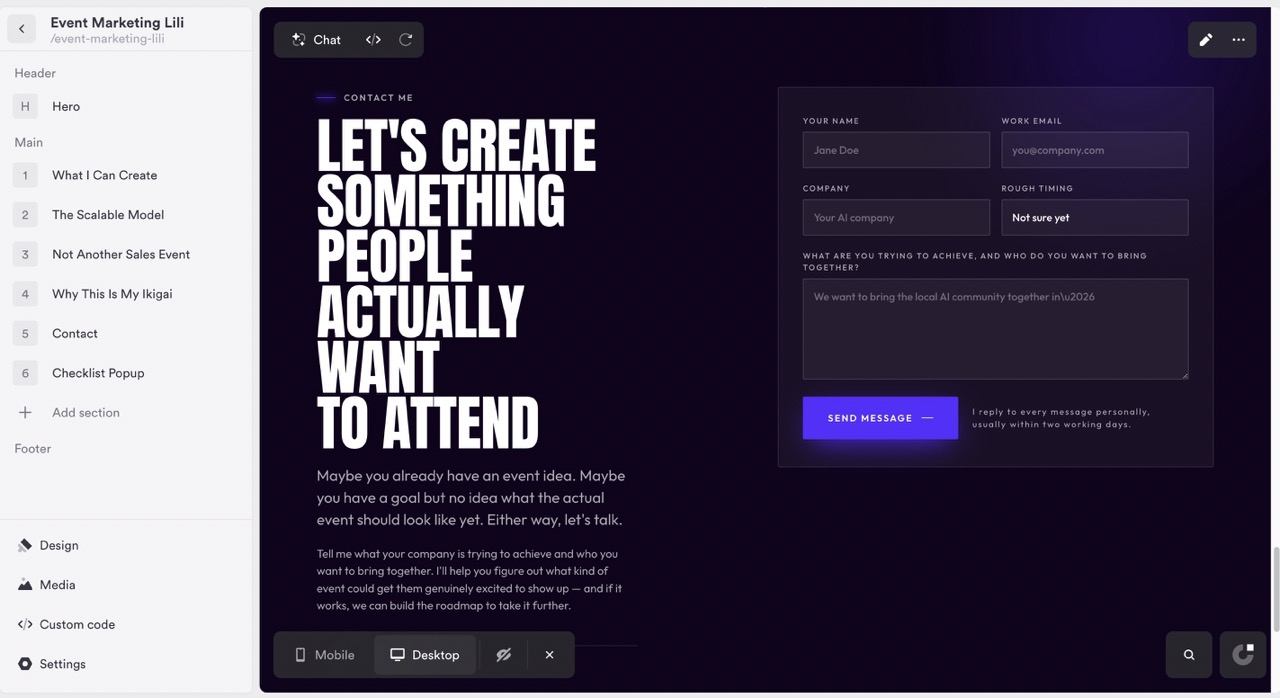
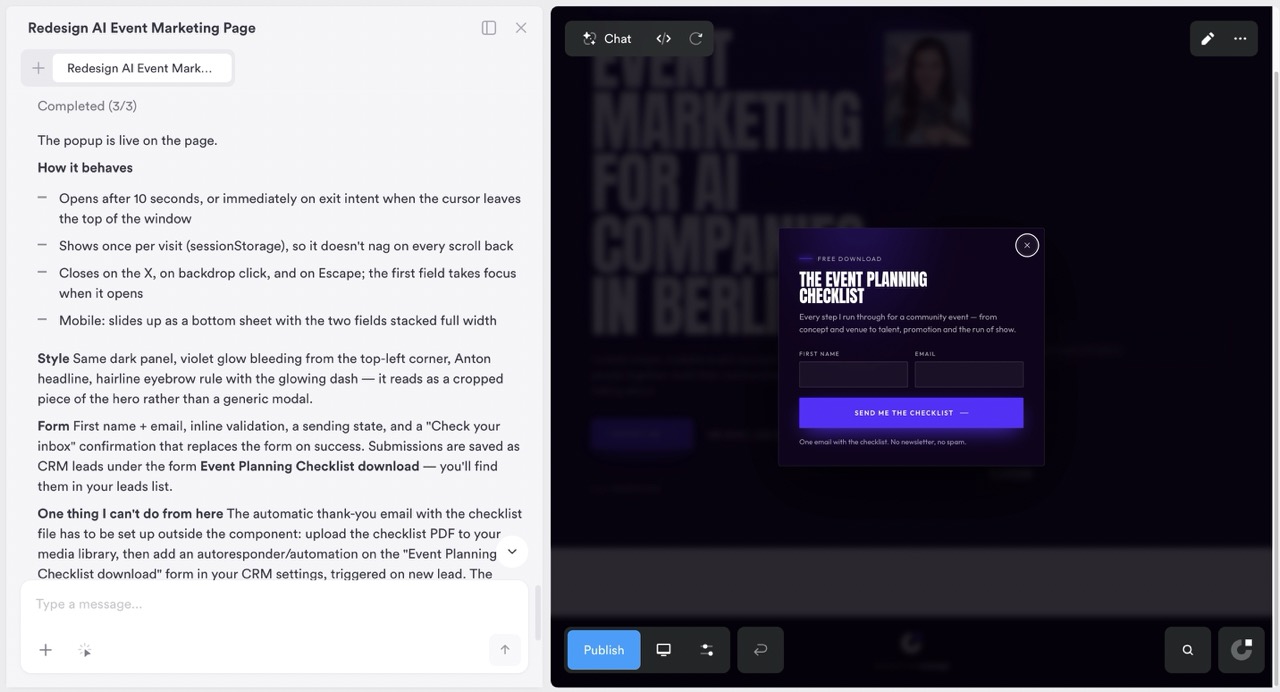
Once everything was built, I took a look at the extras I'd requested. The contact form looks solid, and the one in the popup even more so. When I think about how much I struggled to create this manually for my own website, I frown a little.
Now it was time to challenge Onepage for real. I wanted it to add custom code for a countdown timer to one of my next events. It had to write the code itself and use the date I set for it, October 13th.

This seemed to be incredibly easy for Onepage. It created the countdown in an instant, and it fits perfectly with the rest of the page.
So overall, I wasn't able to challenge Onepage enough to find something it can't deliver. Good one!

Onepage's new AI Agent

Until now, Onepage's AI mostly worked inside one project. The new AI Agent sits at the bottom left of the editor and works across your whole account. Each project has its own memory for your tone, your brand and your prices, so you don't have to explain your business again every time.

To challenge it, I gave it one brief for a complete new website for my event business, where I create event concepts for AI companies. I asked for a home page, an about page and a blog. On the home page I wanted my three event formats (an AI Pub Quiz, a comedy night with slides and Founder Table Talks), a short bio about me, my prices and a contact form. The agent built the whole site, looking damn good! It even saved my brand, my tone and both prices in the project notes on its own, so it can use them for everything I build on this site later.

It's also honest about its limits. It told me it can't see how the pages look in a browser and asked me to check them in the editor. It asked before publishing anything. And when I asked for the sitemap, it pointed out a page called /formats that it had created by accident while setting up my event formats, and asked whether to delete it or keep it as a draft. It even noticed that my homepage was still called "Startseite" and offered to rename it to "Home". I wish more AI tools did that, because usually you find these things yourself three weeks later.

Small things like adding a "Cities" link to the menu on every page or publishing six pages at once were done with one sentence. For a small business owner who doesn't want to click through settings, this is where the agent really pays off.

I really like that it chose very bold colours for my comedy night. It totally fits the topic, so it kind of understood where we're going. I think Onepage's agent is almost as clever as Claude, just that it's right where we need it: in the builder.

Onepage's new CMS: from one website to 100+ pages

Onepage now also has a built-in CMS with a blog. The idea is simple: you create a structure once, for example for your services, locations or blog posts, and Onepage turns it into as many pages as you need. Each page gets its own URL, its own SEO title and its own content. This way you can catch multiple long-tail keyword searches with one build.

You don't even have to set up that structure yourself, because the AI Agent does it for you. I wanted to see how far this goes, so I asked the agent to create city pages for my event business:

"Give every city where we run events its own page: Berlin, Munich, Hamburg, Vienna, Zurich, London, Amsterdam and Austin. Each page needs its own SEO title, a short intro about the event scene in that city and a 'Book a call' button."

The agent did the job impressively well. It created the full structure with the pages and slugs, and it put the content in the right places. On top of that, it built an overview page that lists all the cities, and the same works for the blog. Even the design was really good, so I didn't have to fix anything afterwards.

Each city really is its own page, with its own address like /cities/berlin and its own SEO title like "AI Community Events in Berlin | Lili Events". They aren't copies with only the city name swapped.

For small businesses that work in several locations or want to publish regularly, this is a crazy time saver. And for a creative person like me who doesn't like building these kinds of things by hand, it also saves a lot of nerves.

A few more things the CMS handles for you:
  • Every new entry automatically gets its own page in the sitemap

- You can schedule blog posts and publish them over time

- Every change is saved, and you can bring back an older version with one click

- You can build with the agent, in the editor or through MCP from tools like Claude

Try Onepage FREE
Onepage contact form
Onepage popup
Onepage countdown
Agent
CMS
Arrow previous
Arrow next

What I like about Onepage

I really like that Onepage communicates a lot with me, especially before building things out. This saves credits in the end, because I don't have to circle back and clear up misunderstandings. I like that it lets me see all the backend stuff. I can see the code it's building the page on while it works, and I can ask Onepage questions about it. I like their professional templates, even though I didn't use them for this test because I built everything from scratch with AI.

I like how easy it is to use. I really don't have to know anything about website building or structure, because Onepage handles it all for me.
It was able to handle every single one of my requests, and I never had to get technical myself.
The new AI Agent takes this even further. It tells me which decisions it made for me and points out things I would have missed, like a page it created by accident.

What could be better about Onepage

While Onepage is working, I can't add more information into the chat window. But sometimes things pop into my head and I'd like to dump them there right away. When it sketches out your website, it generates a plan where a lot of things are repetitive, so you have to read through a lot. I wish it would summarize the overall plan better. The design of my custom page is solid, but not that exciting. I actually like the templates better and wish I could combine a template with Create with AI, but from what I saw I could only go with either.

My Onepage verdict

I went into this test wanting to push Onepage to its limits, and I honestly couldn't find them. I built a full business website with a contact form, a popup with a form inside and a custom countdown timer, all through the chat window and without touching anything manually myself. For a small business owner who doesn't want to learn how websites work, that's exactly what you need. What I value most is how Onepage checks in with you before it builds. It asks about the style, shows you the hero first and only then continues, so you don't waste credits on a page you don't like. The planning phase can be a bit wordy, and I'd love to be able to type into the chat while it's working, but these are small things compared to what it delivers. With the new AI Agent and the CMS, Onepage has become a lot more than a landing page builder. One sentence gave me eight city pages with their own URLs and SEO titles, and the agent told me every decision it made along the way. If your business works in several locations or you want to blog regularly, this alone can save you days of work. If you run a small business in Germany or the EU, Onepage is an especially good pick because of the built-in GDPR cookie solution and CRM. My recommendation: start on the free plan, build your first page with the Create with AI feature and see how far you get. I think you'll be surprised.

Onepage free plan and prices

Onepage has a free plan that you can keep using for as long as you like. It's not a trial that runs out after 14 days, so you can take your time and test the builder properly before you pay anything. When you're ready to upgrade, there are four paid plans:
  • Essential: €19.90 a month

- Standard: €39.90 a month

- Advanced: €69.90 a month

- Expert: €179.90 a month

If you commit for longer, it gets cheaper. You save up to 25% with a 12-month plan and up to 50% with a 24-month plan, which brings Essential down to €9.90 a month.

One thing to keep in mind is that the AI features work with credits. The Essential plan comes with 25 AI credits a month, and generating whole sections or pages uses them up quite fast. So if you want to build a lot with AI, plan for a higher tier or extra credits.
Some features are also tied to specific plans. A/B testing only comes with the Advanced plan and up, and Forms and Funnels is a paid add-on on top of your plan.

Try Onepage FREE

Onepage FAQs

Is Onepage free?
Yes, Onepage has a free plan that doesn't expire. The paid plans start at €19.90 a month for Essential and go up to €179.90 a month for Expert. With a 24-month plan, Essential drops to €9.90 a month.

Can I build a website with Onepage's AI without any experience?
Yes. In my test I built a complete business website only by chatting with Onepage, including forms, a popup and a custom code element. I never had to get technical or make manual changes.

Is Onepage GDPR compliant?
Onepage comes with its own GDPR cookie solution, which makes it a good fit for businesses in Germany and the EU.

Can I add custom code to Onepage?
Yes. You can embed things like booking widgets, Google Maps or review widgets. In my test, Onepage even wrote the code for a countdown timer itself and matched it to the page design.

How many AI credits do I get with Onepage?
The Essential plan includes 25 AI credits a month. If you plan to build a lot with AI, a higher plan or extra credits make sense, because generating full sections uses credits quickly.

Does Onepage have a blog or CMS?
Yes. Onepage has a built-in CMS with a blog. You set up a structure once, for example for locations or blog posts, and every entry gets its own page with its own URL and SEO title. You can also schedule posts.

What can Onepage's AI Agent do?
The AI Agent works across your whole Onepage account. It can build new websites with design, branding and content, set up CMS structures like city pages, update your menu on all pages and publish pages for you. Each project has its own memory for your tone, brand and prices.

Try Onepage FREE
Author:
Lili Marocsik
Lili remembers the excitement of discovering the internet at 14 — a true window to the world. The AI boom now feels just as thrilling. Since 2023, she's tested many AI tools, seeing the good, the bad and the ugly (especially at the beginning). Before AI, she worked as a video marketer, crafting YouTube Ads for HelloFresh and Revolut. She believes AI should empower people, leading her to build this site for SMEs. When not exploring AI, she enjoys her 30 plants and modern art.
Author Lili Marocsik

Bi-weekly: the best AI Tool picks, hot DEALS, and tips you can use straight away.

By entering your email, you agree to receive occasional updates and marketing emails from us. You can unsubscribe at any time. Privacy policy
Black arrow icon