Why you can trust us: Testing Methodology & Editorial policy

The Best Social Media Management Tools

Automation To The Fullest
Mariam Pilishvili
December 4, 2025
Social Media Tools Comp Header

TL;DR

  • Social media management tools automate posting, scheduling, content discovery, analytics, cross-platform customization, and workflow management, with starter packages ranging from $6-$99 monthly making them cheaper than hiring a social media manager.
  • The category includes established platforms like Hootsuite, Sprinklr, and Buffer alongside newer favorites like ContentStudio ($25/month) and Social Champ ($27/month), with AI-generated content making competition fiercer and requiring features like social listening, TikTok scheduling, and hashtag optimization.
  • Common issues include the reality that many AI features (content discovery, cross-platform customization) could be manually prompted through LLMs, though automated tools remain cost-effective investments for small businesses managing multiple social accounts while running their core operations.

Our review contains a few affiliate marketing links. If you purchase any of the tools, we might receive a small commission.

Let your voice be heard with smart social media planners

You've come up with a great business idea and name. Now it's time to start building your social media presence and posting interesting, audience-focused content regularly. But managing multiple social accounts can be a so much work, especially when you're trying to run your small business in the meantime. That's why the best social media management tools are truly practical. They take over the posting, simplify your workflow, and, with that, save time. They allow you to create a steady stream of engaging content tailored to your audience.

These are the tasks social media management software can help you with:

  • Automated Posting and Scheduling
  • Content Discovery and Planning
  • Analytics and Performance Tracking
  • Cross-Platform Customization
  • Collaboration and Workflow Management
This frees you up to focus on the core of your business while still maintaining an active, polished presence on social networks. We've tested the most common tools like Hootsuite or Sprinklr, and added a few new favorites like Content Studio and Social Champ. Honestly, a lot of the features could be prompted manually, content discovery or cross-platform customization can easily be done by an LLM. But since our two top tools offer starter packages at $25 and $29 already, automating your social media posts is well-invested money and so much cheaper than hiring a social media manager. With the rise of AI tools and more AI-generated content, getting clicks and likes's not getting easier. So, if you want to stay ahead of the competition, it sure is clever to find tools for social listening (looking for mentions of specific topics you choose), one that schedules your TikTok videos, monitors your social inbox, finds the best hashtags and helps you with analytics. One thing is for sure: we will not get around social media marketing anymore. So check out your new social media management team members.

Use Cases for The Best AI Tools of

Social Media Tools

Check icon
Check icon
Check icon
Check icon
Check icon
Check icon
Check icon
Check icon
Check icon
Check icon
Check icon
Check icon

Quick Overview of the Best AI Tools

#
Tool name
Best Pro
Biggest Con
Free Trial
1
ContentStudio
Has solid content planning and scheduling tools
The user interface is a bit clunky
14 days
2
Social Champ
Instagram scheduler works great
Connecting to Twitter and Pinterest is unavailable on the free plan
7 days
3
Social Bee
AI-generated images are quick and allow up to 4 variations
Instagram personal publishing requires mobile reminders
14 days
4
Sprout Social
All-in-one social inbox
Super Expensive
30 days
5
Onlypult
Super easy Social Media Tools integration
Only 5 accounts in the Starter plan
7-day free trial (No credit card required)
6
Hubspot Social Media Manager
Easy linking with Twitter, Facebook, LinkedIn, and Google+
Part of larger CRM system which might be overwhelming
14 days
7
PosterMyWall
Huge selection of design templates, covering nearly every platform format
Instagram connection only works with Business accounts linked to a Facebook Page, which makes it restrictive for personal/creator accounts.
Free plan available
8
Vista Social
Simple interface
Slow screen loading times
14 days
9
Metricool
Best Times to Post
The page takes time to load
Free Plan for Life
10
Sprinklr
Really easy to plan and schedule social media posts for different business accounts
Super expensive - might be too pricey for smaller companies
30-day free for the Self-Serve plan
11
Hootsuite
Their training materials are really helpful - they teach you not just about their platform but social media marketing in general
It's expensive - $99 per month is too much for smaller businesses
30 days
12
SocialPilot
Easy Integration
The page takes time to load
14 days
13
Buffer
Valuable analytics
A little confusing to learn the interface
Available for up to 3 social channels
14
Lately
Custom audience targeting
Relatively expensive
7 days

Compare AI tools directly

Lightning icon
ContentStudio
Social Champ
Social Bee
Sprout Social
Onlypult
Hubspot Social Media Manager
PosterMyWall
Vista Social
Metricool
Sprinklr
Hootsuite
SocialPilot
Buffer
Lately
Chevron down
ContentStudio
Star icon
Score 
5
/
5
Pros icon
Has solid content planning and scheduling tools
Pros icon
Good reporting tools for tracking how posts perform
Pros icon
Perhaps the best all-in-one platform for network management
Cons icon
The user interface is a bit clunky
Cons icon
Some integrations are more complex, such as connecting an account to X (Twitter), which requires an API key that may be difficult for basic users to locate or link.
Cons icon
$25
Social Champ
Star icon
Score 
4.67
/
5
Pros icon
Instagram scheduler works great
Pros icon
Competitor Analysis
Pros icon
Nice analytics features to track performance
Cons icon
Connecting to Twitter and Pinterest is unavailable on the free plan
Cons icon
To downgrade to the $29 plan, you must pay in advance
Cons icon
No reply to live chats
$29
Social Bee
Star icon
Score 
4.33
/
5
Pros icon
AI-generated images are quick and allow up to 4 variations
Pros icon
Easy integration with multiple Facebook and Instagram account types
Pros icon
You can add designs directly from Canva through the Canva integration
Cons icon
Instagram personal publishing requires mobile reminders
Cons icon
Twitter/X authorization didn’t work on the first attempt
Cons icon
Dashboard sometimes glitches or needs refreshing
$8.70
Sprout Social
Star icon
Score 
4.33
/
5
Pros icon
All-in-one social inbox
Pros icon
Advanced Automation
Pros icon
Comprehensive Reporting
Cons icon
Super Expensive
Cons icon
Pricey Add-Ons
Cons icon
Complex Cancellation Process
$199
Onlypult
Star icon
Score 
4
/
5
Pros icon
Super easy Social Media Tools integration
Pros icon
Automatically detects linked pages
Pros icon
Simple, user-friendly interface
Cons icon
Only 5 accounts in the Starter plan
Cons icon
No analytics for Twitter, YouTube, or Telegram
Cons icon
No built-in image generator
$17.5
Hubspot Social Media Manager
Star icon
Score 
4
/
5
Pros icon
Easy linking with Twitter, Facebook, LinkedIn, and Google+
Pros icon
One-click cross-platform posting
Pros icon
Calendar view of all scheduled posts across platforms
Cons icon
Part of larger CRM system which might be overwhelming
Cons icon
Premium plans are costly
Cons icon
Limited Calendar View
$20
PosterMyWall
Star icon
Score 
3.67
/
5
Pros icon
Huge selection of design templates, covering nearly every platform format
Pros icon
Creative flexibility with multimedia support and fancy text styling
Pros icon
Built-in email marketing features
Cons icon
Instagram connection only works with Business accounts linked to a Facebook Page, which makes it restrictive for personal/creator accounts.
Cons icon
Many AI features (AI captions, AI images) and scheduling options are locked behind paid plans
Cons icon
Analytics are basic compared to advanced competitors
$9.95
Vista Social
Star icon
Score 
3.67
/
5
Pros icon
Simple interface
Pros icon
Built-in link shortener
Pros icon
Well-organized calendar system
Cons icon
Slow screen loading times
Cons icon
Poor AI-powered content generation
Cons icon
Expensive plans for small agencies
$39
Metricool
Star icon
Score 
3.33
/
5
Pros icon
Best Times to Post
Pros icon
Image and Video Bank
Pros icon
Hashtag Search Engine
Cons icon
The page takes time to load
Cons icon
Only Facebook pages can be connected, not Facebook profiles
Cons icon
Twitter and LinkedIn not available on Free Plan
$22
Sprinklr
Star icon
Score 
3.33
/
5
Pros icon
Really easy to plan and schedule social media posts for different business accounts
Pros icon
Really good at planning ahead - you can schedule posts weeks in advance
Pros icon
Strong data tracking and reporting features to see how well posts are doing
Cons icon
Super expensive - might be too pricey for smaller companies
Cons icon
Hard to learn - needs special training to use it properly
Cons icon
Can be confusing to find your way around the system
$250
Hootsuite
Star icon
Score 
3
/
5
Pros icon
Their training materials are really helpful - they teach you not just about their platform but social media marketing in general
Pros icon
You can see how well your posts are doing with their tracking tools
Pros icon
The calendar tool makes planning posts ahead of time really simple
Cons icon
It's expensive - $99 per month is too much for smaller businesses
Cons icon
Customer service isn't very helpful, especially with billing problems
Cons icon
Posting stories is tricky and not user-friendly
$99
SocialPilot
Star icon
Score 
3
/
5
Pros icon
Easy Integration
Pros icon
Very affordable compared to competitors
Pros icon
Good bulk scheduling features
Cons icon
The page takes time to load
Cons icon
Only Facebook pages can be connected, not Facebook profiles
Cons icon
Interface isn't very intuitive - takes too many clicks to get things done
$30
Buffer
Star icon
Score 
2.33
/
5
Pros icon
Valuable analytics
Pros icon
Task automation
Pros icon
Mobile accessibility
Cons icon
A little confusing to learn the interface
Cons icon
A little buggy
Cons icon
Enrolls you onto yearly plan automatically
$6
Lately
Star icon
Score 
2
/
5
Pros icon
Custom audience targeting
Pros icon
Video & audio clip captioning
Pros icon
Top time and day publishing analysis
Cons icon
Relatively expensive
Cons icon
Most features are limited in the starter package
Cons icon
Inconsistent Post Queue
$49
No AI tools found.
Thank you! Your submission has been received!
Oops! Something went wrong while submitting the form.
ContentStudio
Social Champ
Social Bee
Sprout Social
Onlypult
Hubspot Social Media Manager
PosterMyWall
Vista Social
Metricool
Sprinklr
Hootsuite
SocialPilot
Buffer
Lately
Chevron down
ContentStudio
Star icon
Score 
5
/
5
Pros icon
Has solid content planning and scheduling tools
Pros icon
Good reporting tools for tracking how posts perform
Pros icon
Perhaps the best all-in-one platform for network management
Cons icon
The user interface is a bit clunky
Cons icon
Some integrations are more complex, such as connecting an account to X (Twitter), which requires an API key that may be difficult for basic users to locate or link.
Cons icon
$25
Social Champ
Star icon
Score 
4.67
/
5
Pros icon
Instagram scheduler works great
Pros icon
Competitor Analysis
Pros icon
Nice analytics features to track performance
Cons icon
Connecting to Twitter and Pinterest is unavailable on the free plan
Cons icon
To downgrade to the $29 plan, you must pay in advance
Cons icon
No reply to live chats
$29
Social Bee
Star icon
Score 
4.33
/
5
Pros icon
AI-generated images are quick and allow up to 4 variations
Pros icon
Easy integration with multiple Facebook and Instagram account types
Pros icon
You can add designs directly from Canva through the Canva integration
Cons icon
Instagram personal publishing requires mobile reminders
Cons icon
Twitter/X authorization didn’t work on the first attempt
Cons icon
Dashboard sometimes glitches or needs refreshing
$8.70
Sprout Social
Star icon
Score 
4.33
/
5
Pros icon
All-in-one social inbox
Pros icon
Advanced Automation
Pros icon
Comprehensive Reporting
Cons icon
Super Expensive
Cons icon
Pricey Add-Ons
Cons icon
Complex Cancellation Process
$199
Onlypult
Star icon
Score 
4
/
5
Pros icon
Super easy Social Media Tools integration
Pros icon
Automatically detects linked pages
Pros icon
Simple, user-friendly interface
Cons icon
Only 5 accounts in the Starter plan
Cons icon
No analytics for Twitter, YouTube, or Telegram
Cons icon
No built-in image generator
$17.5
Hubspot Social Media Manager
Star icon
Score 
4
/
5
Pros icon
Easy linking with Twitter, Facebook, LinkedIn, and Google+
Pros icon
One-click cross-platform posting
Pros icon
Calendar view of all scheduled posts across platforms
Cons icon
Part of larger CRM system which might be overwhelming
Cons icon
Premium plans are costly
Cons icon
Limited Calendar View
$20
PosterMyWall
Star icon
Score 
3.67
/
5
Pros icon
Huge selection of design templates, covering nearly every platform format
Pros icon
Creative flexibility with multimedia support and fancy text styling
Pros icon
Built-in email marketing features
Cons icon
Instagram connection only works with Business accounts linked to a Facebook Page, which makes it restrictive for personal/creator accounts.
Cons icon
Many AI features (AI captions, AI images) and scheduling options are locked behind paid plans
Cons icon
Analytics are basic compared to advanced competitors
$9.95
Vista Social
Star icon
Score 
3.67
/
5
Pros icon
Simple interface
Pros icon
Built-in link shortener
Pros icon
Well-organized calendar system
Cons icon
Slow screen loading times
Cons icon
Poor AI-powered content generation
Cons icon
Expensive plans for small agencies
$39
Metricool
Star icon
Score 
3.33
/
5
Pros icon
Best Times to Post
Pros icon
Image and Video Bank
Pros icon
Hashtag Search Engine
Cons icon
The page takes time to load
Cons icon
Only Facebook pages can be connected, not Facebook profiles
Cons icon
Twitter and LinkedIn not available on Free Plan
$22
Sprinklr
Star icon
Score 
3.33
/
5
Pros icon
Really easy to plan and schedule social media posts for different business accounts
Pros icon
Really good at planning ahead - you can schedule posts weeks in advance
Pros icon
Strong data tracking and reporting features to see how well posts are doing
Cons icon
Super expensive - might be too pricey for smaller companies
Cons icon
Hard to learn - needs special training to use it properly
Cons icon
Can be confusing to find your way around the system
$250
Hootsuite
Star icon
Score 
3
/
5
Pros icon
Their training materials are really helpful - they teach you not just about their platform but social media marketing in general
Pros icon
You can see how well your posts are doing with their tracking tools
Pros icon
The calendar tool makes planning posts ahead of time really simple
Cons icon
It's expensive - $99 per month is too much for smaller businesses
Cons icon
Customer service isn't very helpful, especially with billing problems
Cons icon
Posting stories is tricky and not user-friendly
$99
SocialPilot
Star icon
Score 
3
/
5
Pros icon
Easy Integration
Pros icon
Very affordable compared to competitors
Pros icon
Good bulk scheduling features
Cons icon
The page takes time to load
Cons icon
Only Facebook pages can be connected, not Facebook profiles
Cons icon
Interface isn't very intuitive - takes too many clicks to get things done
$30
Buffer
Star icon
Score 
2.33
/
5
Pros icon
Valuable analytics
Pros icon
Task automation
Pros icon
Mobile accessibility
Cons icon
A little confusing to learn the interface
Cons icon
A little buggy
Cons icon
Enrolls you onto yearly plan automatically
$6
Lately
Star icon
Score 
2
/
5
Pros icon
Custom audience targeting
Pros icon
Video & audio clip captioning
Pros icon
Top time and day publishing analysis
Cons icon
Relatively expensive
Cons icon
Most features are limited in the starter package
Cons icon
Inconsistent Post Queue
$49
No AI tools found.
Thank you! Your submission has been received!
Oops! Something went wrong while submitting the form.

Social Media Tools

Comparison

1
Best Tool for:
Social Media Tools
ContentStudio
Star icon
Score 
5
/
5
Tool performance:
5
/
5
Star icon
Star icon
Star icon
Star icon
Star icon
Setup/Onboarding:
5
/
5
Star icon
Star icon
Star icon
Star icon
Star icon
User Experience:
5
/
5
Star icon
Star icon
Star icon
Star icon
Star icon
Prompt coherence:
0
/
5
Star icon
Star icon
Star icon
Star icon
Star icon
AI capabilities:
0
/
5
Star icon
Star icon
Star icon
Star icon
Star icon
Voice quality:
0
/
5
Star icon
Star icon
Star icon
Star icon
Star icon
Lip sync & motion:
0
/
5
Star icon
Star icon
Star icon
Star icon
Star icon
Music quality:
0
/
5
Star icon
Star icon
Star icon
Star icon
Star icon
Image quality:
0
/
5
Star icon
Star icon
Star icon
Star icon
Star icon
Design capabilities:
0
/
5
Star icon
Star icon
Star icon
Star icon
Star icon
ContentStudio Dashboard
Arrow previous
Arrow next
Pros:
Has solid content planning and scheduling tools
Good reporting tools for tracking how posts perform
Perhaps the best all-in-one platform for network management
Really budget-friendly, especially if you catch a lifetime deal
100% human-based customer support
Cons:
The user interface is a bit clunky
Some integrations are more complex, such as connecting an account to X (Twitter), which requires an API key that may be difficult for basic users to locate or link.
Coin icon
Monthly price starting from:
$25
User icon
For Who?

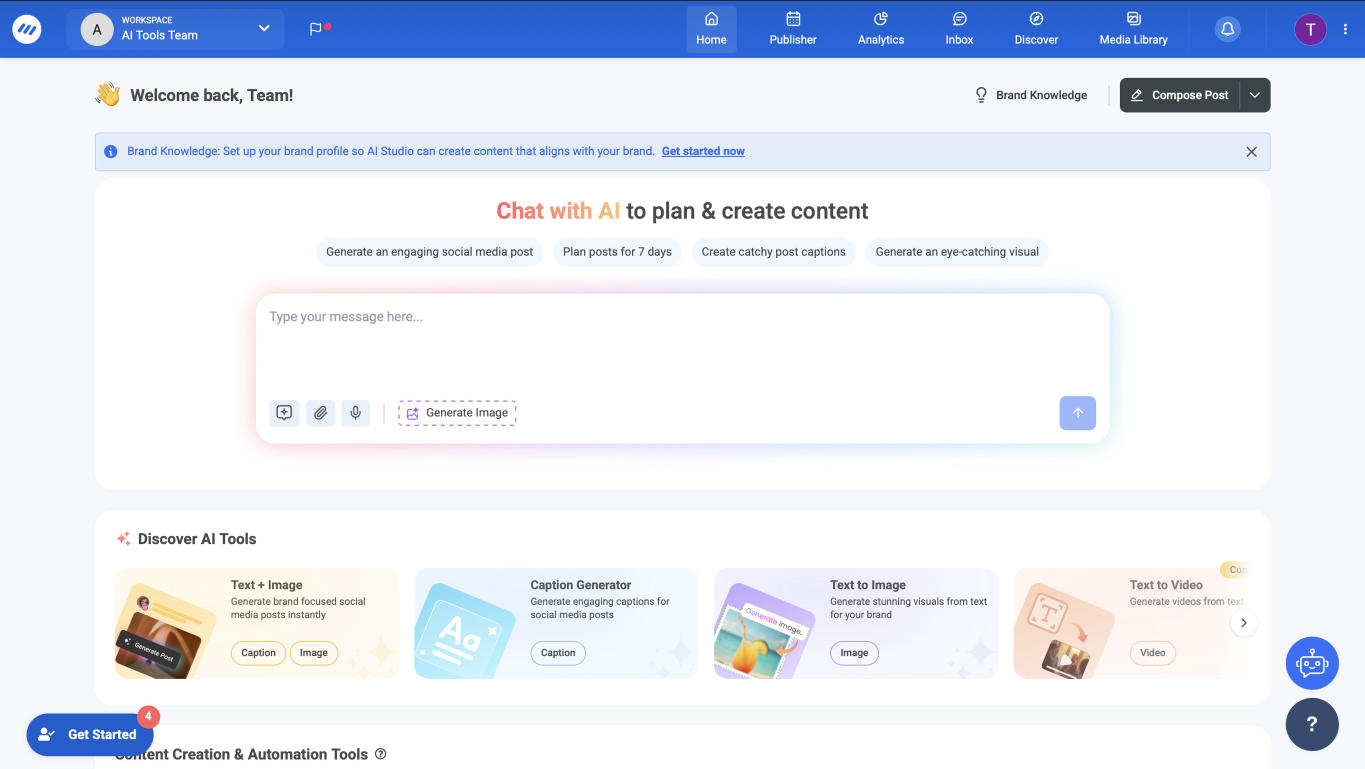
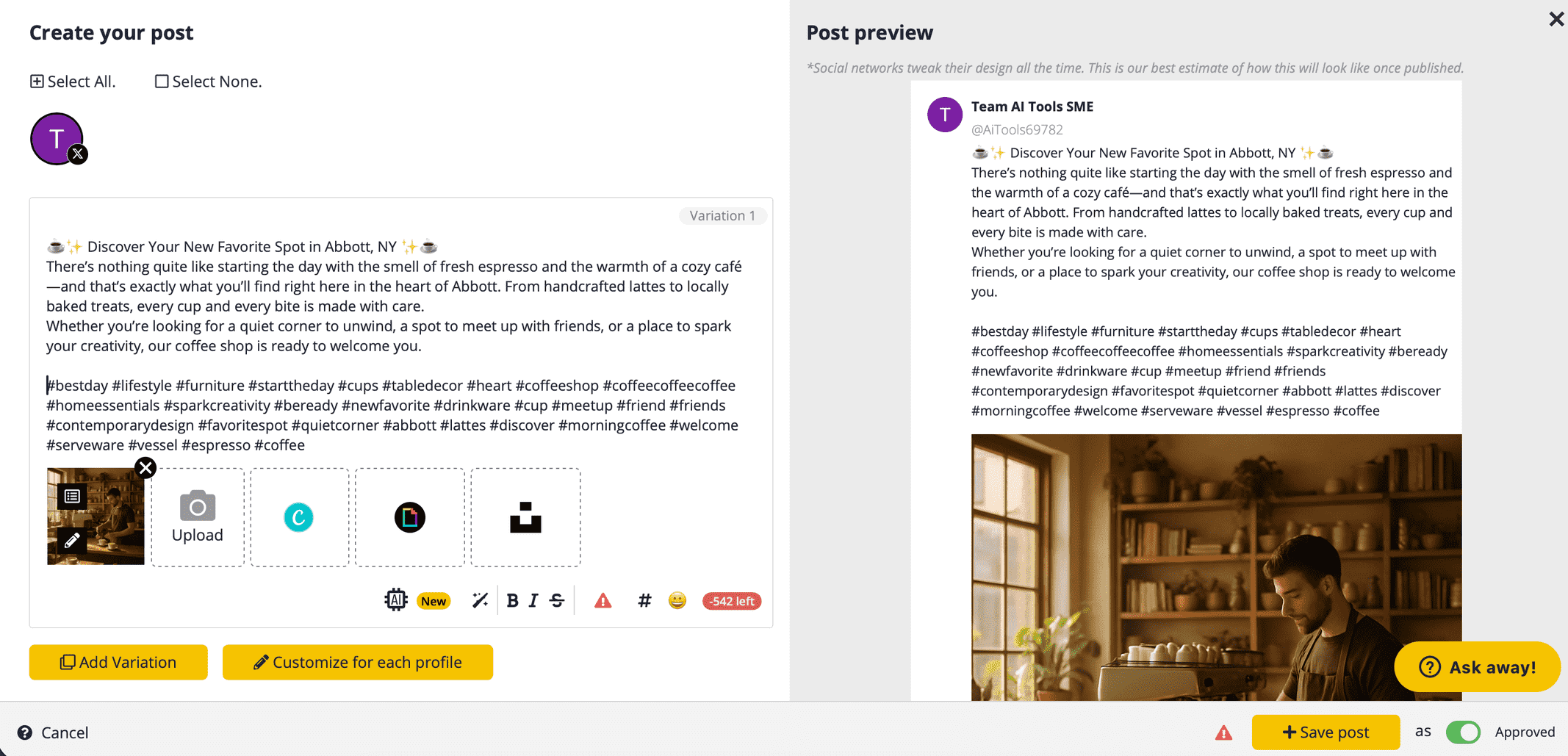
I find ContentStudio to be an incredibly powerful tool - its scheduling features and multiple app integrations definitely transform how you plan and create content. The analytics tools provide deep insights that genuinely help improve your social media strategy. What really sets ContentStudio apart is how it transforms the entire content management process into a smooth, professional operation. Sure, the interface could use some polishing here and there, but honestly, once you get used to the features, you'll be too impressed with what it can do to even notice.
Tested Model:
Last test:
November 7, 2025
1
Best Tool for:
Social Champ
Star icon
Score 
4.67
/
5
Tool performance:
4
/
5
Star icon
Star icon
Star icon
Star icon
Star icon
Setup/Onboarding:
5
/
5
Star icon
Star icon
Star icon
Star icon
Star icon
User Experience:
5
/
5
Star icon
Star icon
Star icon
Star icon
Star icon
Prompt coherence:
0
/
5
Star icon
Star icon
Star icon
Star icon
Star icon
AI capabilities:
0
/
5
Star icon
Star icon
Star icon
Star icon
Star icon
Voice quality:
0
/
5
Star icon
Star icon
Star icon
Star icon
Star icon
Lip sync & motion:
0
/
5
Star icon
Star icon
Star icon
Star icon
Star icon
Music quality:
0
/
5
Star icon
Star icon
Star icon
Star icon
Star icon
Image quality:
0
/
5
Star icon
Star icon
Star icon
Star icon
Star icon
Design capabilities:
0
/
5
Star icon
Star icon
Star icon
Star icon
Star icon
Social Champ Dashboard
Arrow previous
Arrow next
Pros:
Instagram scheduler works great
Competitor Analysis
Nice analytics features to track performance
Easy to customize posts for different platforms
Simple, easy-to-use interface
Cons:
Connecting to Twitter and Pinterest is unavailable on the free plan
To downgrade to the $29 plan, you must pay in advance
No reply to live chats
Coin icon
Monthly price starting from:
$29
User icon
For Who?

This service lets you plan and track all your social media posts in one place. The main dashboard is easy to use and makes managing everything simple. The price is great compared to similar tools, giving you good value for your money. While the phone app is simple and needs some design updates, I still find it works well enough to manage everything from my phone.

Tested Model:
Last test:
November 7, 2025
1
Best Tool for:
Social Bee
Star icon
Score 
4.33
/
5
Tool performance:
4
/
5
Star icon
Star icon
Star icon
Star icon
Star icon
Setup/Onboarding:
5
/
5
Star icon
Star icon
Star icon
Star icon
Star icon
User Experience:
4
/
5
Star icon
Star icon
Star icon
Star icon
Star icon
Prompt coherence:
0
/
5
Star icon
Star icon
Star icon
Star icon
Star icon
AI capabilities:
0
/
5
Star icon
Star icon
Star icon
Star icon
Star icon
Voice quality:
0
/
5
Star icon
Star icon
Star icon
Star icon
Star icon
Lip sync & motion:
0
/
5
Star icon
Star icon
Star icon
Star icon
Star icon
Music quality:
0
/
5
Star icon
Star icon
Star icon
Star icon
Star icon
Image quality:
0
/
5
Star icon
Star icon
Star icon
Star icon
Star icon
Design capabilities:
0
/
5
Star icon
Star icon
Star icon
Star icon
Star icon
Social Bee
Arrow previous
Arrow next
Pros:
AI-generated images are quick and allow up to 4 variations
Easy integration with multiple Facebook and Instagram account types
You can add designs directly from Canva through the Canva integration
The automatic hashtags blend perfectly with the post and offer so much value.
You can connect up to 25 profiles on the Pro plan.
Cons:
Instagram personal publishing requires mobile reminders
Twitter/X authorization didn’t work on the first attempt
Dashboard sometimes glitches or needs refreshing
Coin icon
Monthly price starting from:
$8.70
User icon
For Who?

After spending time with SocialBee, I have to say it strikes a really nice balance between smart automation and hands-on control. The AI tools were a pleasant surprise: the captions came out genuinely usable, and the AI image generation was much quicker (and better) than I expected. I also liked how easy it was to connect both personal and business accounts across Facebook and Instagram, which isn’t something every tool handles smoothly.
That said, it’s not without a few hiccups. The occasional editor glitches and the extra step needed to publish on Instagram personal accounts can slow you down a little. And while connecting to X (Twitter) eventually worked, it took a couple of tries. Still, none of this felt like a dealbreaker, more like small bumps while you're getting things set up.
Overall, SocialBee feels like a solid, reliable option for anyone who wants to simplify their social media workflow without spending a fortune. If you’re looking for a tool that blends AI assistance, scheduling, and multi-platform support in one place, SocialBee is definitely worth considering.
Tested Model:
Last test:
December 1, 2025
1
Best Tool for:
Sprout Social
Star icon
Score 
4.33
/
5
Tool performance:
4
/
5
Star icon
Star icon
Star icon
Star icon
Star icon
Setup/Onboarding:
5
/
5
Star icon
Star icon
Star icon
Star icon
Star icon
User Experience:
4
/
5
Star icon
Star icon
Star icon
Star icon
Star icon
Prompt coherence:
0
/
5
Star icon
Star icon
Star icon
Star icon
Star icon
AI capabilities:
0
/
5
Star icon
Star icon
Star icon
Star icon
Star icon
Voice quality:
0
/
5
Star icon
Star icon
Star icon
Star icon
Star icon
Lip sync & motion:
0
/
5
Star icon
Star icon
Star icon
Star icon
Star icon
Music quality:
0
/
5
Star icon
Star icon
Star icon
Star icon
Star icon
Image quality:
0
/
5
Star icon
Star icon
Star icon
Star icon
Star icon
Design capabilities:
0
/
5
Star icon
Star icon
Star icon
Star icon
Star icon
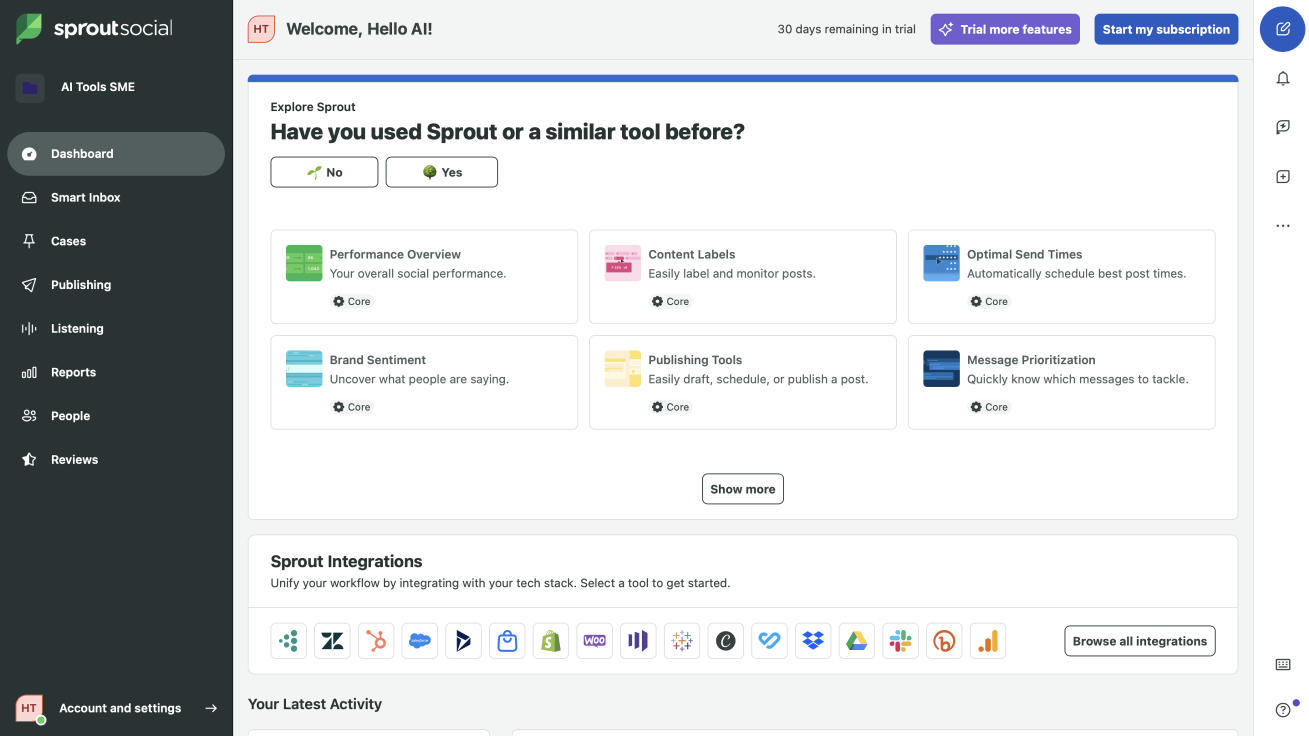
Sprout Social Dashboard
Arrow previous
Arrow next
Pros:
All-in-one social inbox
Advanced Automation
Comprehensive Reporting
Marketing Analytics
Reputation Management
Cons:
Super Expensive
Pricey Add-Ons
Complex Cancellation Process
Limited Features on Basic Edition
Coin icon
Monthly price starting from:
$199
User icon
For Who?

We had high hopes for Sprout because of its premium pricing, and it has completely exceeded our expectations. The features are decent, and the platform delivers real value, making it worth every penny. Sprout isn’t just social media management app—it’s setting the standard and proving it’s worth the investment.

Tested Model:
Last test:
November 7, 2025
1
Best Tool for:
Onlypult
Star icon
Score 
4
/
5
Tool performance:
0
/
5
Star icon
Star icon
Star icon
Star icon
Star icon
Setup/Onboarding:
4
/
5
Star icon
Star icon
Star icon
Star icon
Star icon
User Experience:
4
/
5
Star icon
Star icon
Star icon
Star icon
Star icon
Prompt coherence:
0
/
5
Star icon
Star icon
Star icon
Star icon
Star icon
AI capabilities:
0
/
5
Star icon
Star icon
Star icon
Star icon
Star icon
Voice quality:
0
/
5
Star icon
Star icon
Star icon
Star icon
Star icon
Lip sync & motion:
0
/
5
Star icon
Star icon
Star icon
Star icon
Star icon
Music quality:
0
/
5
Star icon
Star icon
Star icon
Star icon
Star icon
Image quality:
0
/
5
Star icon
Star icon
Star icon
Star icon
Star icon
Design capabilities:
0
/
5
Star icon
Star icon
Star icon
Star icon
Star icon
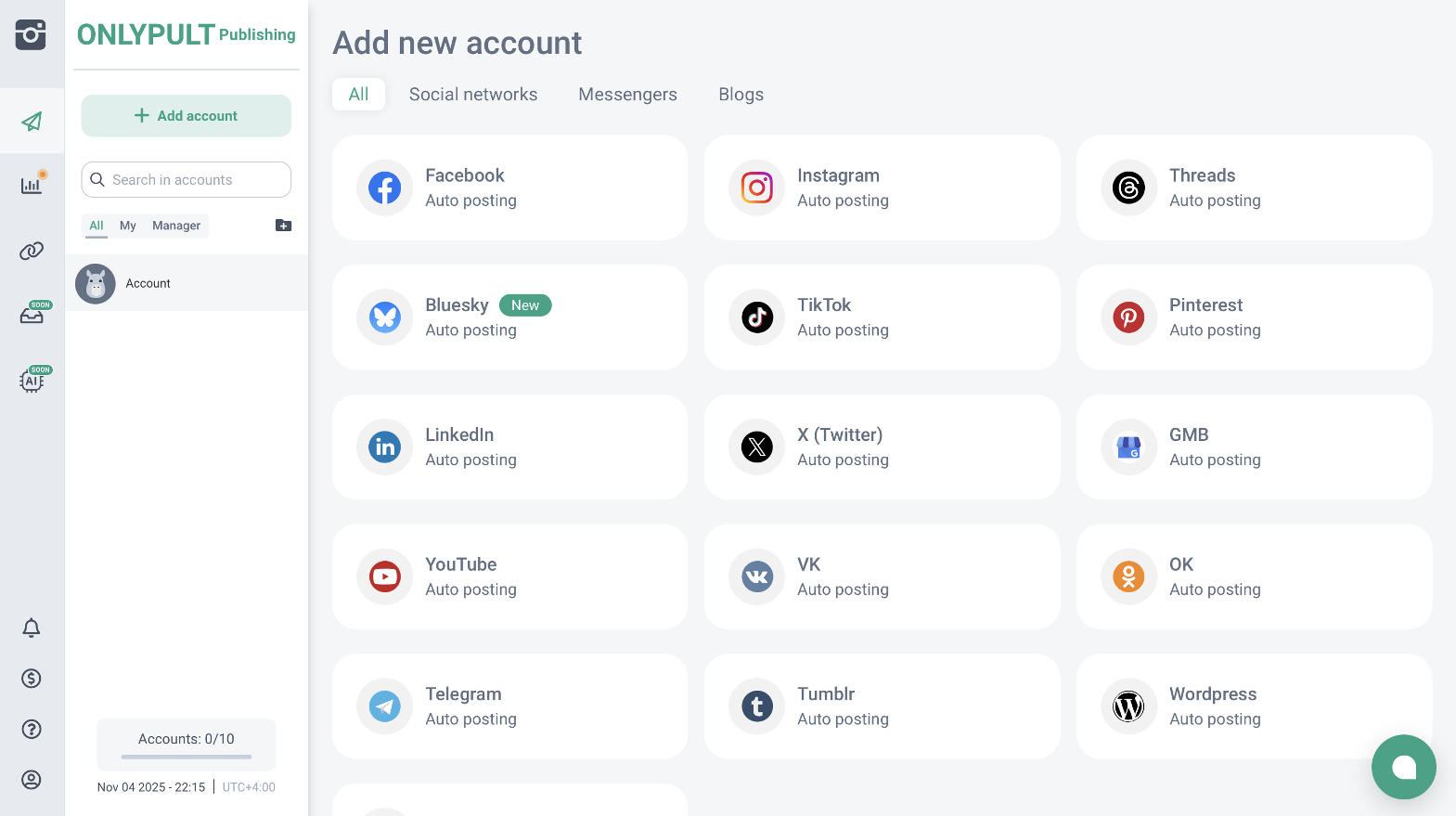
Onlypult Dashboard
Arrow previous
Arrow next
Pros:
Super easy Social Media Tools integration
Automatically detects linked pages
Simple, user-friendly interface
AI writing assistant with tone adjustment & 3 text versions
Fast, friendly live chat support
Cons:
Only 5 accounts in the Starter plan
No analytics for Twitter, YouTube, or Telegram
No built-in image generator
Team feature limited to 1 member on free trial
Coin icon
Monthly price starting from:
$17.5
User icon
For Who?

Onlypult is a great tool for managing multiple social media accounts. It’s easy to use, with features like AI-powered content creation, post scheduling, and watermarking. The platform helps you manage and renew old posts, making it simple to stay organized. While it lacks some analytics features and has limitations on the free trial, it’s still a solid choice for users looking for an efficient way to handle their social media. Plus, the live chat support is super fast and friendly, making it even easier to get help when needed. If you need a no-fuss tool for managing posts across different platforms, Onlypult is worth a look.
Tested Model:
Last test:
November 7, 2025
1
Best Tool for:
Hubspot Social Media Manager
Star icon
Score 
4
/
5
Tool performance:
4
/
5
Star icon
Star icon
Star icon
Star icon
Star icon
Setup/Onboarding:
4
/
5
Star icon
Star icon
Star icon
Star icon
Star icon
User Experience:
4
/
5
Star icon
Star icon
Star icon
Star icon
Star icon
Prompt coherence:
0
/
5
Star icon
Star icon
Star icon
Star icon
Star icon
AI capabilities:
0
/
5
Star icon
Star icon
Star icon
Star icon
Star icon
Voice quality:
0
/
5
Star icon
Star icon
Star icon
Star icon
Star icon
Lip sync & motion:
0
/
5
Star icon
Star icon
Star icon
Star icon
Star icon
Music quality:
0
/
5
Star icon
Star icon
Star icon
Star icon
Star icon
Image quality:
0
/
5
Star icon
Star icon
Star icon
Star icon
Star icon
Design capabilities:
0
/
5
Star icon
Star icon
Star icon
Star icon
Star icon
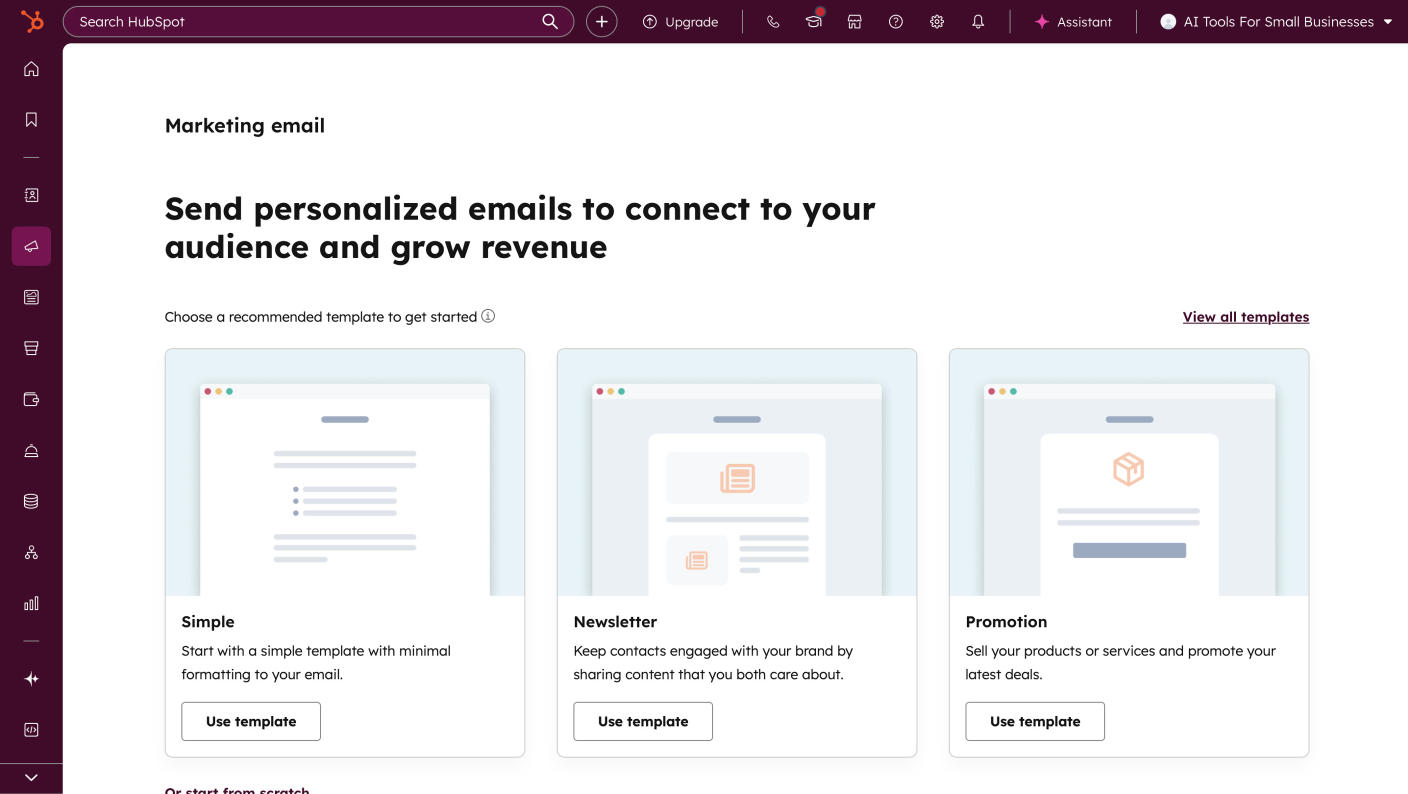
Hubspot Social Media Manager Dashboard
Arrow previous
Arrow next
Pros:
Easy linking with Twitter, Facebook, LinkedIn, and Google+
One-click cross-platform posting
Calendar view of all scheduled posts across platforms
Easy post editing
Social clicks tracking
Cons:
Part of larger CRM system which might be overwhelming
Premium plans are costly
Limited Calendar View
Coin icon
Monthly price starting from:
$20
User icon
For Who?

HubSpot's social media tools pack a serious punch for businesses looking to step up their social game. The platform shines with its all-in-one dashboard, smart scheduling features, and detailed analytics that actually make sense. While it might be overkill for small businesses just starting out, it's a game-changer for marketing teams managing multiple social accounts and campaigns. Yes, there's a learning curve and it's not cheap, but if you're serious about social media marketing, HubSpot's features make it worth every penny.
Tested Model:
Last test:
November 7, 2025
1
Best Tool for:
PosterMyWall
Star icon
Score 
3.67
/
5
Tool performance:
4
/
5
Star icon
Star icon
Star icon
Star icon
Star icon
Setup/Onboarding:
4
/
5
Star icon
Star icon
Star icon
Star icon
Star icon
User Experience:
3
/
5
Star icon
Star icon
Star icon
Star icon
Star icon
Prompt coherence:
0
/
5
Star icon
Star icon
Star icon
Star icon
Star icon
AI capabilities:
0
/
5
Star icon
Star icon
Star icon
Star icon
Star icon
Voice quality:
0
/
5
Star icon
Star icon
Star icon
Star icon
Star icon
Lip sync & motion:
0
/
5
Star icon
Star icon
Star icon
Star icon
Star icon
Music quality:
0
/
5
Star icon
Star icon
Star icon
Star icon
Star icon
Image quality:
0
/
5
Star icon
Star icon
Star icon
Star icon
Star icon
Design capabilities:
0
/
5
Star icon
Star icon
Star icon
Star icon
Star icon
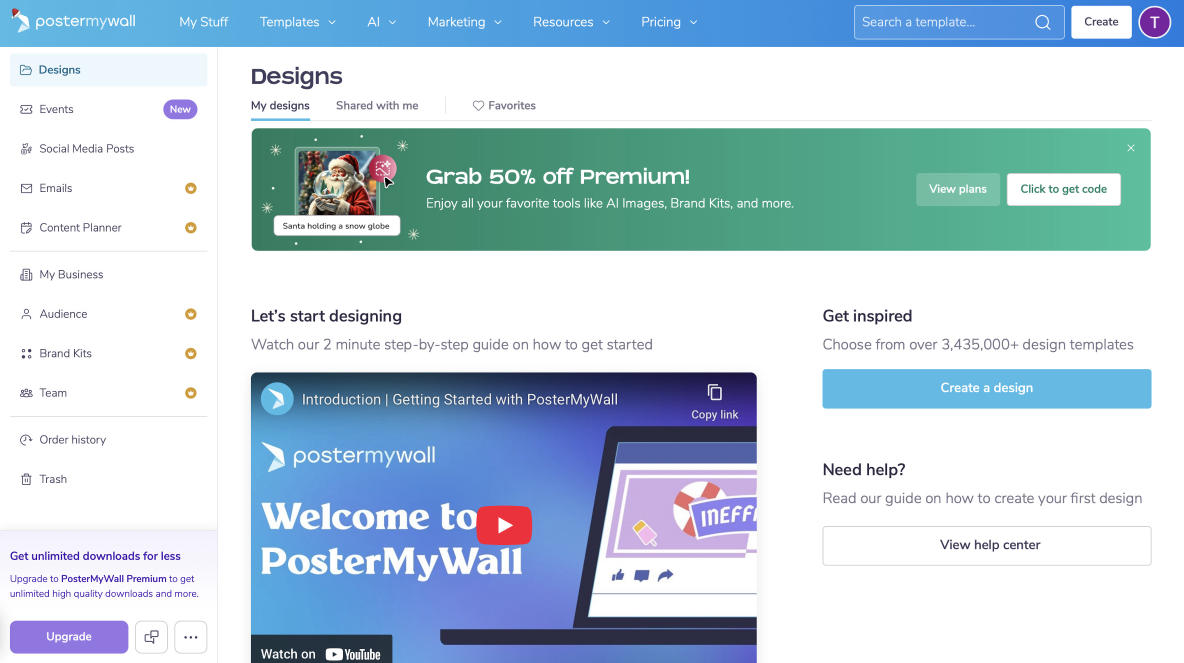
PosterMyWall Dashboard
Arrow previous
Arrow next
Pros:
Huge selection of design templates, covering nearly every platform format
Creative flexibility with multimedia support and fancy text styling
Built-in email marketing features
Easy Twitter connection
Rich media options
Cons:
Instagram connection only works with Business accounts linked to a Facebook Page, which makes it restrictive for personal/creator accounts.
Many AI features (AI captions, AI images) and scheduling options are locked behind paid plans
Analytics are basic compared to advanced competitors
I was unable to connect the tool to my Facebook account
Coin icon
Monthly price starting from:
$9.95
User icon
For Who?

PosterMyWall felt less like testing a tool and more like stepping into a design and marketing. From the very beginning, I had access to a wide range of templates and creative editing options that made building posts fast and enjoyable. The AI background remover and other creative features added an extra layer of polish, while multimedia elements like videos, stickers, and QR codes helped make content stand out. The free plan already lets you do a lot, and upgrading unlocks scheduling, AI captions, and bulk email tools at a very reasonable price. The bad news is that I wasn’t able to connect my Facebook page at all—even when logged in, the tool returned an error every time. Instagram connection also only works with Business accounts linked to a Facebook Page, which makes it restrictive for personal or creator accounts. Combined with fairly basic analytics, integrations still leave room for improvement. Still, the overall experience was smooth, flexible, and inspiring—a strong choice for freelancers and small businesses who want to create eye-catching content without overspending.
Tested Model:
Last test:
November 11, 2025
1
Best Tool for:
Vista Social
Star icon
Score 
3.67
/
5
Tool performance:
4
/
5
Star icon
Star icon
Star icon
Star icon
Star icon
Setup/Onboarding:
4
/
5
Star icon
Star icon
Star icon
Star icon
Star icon
User Experience:
3
/
5
Star icon
Star icon
Star icon
Star icon
Star icon
Prompt coherence:
0
/
5
Star icon
Star icon
Star icon
Star icon
Star icon
AI capabilities:
0
/
5
Star icon
Star icon
Star icon
Star icon
Star icon
Voice quality:
0
/
5
Star icon
Star icon
Star icon
Star icon
Star icon
Lip sync & motion:
0
/
5
Star icon
Star icon
Star icon
Star icon
Star icon
Music quality:
0
/
5
Star icon
Star icon
Star icon
Star icon
Star icon
Image quality:
0
/
5
Star icon
Star icon
Star icon
Star icon
Star icon
Design capabilities:
0
/
5
Star icon
Star icon
Star icon
Star icon
Star icon
Vista Social Dashboard
Arrow previous
Arrow next
Pros:
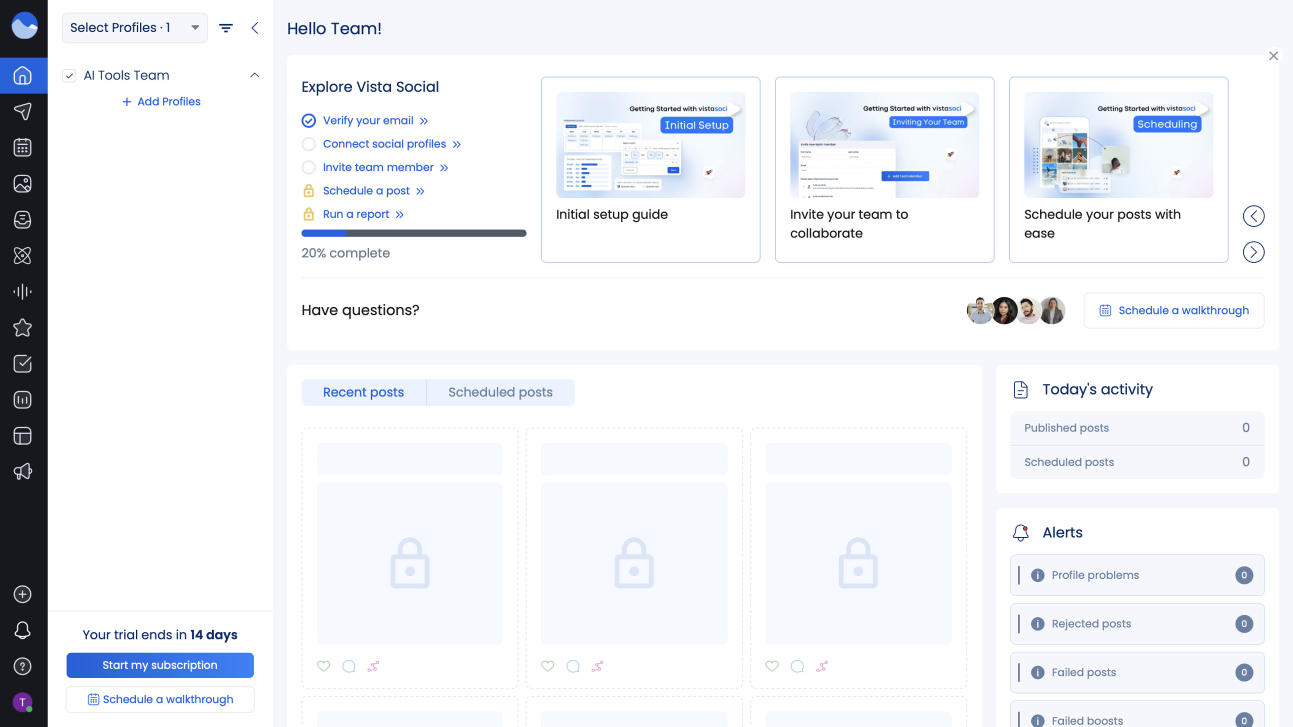
Simple interface
Built-in link shortener
Well-organized calendar system
No credit card required for initial signup
Wide range of supported social platforms (Facebook, Instagram, LinkedIn, TikTok, Twitter, Reddit)
Cons:
Slow screen loading times
Poor AI-powered content generation
Expensive plans for small agencies
Excessive email notifications
Limited features in the basic plan
Coin icon
Monthly price starting from:
$39
User icon
For Who?

We genuinely enjoyed using Vista and would recommend it, despite some room for improvement. While we like the overall functionality, we found the social account connection process a bit confusing - it wasn't clear which accounts were already connected. While we truly enjoyed Vista's AI capabilities for content generation, it sometimes lacked creativity. Adding more innovative content would make a huge difference. With these missing pieces fixed, Vista could really shine as a complete social media management tool.
Tested Model:
Last test:
November 11, 2025
1
Best Tool for:
Metricool
Star icon
Score 
3.33
/
5
Tool performance:
3
/
5
Star icon
Star icon
Star icon
Star icon
Star icon
Setup/Onboarding:
4
/
5
Star icon
Star icon
Star icon
Star icon
Star icon
User Experience:
3
/
5
Star icon
Star icon
Star icon
Star icon
Star icon
Prompt coherence:
0
/
5
Star icon
Star icon
Star icon
Star icon
Star icon
AI capabilities:
0
/
5
Star icon
Star icon
Star icon
Star icon
Star icon
Voice quality:
0
/
5
Star icon
Star icon
Star icon
Star icon
Star icon
Lip sync & motion:
0
/
5
Star icon
Star icon
Star icon
Star icon
Star icon
Music quality:
0
/
5
Star icon
Star icon
Star icon
Star icon
Star icon
Image quality:
0
/
5
Star icon
Star icon
Star icon
Star icon
Star icon
Design capabilities:
0
/
5
Star icon
Star icon
Star icon
Star icon
Star icon
Metricool Dashboard
Arrow previous
Arrow next
Pros:
Best Times to Post
Image and Video Bank
Hashtag Search Engine
Post Promotion
AI Social Media Assistant
Cons:
The page takes time to load
Only Facebook pages can be connected, not Facebook profiles
Twitter and LinkedIn not available on Free Plan
Team access on higher tiers
Customizable templates on advanced plans
Coin icon
Monthly price starting from:
$22
User icon
For Who?

I've been playing around with Metricool lately, and it's kind of underrated gem in the social media tools world. Sure, the free version doesn't give you everything, but I love how I don't need a PhD to figure out how it works! The interface is simple and intuitive, making it easy for users to connect and integrate various tools. They've got a mobile app too, which is super handy when you're on the go. While you won't get all the fancy bells without paying, it's perfect if you just want something simple that actually makes sense to use.

Tested Model:
Last test:
November 11, 2025
1
Best Tool for:
Sprinklr
Star icon
Score 
3.33
/
5
Tool performance:
3
/
5
Star icon
Star icon
Star icon
Star icon
Star icon
Setup/Onboarding:
4
/
5
Star icon
Star icon
Star icon
Star icon
Star icon
User Experience:
3
/
5
Star icon
Star icon
Star icon
Star icon
Star icon
Prompt coherence:
0
/
5
Star icon
Star icon
Star icon
Star icon
Star icon
AI capabilities:
0
/
5
Star icon
Star icon
Star icon
Star icon
Star icon
Voice quality:
0
/
5
Star icon
Star icon
Star icon
Star icon
Star icon
Lip sync & motion:
0
/
5
Star icon
Star icon
Star icon
Star icon
Star icon
Music quality:
0
/
5
Star icon
Star icon
Star icon
Star icon
Star icon
Image quality:
0
/
5
Star icon
Star icon
Star icon
Star icon
Star icon
Design capabilities:
0
/
5
Star icon
Star icon
Star icon
Star icon
Star icon
Arrow previous
Arrow next
Pros:
Really easy to plan and schedule social media posts for different business accounts
Really good at planning ahead - you can schedule posts weeks in advance
Strong data tracking and reporting features to see how well posts are doing
Does both posting and advertising from one place
Perfect for big teams who need to work together on social media
Cons:
Super expensive - might be too pricey for smaller companies
Hard to learn - needs special training to use it properly
Can be confusing to find your way around the system
Reports can take a long time to download
Coin icon
Monthly price starting from:
$250
User icon
For Who?

Sprinklr is a powerful tool that's best for large companies or agencies managing multiple social media accounts. But I'll be honest - it's not cheap, and the learning curve is pretty steep. I had to sit through several sessions just to get comfortable with the basics. If you're a big company with the budget for it and willing to invest time in learning the system, it's worth considering. But smaller businesses or those needing something simple might want to look at easier, less expensive options.
Tested Model:
Last test:
November 7, 2025
1
Best Tool for:
Hootsuite
Star icon
Score 
3
/
5
Tool performance:
3
/
5
Star icon
Star icon
Star icon
Star icon
Star icon
Setup/Onboarding:
3
/
5
Star icon
Star icon
Star icon
Star icon
Star icon
User Experience:
3
/
5
Star icon
Star icon
Star icon
Star icon
Star icon
Prompt coherence:
0
/
5
Star icon
Star icon
Star icon
Star icon
Star icon
AI capabilities:
0
/
5
Star icon
Star icon
Star icon
Star icon
Star icon
Voice quality:
0
/
5
Star icon
Star icon
Star icon
Star icon
Star icon
Lip sync & motion:
0
/
5
Star icon
Star icon
Star icon
Star icon
Star icon
Music quality:
0
/
5
Star icon
Star icon
Star icon
Star icon
Star icon
Image quality:
0
/
5
Star icon
Star icon
Star icon
Star icon
Star icon
Design capabilities:
0
/
5
Star icon
Star icon
Star icon
Star icon
Star icon
Hootsuite Dashboard
Arrow previous
Arrow next
Pros:
Their training materials are really helpful - they teach you not just about their platform but social media marketing in general
You can see how well your posts are doing with their tracking tools
The calendar tool makes planning posts ahead of time really simple
Cons:
It's expensive - $99 per month is too much for smaller businesses
Customer service isn't very helpful, especially with billing problems
Posting stories is tricky and not user-friendly
The free version doesn't offer much
Some of the advanced features take time to figure out
Coin icon
Monthly price starting from:
$99
User icon
For Who?

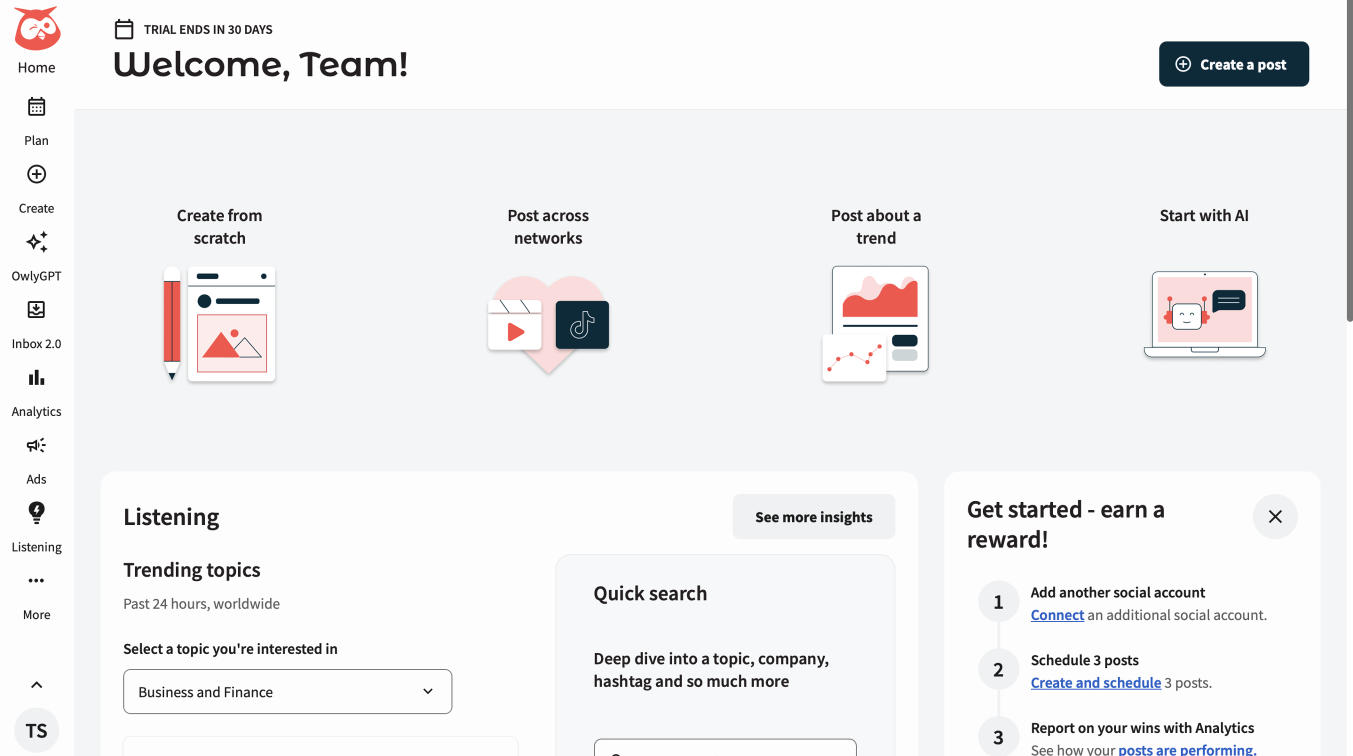
I find Hootsuite to be a mixed bag. While it's clearly a powerful social media management tool that helps manage multiple accounts in one place, I have some concerns. The scheduling features and analytics seem really solid, and I'm impressed by their training resources. But the pricing feels steep at $99/month, especially for smaller businesses like mine. That said, I think it's doing something right - I mean, it's pretty slick for scheduling posts and tracking how everything performs. I just think you'd need to be a medium or larger business to justify the cost, since there are cheaper alternatives out there with similar features.
Tested Model:
Last test:
November 11, 2025
1
Best Tool for:
SocialPilot
Star icon
Score 
3
/
5
Tool performance:
3
/
5
Star icon
Star icon
Star icon
Star icon
Star icon
Setup/Onboarding:
4
/
5
Star icon
Star icon
Star icon
Star icon
Star icon
User Experience:
2
/
5
Star icon
Star icon
Star icon
Star icon
Star icon
Prompt coherence:
0
/
5
Star icon
Star icon
Star icon
Star icon
Star icon
AI capabilities:
0
/
5
Star icon
Star icon
Star icon
Star icon
Star icon
Voice quality:
0
/
5
Star icon
Star icon
Star icon
Star icon
Star icon
Lip sync & motion:
0
/
5
Star icon
Star icon
Star icon
Star icon
Star icon
Music quality:
0
/
5
Star icon
Star icon
Star icon
Star icon
Star icon
Image quality:
0
/
5
Star icon
Star icon
Star icon
Star icon
Star icon
Design capabilities:
0
/
5
Star icon
Star icon
Star icon
Star icon
Star icon
Social Pilot Dashboard
Arrow previous
Arrow next
Pros:
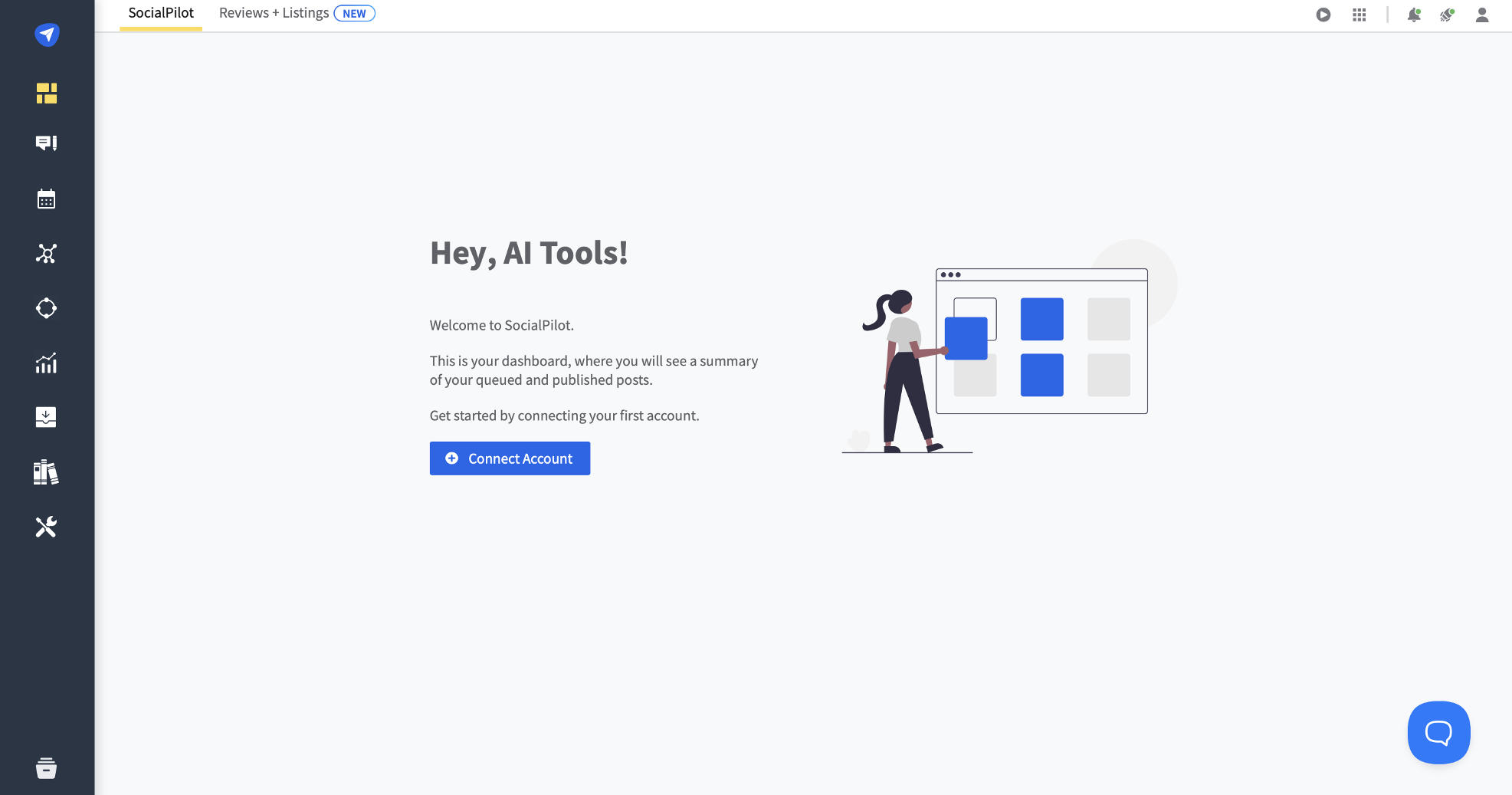
Easy Integration
Very affordable compared to competitors
Good bulk scheduling features
Great value for the number of accounts you can manage
Real-time engagement monitoring
Cons:
The page takes time to load
Only Facebook pages can be connected, not Facebook profiles
Interface isn't very intuitive - takes too many clicks to get things done
Content can get lost in the system
Posts sometimes don't publish as scheduled
Coin icon
Monthly price starting from:
$30
User icon
For Who?

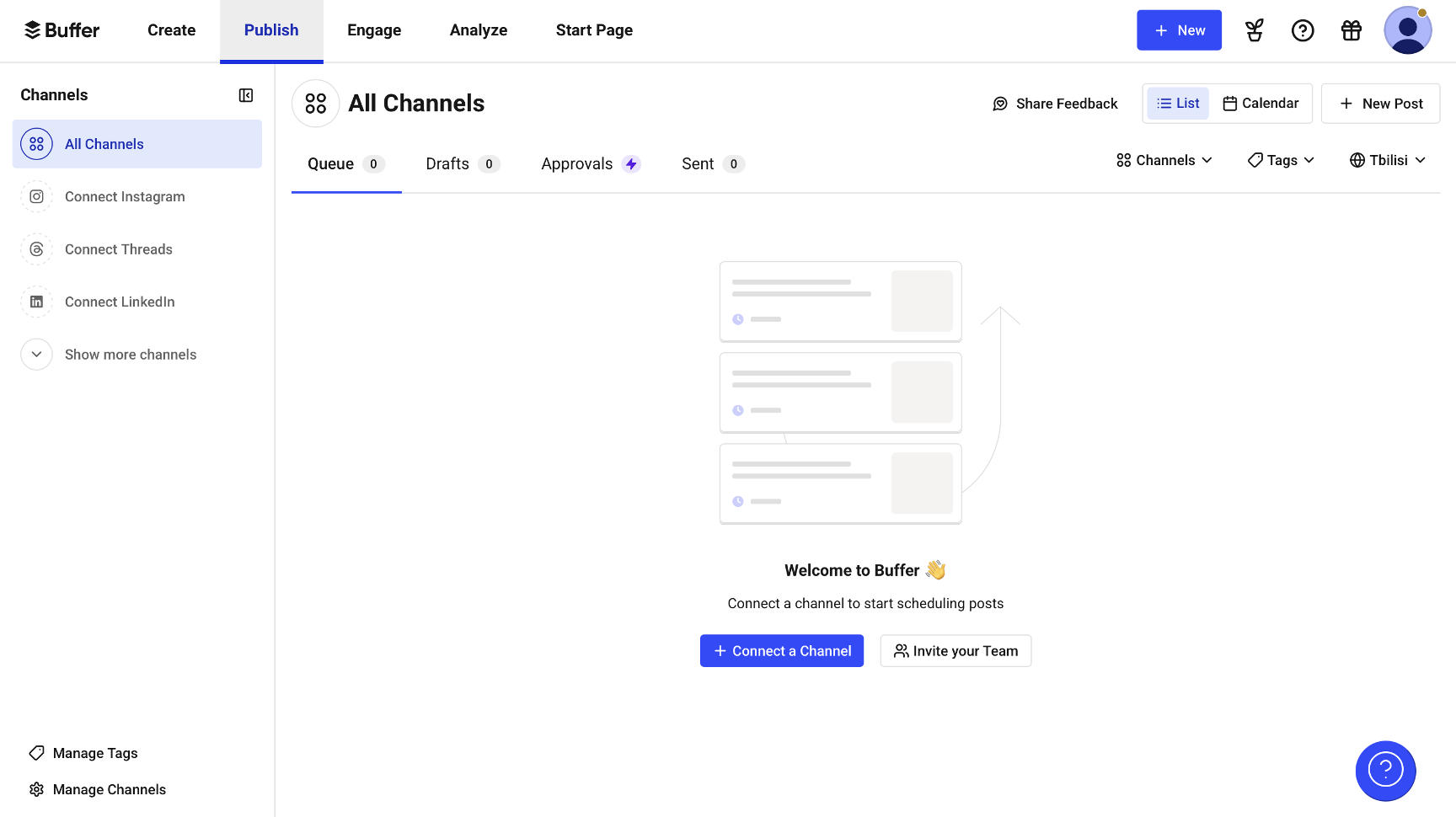
SocialPilot has some good features, like bulk scheduling. But honestly, it's been a letdown. There are bugs that never get fixed, and when you need help, it's hard to get. Sure, it's cheaper than some other options, but it's not worth the headache. You're better off using a different social media tool that actually works properly and helps you when you have problems.
Tested Model:
Last test:
November 11, 2025
1
Best Tool for:
Buffer
Star icon
Score 
2.33
/
5
Tool performance:
2
/
5
Star icon
Star icon
Star icon
Star icon
Star icon
Setup/Onboarding:
3
/
5
Star icon
Star icon
Star icon
Star icon
Star icon
User Experience:
2
/
5
Star icon
Star icon
Star icon
Star icon
Star icon
Prompt coherence:
0
/
5
Star icon
Star icon
Star icon
Star icon
Star icon
AI capabilities:
0
/
5
Star icon
Star icon
Star icon
Star icon
Star icon
Voice quality:
0
/
5
Star icon
Star icon
Star icon
Star icon
Star icon
Lip sync & motion:
0
/
5
Star icon
Star icon
Star icon
Star icon
Star icon
Music quality:
0
/
5
Star icon
Star icon
Star icon
Star icon
Star icon
Image quality:
0
/
5
Star icon
Star icon
Star icon
Star icon
Star icon
Design capabilities:
0
/
5
Star icon
Star icon
Star icon
Star icon
Star icon
Buffer Dashboard
Arrow previous
Arrow next
Pros:
Valuable analytics
Task automation
Mobile accessibility
Customizable features
Cons:
A little confusing to learn the interface
A little buggy
Enrolls you onto yearly plan automatically
Poor customer support
Takes time to load page
Coin icon
Monthly price starting from:
$6
User icon
For Who?

Buffer looks promising, but it keeps letting me down where it matters most. The main thing I need it for - scheduling posts - often breaks down for no clear reason. It's really annoying having to post things by hand when the scheduler doesn't work.

Tested Model:
Last test:
November 11, 2025
1
Best Tool for:
Lately
Star icon
Score 
2
/
5
Tool performance:
2
/
5
Star icon
Star icon
Star icon
Star icon
Star icon
Setup/Onboarding:
2
/
5
Star icon
Star icon
Star icon
Star icon
Star icon
User Experience:
2
/
5
Star icon
Star icon
Star icon
Star icon
Star icon
Prompt coherence:
0
/
5
Star icon
Star icon
Star icon
Star icon
Star icon
AI capabilities:
0
/
5
Star icon
Star icon
Star icon
Star icon
Star icon
Voice quality:
0
/
5
Star icon
Star icon
Star icon
Star icon
Star icon
Lip sync & motion:
0
/
5
Star icon
Star icon
Star icon
Star icon
Star icon
Music quality:
0
/
5
Star icon
Star icon
Star icon
Star icon
Star icon
Image quality:
0
/
5
Star icon
Star icon
Star icon
Star icon
Star icon
Design capabilities:
0
/
5
Star icon
Star icon
Star icon
Star icon
Star icon
Arrow previous
Arrow next
Pros:
Custom audience targeting
Video & audio clip captioning
Top time and day publishing analysis
Channel performance comparison
Top keywords, hashtags and @mention synopsis
Cons:
Relatively expensive
Most features are limited in the starter package
Inconsistent Post Queue
Basic Plan limited to 5 social media accounts
Occasionally Slow Performance
Coin icon
Monthly price starting from:
$49
User icon
For Who?

Our experience with Lately.ai has been a rollercoaster. While it shines on Instagram, particularly with AI content suggestions and analytics, it's not the magic solution some make it out to be for social media presence. The basic plan is super limited - they lock down almost everything useful behind higher tiers. For small business owners working solo, it's hard to justify dropping that much cash when the actual value just isn't there. The tool helps streamline social media tasks, but you still need someone who understands social media strategy – Lately.ai just makes their job easier.

Tested Model:
Last test:
November 11, 2025

Did you know?

Mariam Pilishvili
Author:
Mariam Pilishvili
A board game enthusiast by night, blockchain law detective by day. Mariam is busy getting a Ph.D. while secretly suspecting we're all just pawns in a cosmic game of Monopoly. Spends way too much time wondering if smart contracts are smarter than the average bear and if the blockchain is just the universe's way of keeping score.

FAQ

Social Media Tools

What's the best social media tool for content ideas?
What's the best social media tool for content creation?
Are there free social media manager tools?
What's the top social media tool for analytics?
What's the best all-in-one social media management tool?
Author Lili Marocsik

Get the best AI tool deals and newest tool reviews straight in your inbox.

By entering your email, you agree to receive occasional updates and marketing emails from us. You can unsubscribe at any time. We respect your privacy and will never share your information without your consent.
You might also like
Black arrow icon Update cookies preferences
Artlist Deal

Get 40% OFF

on the AI Suite plan or 20% off Max
Pro + free AI Credits!

Artlist is the ultimate All-in-One
Creative Platform for

AI Video + AI Image + Sound Effects
+ AI Voiceover

GET DEAL NOW