Artlist and the Future of AI Video Generation
From Rigid Prompts to Creative Freedom




If this is your first time hearing about Artlist, then you're probably pretty new to my website too. I've regularly written about them because, in my opinion, they are the best creative AI platforms out there. They offer a great package for content creators and filmmakers, bundling the latest AI models for video and image generation, plus adding their own voice-over tool with a large film and music library on top.
The Artlist app started out as a music catalog for filmmakers (they still offer access to around 70K tracks), but the AI boom prompted them to rethink their platform from the ground up. In January 2026, they reinvented themselves again by launching the Artlist AI Toolkit and revealing Artlist Studio, which is scheduled to go live in spring 2026. I was lucky to attend their launch event in New York and can walk you through the newest features and innovations one by one.
At the event, Artlist also shared a broader roadmap for what’s coming this year, and I sat down with Chief Innovation Officer Joshua Davies to dig into what the future of AI‑powered video creation will look like. Let’s start with the future, look far ahead, and end up at the innovations of the AI toolkit today.
Instead of forcing creators to wrestle with long, fragile prompts, Artlist is shifting its focus to tools that feel more like a real film set than a chat box.
Artlist Studio will bring back a more layered production process, much closer to how filmmakers are used to working pre‑AI. Instead of the old “one prompt, one outcome” model - where you have to start from scratch every time - you’ll work in flexible layers which you can adjust without rebuilding the whole project.
For example, you might start by “casting” your protagonist, choosing from a roster of characters, and then placing that person into your scene. If the team later decides to change the setting from a train station to an airport, you’ll be able to swap just that one element without re‑prompting the entire sequence. This kind of granular control will give filmmakers far more flexibility and creativity, and make the whole workflow feel much more cohesive.
Here are some of the key innovations Artlist is planning for this year:
- Layered production: Build scenes in modular layers—characters, environments, camera moves—so you can iterate without starting over.
- AI Agent (coming soon): An intelligent assistant that helps with choices, settings, and workflows behind the scenes.
- Smart canvas with drag‑and‑drop: Visually arrange scenes, assets, and shots on an intuitive canvas instead of living inside long text prompts.
- Node‑based workflows: Design complex video pipelines using a node graph, giving power users advanced control over how assets and effects connect.
- Deep connection between AI Toolkit and Artlist Studio: Move seamlessly between tools so your assets, prompts, and settings stay in sync.


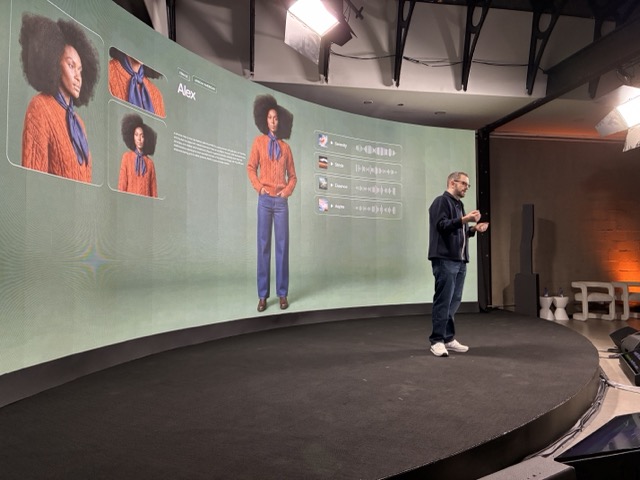


Artlist AI Toolkit Launch Event In New York
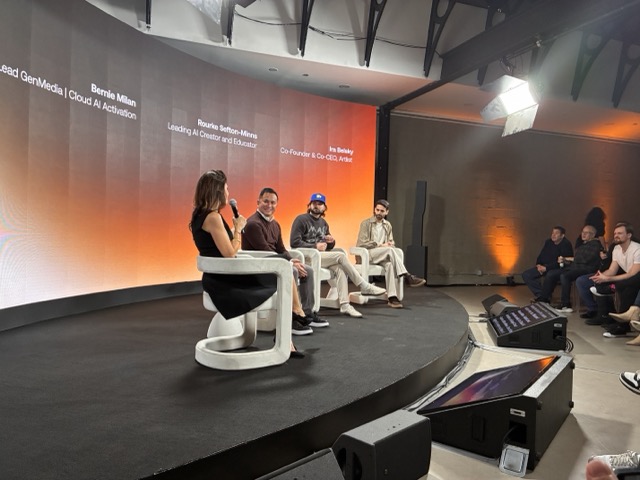
The Artlist AI Toolkit launch took place in New York City and brought together some of the world's top AI creators. It was fascinating to see a professional filmmaker and creator crew so fully embracing Artlist—and reassuring to realise I’m not the only one who thinks Artlist is becoming seriously powerful. Rourke Heath, Aussie YouTuber and AI enthusiast, took the stage alongside Artlist Co‑Founder and CEO Ira Belsky and Google’s Cloud AI Activation lead, Bernie Milan, in a panel hosted and moderated by Artlist’s own Dikla Bengio.
Here are some of my favorite quotes from the evening:
Ira Belsky, CEO Artlist:
“Yes, some companies will build tools where a marketer presses a button and gets 20 ads. Nice. We’re not interested in that. We think the value of ideas, creativity, taste, and intention is forever.”
Rourke Heath, Youtuber:
“It felt like the whole of last year was just new update after new update, and it was really tiring. We could never really get into a flow state as creatives, because you’d start a project and then the work you were doing would feel outdated when a new, much better model came out. So people working on feature‑length films just couldn’t do it, because by the time they finished, it would look pretty crappy and outdated. When ‘Nano Banana Pro’ came out, it was a turning point for me in the industry. We could say, ‘Okay, it’s here now.’ With image generation, I’d honestly be happy if no image model ever released again. It’s so good now. The image models are becoming so photorealistic, with so much control.”
Bernie Milan, Cloud AI Activation at Google:
“I think the mindset for the creators in this room should be to prepare for change.”
What kind of change exactly? Thankfully, I had the chance to dig into that question with Artlist Chief Innovation Officer Joshua Davies.
I asked him what the AI future for video generation has in store for us. Many of the problems creators face are already on the minds of the team at Artlist—and they’ll be solved much sooner than I ever would have imagined.
Lili: Joshua, you’re at the forefront of AI for video generation, and we’ve just heard about the Artlist AI Studio tonight, which sounds really exciting. What can we expect from video generation with AI in the near future, beyond the shift from single prompts to more layered workflows?
Joshua: Pretty much this year, if not early next year, Google and others will have world models that you can literally interact with live. You’ll be able to put all your pieces together. The nearest thing at the moment is doing that in 3D with a game engine, but it'll be generative AI running in real time, where you can just position the camera where you want and talk to your actors however you want.
This is just on the horizon now. It will be another piece of software, because you're still going to want all the tools you're used to, like the lens, the camera, and where you place things. So it'll just be more and more software, and we're going to have to move really fast.
Lili: And where will the AI agent be able to fit into this?
Joshua: I think the AI agent is really about helping people who don't care about AI, which hopefully is most of us. It’ll give you all of the flexibility of the different tools we have, without you having to remember which one does what.
Right now, we all know that if I want to edit an image, I use one tool, but if I want to generate an image, I use another. This is ridiculous. We shouldn't have to do this.
The agent will handle that. You’ll just tell it what you want, and it will do all the work behind the scenes for you.
Lili: And what about audio? When will we be able to fully control the entire audio part? Because if we're making a movie right now, we have to do everything separately. Even if we use something like Veo3 with audio, every clip will have a different sound.
Joshua: We’re doing certain things in Artlist Studio to allow that to be more controlled. But there’s definitely evidence that the next version of VO will actually let you add a reference audio file for the voice, so it will generate the voice you want for the video.


For me, this is the biggest current innovation: Artlist App launched their first own model Artlist Original 1.0. I've tested it with my usual prompt (Create an image of 2 people looking at each other and shaking hands, one being an AI robot, the other a woman. The background is space and the mood is friendly). The generator is super fast, and I really like the output. The cyborg and woman look very real and lifelike.
I've also tested it with a more detailed prompt, and I'm positively surprised by its coherence and attention to detail. See the second generation below, where I basically prompt a mystic tarot lady. I love how Artlist Original 1.0 has given the lady an authentic look and with how much love it depicted the background and cards.
Compared to other models within Artlist, the credits are in the mid range, with 80 credits per generation, and therefore a great alternative to Nano Banana Pro, which is at 400 credits.
Sessions Chapters
Another super clever novelty is the Session Chapters. Inspired by LLM chapters, they break down your generation history into different chapters so you can search through creations easily. With every new login into the app, Artlist automatically creates a new chapter for you. All old generations from before the Artlist App relaunch are stored in the last chapter, so nothing is lost, but only grouped together for you.
I think this is super cool and helpful because over time, my collection will become its own library, and it makes sense to get organised early on. I've been using the Artlist Max subscription for about 6 months now and have generated hundreds of videos and images. Clearly, this is only the beginning of a long creative friendship with AI. Just like with LLM chapters, you can rename your sessions and create your own system.
If I'm not in my office, I'm generating social media content on my small-screen MacBook Air. So far, I was only able to see 1-2 images at once, but now with the compact view button, I can resize the preview pictures to much smaller sizes and get the clean overview of my last 15-20 generations.
Inspirations and Prompting 3.0 With Artlist
Now, when getting started with a new session, you can scroll through the Artlist catalog of very unique videos and images on the AI toolkit homescreen and use them as a base for your own generations. Whether that's a lady crying jewelry tears or a woman from the 70s introducing an old school computer, you can just easily build up on these worlds. Check out how I turned the computer lady into a disco ball below.
I'll say goodbye to creative block for now, and you can do the same. If you were feeling like your prompts were missing that secret sauce, Artlist has thought of you, too. When you click on the AI image or video, you're presented with the prompt Artlist has used to create the jewelry tears. So along the way, you can improve your prompt skills as well. I've learned so much from other people's prompts, so I really like this soft feature.
Speaking of prompts, they are no longer limited in length on Artlist anymore, and you can add as many details as your creativity allows. If you want to see the full written text, just easily resize the prompt box by dragging the top right corner.
2026 promises to be a breakthrough year for AI video generation, with Artlist leading the charge toward tools that finally let creators focus on storytelling instead of prompt engineering. I’m genuinely thrilled to watch Artlist step into its role as the go-to AI platform for filmmakers, blending their creative heritage with cutting-edge tech to unlock what’s next.



