Artlist AI Tested for 30 Days: Here's What I Actually Got (2026)
Is Artlist AI worth it for you?




The newer additions to this AI toolbox are the Artlist Studio and Artlist Agent, which I explain further down. Generally Artlist offers everything you need for creating a video with AI.
What I appreciate about Artlist and why I keep logging into my artlist.io account regularly is that the platform lets me access the newest AI models on the day they launch.
In this blog post I'll dive into the Artlist AI platform, what it does and how you can get the best out of it. But I've also covered Artlist AI in more detail in my test and honest Artlist write-up here. And if you want to dig specifically into the video side, I did a deep dive into those features here.
❤️ Before we get started I'd like to thank you for using my affiliate links to sign up to free trials, you help me stay afloat and create more of this content to AI enthusiasts and small business owners. ❤️
If you want to zoom out and read my broader take on whether this platform is worth the money - not just the AI side - I cover that in my full verdict after 30 days of daily use._
For a deeper test of just the video side, including head-to-head comparisons with Runway and Midjourney, I broke that down separately in my dedicated walkthrough of the video features._


Artlist Studio
Artlist Studio is one of the more interesting things Artlist has shipped recently. Instead of a single-prompt generation where changing one detail blows up the whole scene, Studio lets you build video in layers. You pick characters, backgrounds and settings independently and swap them out without starting over.
The character reuse is the standout part. You build a character once and bring them back into different scenes with the same look, voice and feel.
You also get directorial control: camera type, angle, lighting and motion are all set separately. It's less random than standard prompting. The workflow splits into two stages, framing (where you assemble the scene from components) and directing (where you set motion, clip length and voice). You then bring the footage into your own editing tool to finish.
If you want to see what's coming next with the layered workflow tool I previewed before launch, here's my early hands-on test of the new environment._
Video generation
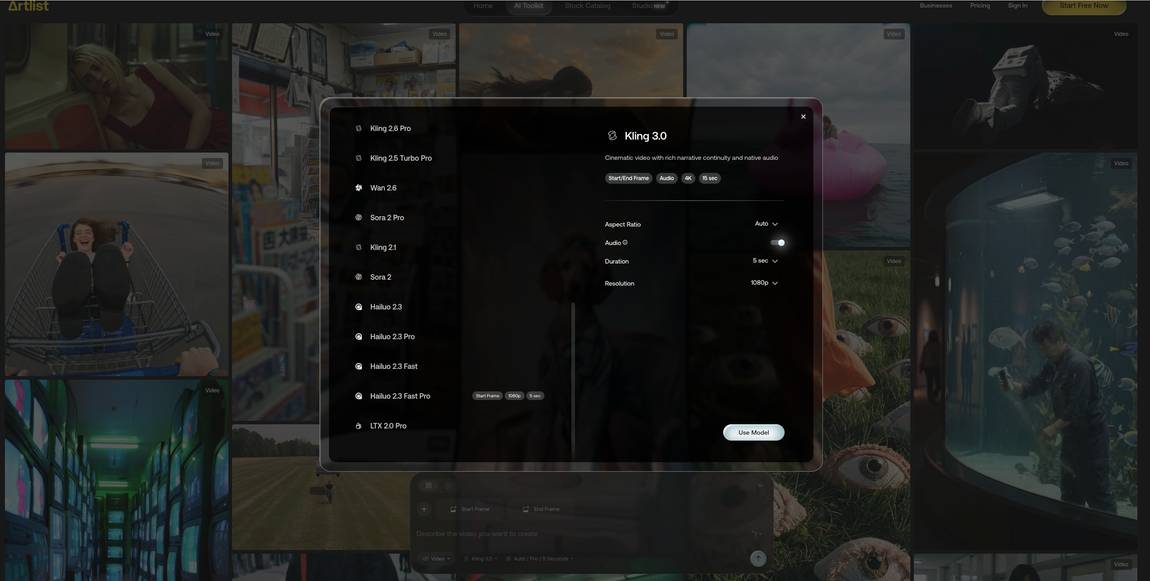
Artlist AI currently combines 38 video models in one place and covers all the main ones: Seedance 2.0, Veo 3.1, Kling 3.0, Grok Imagine, Wan 2.7, Sora 2, plus newer additions like Happy Horse 1.0. For each model you can see whether it supports start to end frame, the maximum length and resolution, and how many credits it costs.
The background board lets you see other creators' generations and adapt them to your own project, which is useful if you're not sure what prompt to write. On the left hand side you'll find your generation chapters, which keep different projects separate.
Once you've generated a clip, you can recreate, edit, download, translate or upscale it from the same interface.
Image generation
I counted 28 image generation models on Artlist AI. The main ones are all there: Nano Banana Pro, NB2, Seedream 5.0, GPT Image 2, Kling 3.0, O3, and Artlist's own model, Artlist Original 1.0. Like with the video models, when you select an image model you can see whether multi-image input is allowed, the maximum resolution and aspect ratios, and how many credits it costs.
The auto prompt feature and the AI agent help refine prompts if you're not sure how to phrase what you want. The top right filter lets you sort your generation chapters by video or image, so you can quickly find what's in any project.
You can also take any generated image and turn it into a clip in the next step, which is what makes the whole setup feel connected rather than a bundle of separate tools.
Voice generation
AI voice generation on Artlist is fairly simple. You add your prompt into the chat, choose between four models (ElevenLabs Multilingual v2, Minimax 02 HD, Cartesia Sonic 2 and Eleven v3), pick your language, set the stability (which controls expressiveness) and decide if you want to add an effect like vintage radio, robotic assistant or monster. The effects are quite unusual, I haven't come across them elsewhere.
After picking the model, you choose the voice from the catalogue. The voice names hint at the character (like "persuasion" or "polished"), which makes browsing faster than listening to a hundred samples.
The voice generator was how I first discovered Artlist AI. The effects pulled me in and I started exploring the rest of the platform from there.
AI image editing
Artlist AI's image editing feature is a Nano Banana integration. You can generate custom images from text prompts and animate them into clips. It also keeps character and style consistent across frames, which is useful for ads or brand work. You can use multiple reference images at once and change camera angles within a scene.
AI Assistant Extension
This includes tools like Silence Removal and Auto Zoom for editing, plus an integrated AI voice generator. The options speed up the editing workflow and give access to voiceovers in multiple languages directly inside your project.
SFX
There are 72,000 sound effects in the library, covering ambient sounds, transitions, impact sounds, weather effects, nature sounds and urban environments. With that volume, it's not difficult to find something usable.
Create an Artboard
The Artboard feature lets you build visual storyboards by describing your idea in a prompt and customising the format, style and resolution. You can preview different versions and download high-resolution images for presentations or project planning.
Premiere Pro extension
Artlist AI has a plugin that puts the entire music and sound effects library directly inside Adobe Premiere Pro. If you're already using Premiere, you don't have to leave the timeline to find a track.
LUTs
Colour grading is one of the more technical sides of filmmaking and a job on its own. Artlist has a dedicated LUTs section that lets you preview different versions on the same frame. You drag a toggle across the picture and compare the result.
Stems
Artlist automatically provides stems for many tracks, so you can isolate vocals, drums or instruments. The filtering also lets you search by duration, BPM, key signature and specific instruments.
- AI Creator (€41.67/month, billed annually): 80,000 credits plus unlimited generations on 11 models, including Artlist Original 1.0, Nano Banana 2, GPT Image 2.0 and several Kling versions. This is the "Most Popular" tier and probably the sweet spot for most SMEs.
- AI Professional (€239.99/month, billed annually): 500,000 credits plus unlimited generations on 13 models, includes up to 3 team members. For agencies or anyone generating AI content daily.
- Custom Business: Quote on request. Unlimited generations on all models, custom licensing, dedicated account manager, SSO and enterprise compliance.
All AI plans include the AI Toolkit (videos, images, voiceovers, music) and Artlist Studio.
- Max (€50.66/month, billed annually): The "Most Popular" Stock Catalog plan. Music, stems, sound effects, footage, templates, LUTs, plugins and extensions, plus access to 100+ AI models through the AI Toolkit and Artlist Studio. Comes with 16,500 credits. Pro License covers all personal and commercial use of the stock catalog. This is the all-in-one plan for most SMEs.
- Max Business (€399/month, billed annually): 180,000 credits plus unlimited generations across 13 models, 7 team members included, business license, legal indemnification, priority support, team collaboration tools and team credit and model control. For larger teams or agencies.
- Custom Business: Quote on request. Custom credits shared across AI products and models, enhanced legal indemnification, enterprise-grade security and compliance, SSO, dedicated account manager and unlimited generations on all models.




