









I always joke about how I wish I could invest in Gamma AI, because that would make me a rich woman one day. The company impressed me from the beginning when I first reviewed Gamma in 2024 for creating slide decks with AI. Where all other tools had problems generating it, Gamma AI delivered a beautiful and complete slideshow without any trouble.
A lot has happened since the company added various new features, which have further pushed the envelope. With the launch of Gamma 5 everything is fully agent driven. This means you can simply tell Gamma what you want (written or in voice mode) it does the heavy lifting for you. You bring the secret sauce (that's you) and Gamma does the rest.
Let's dive into all the core features here, and I will share my honest assessment of them with you in this review of Gamma AI.
Full disclosure: I am an affiliate for Gamma, so we might receive a small commission if you purchase the tool. But we are also affiliates for many other AI tools, which we don't praise and love as much as Gamma AI. It's really is great.
For Who is Gamma AI?
Since Gamma's core AI features are creating decks, content, and website generation, its audience range is equally broad. I see especially good use for small businesses with an online presence because Gamma AI has such a strong offer to them, and they can pay for one app and access so much for one subscription. People holding speeches regularly and teachers will find it super handy to generate slideshows with Gamma AI because it's so quick and easy. Businesses that require a website can quickly build it with Gamma, even for free. The 400 credits (free trial) includes sufficient AI credits to thoroughly test the Gamma app before deciding if the paid plan meets your need.Gamma AI Review: Core Features - Tried and Tested
AI Presentation Generator - Creating a Presentation based on a prompt
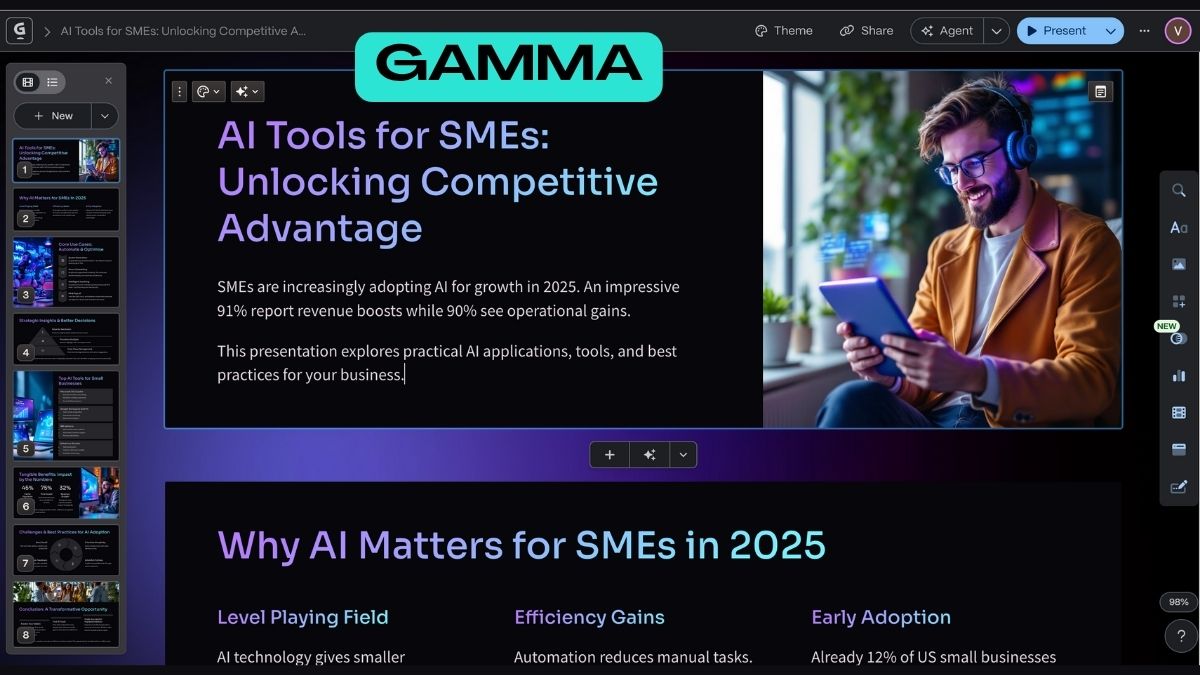
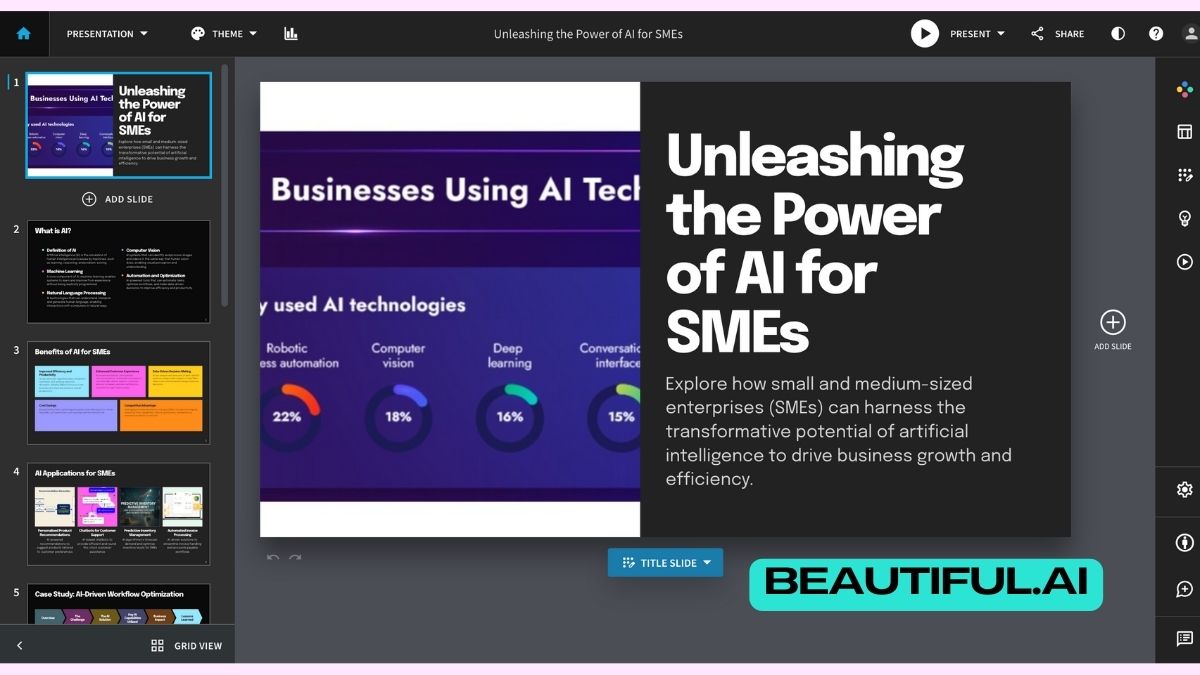
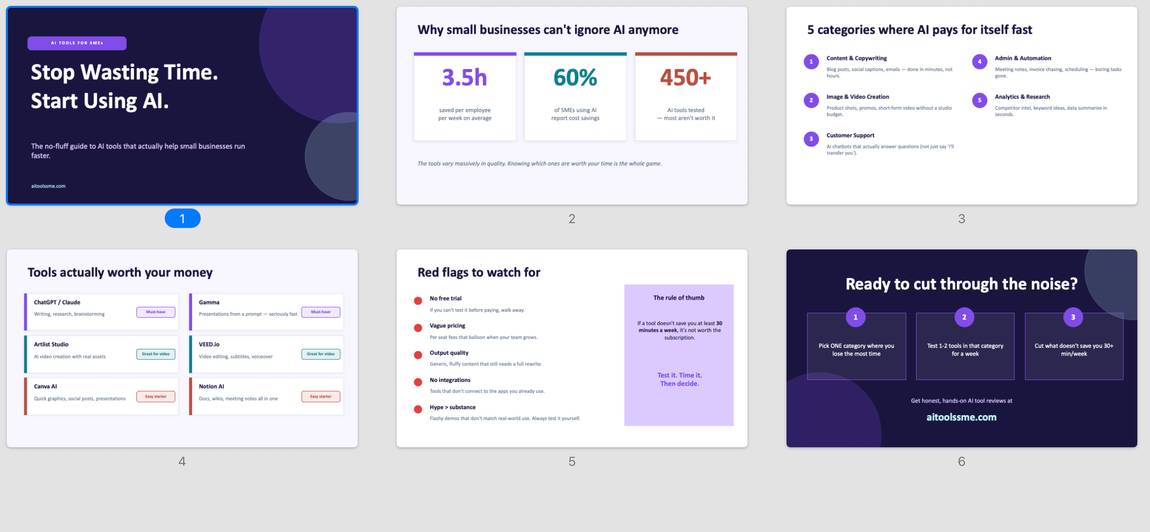
This feature works really well. You type in a prompt (mine was as simple as "AI Tools for SMEs") and Gamma pulls together the relevant text and splits it into slides. You get a first chance to review it, and then Gamma creates the rest of the deck with clean formatting, often with diagrams and matching images.In Gamma 5 this whole process is agent-driven. All changes can be made via the agent, just tell it what you want different (especially bulk changes) and it will make the changes independently. You can also compare old versus the new version and choose which you like better.
AI Agent - The Strongest Gamma Lever
The AI Agent within Gamma has its own chat window and you can request help just like you would from LLMs, just that you don't have to leave the browser tab and that changes are implemented directly within your workplace (which of course you can undo super easily again). Gamma's latest version (Gamma 5) has doubled down on the agent and is much faster. Basically now everything is run through that chat window and you no longer have to implement changes manually.I've tested the agent thoroughly and what impressed me most was this: I uploaded my brand guidelines for AI Tools SME as a file, it thought for a few seconds and then it independently adjusted the whole slide deck to my colour code and correct font. Everything at once, without me having to add additional information. This is a crazy time saver and my favorite new feature! Check out the video below.
The Gamma AI Agent is one of the best AI features I've encountered in any design tool, making it simple to use Gamma AI for bulk changes across your entire deck or upload documents that it can weave into your content automatically.
Gamma Integrations - Claude & Slack
You can now use Claude as your AI assistant and prompt Gamma directly via your Claude interface. I think this is huge, because it means you don't have to leave your LLM anymore and it can directly take over communication with Gamma itself. Similarly exciting is the Slack integration, which also allows you to trigger presentation generation straight from your companies' communication platform.Website Creation - Another One Of Gamma's Fortes
As I've explained in my AI Website Builder Comparison, I think Gamma is the best AI website builder for pages that don't require elaborate SEO, for example, for restaurant menus or online business cards. Here the AI magic works great: You can just input your prompt with all your business information and brand guidelines and Gamma AI will design a ready to go live website within seconds.Although Gamma does an amazing job, I always recommend fact-checking and customizing the content, also adding logos. If you don't mind the domain ending with ...gamma.site you can get your free website. If you prefer to have your custom domain, you have to sign up to a pro account for $20. I have tested about 10 other AI website builders, but I think Gamma delivers by far the best design and now with the AI Agent, it's super easy to make bulk changes.
Image Generator - Huge Choice of Models
Another thing I admire about Gamma AI is that they offer various integrated image generators which make the output even more customisable. You get a solid lineup of image generation models to choose from, split across three tiers. The basic models include Flux 2 Fast, GPT Image Mini Fast, and Ideogram 3.0 Flash, which are quick and good enough for most everyday use cases. If you want better quality, the advanced tier gives you Flux 2 Pro, GPT Image Mini, Ideogram 4.0 Turbo, Recraft V3, and Nano Banana 2 Mini, among others. And on the premium end, you get the full-power versions like GPT Image, GPT Image 2, Ideogram 4.0, and Nano Banana 2.That's more choice than a lot of the all-in-one creative tools offer, and it means you can pick the right model for the job instead of being stuck with whatever one engine the platform decided to go with.The image generation is based on credits; the weaker the model, the fewer credits you use. I like that I can choose between various styles or just simply go with the default theme style if I don't want to customize it. With 400 AI credits on the gratis plan, you have plenty to experiment with different AI models and see which you like most.
Social Media Content Generation - Requires A Bit Of Fine-Tuning
To test this feature, I wanted to create a carousel post about how to use Nano Banana for swapping product names on images. I've added my prompt it created an outline which was really on point and in the following step the social media posts. I really like the images, but the formatting seems a bit off.So I did ask the Agent to make the headlines smaller and the images slightly bigger, which it did for all slides at once. Although the formatting isn't as perfect as within the slides, it's helpful if you don't already have a social media workflow in place. This is much better than designing posts manually, but I wouldn't sign up to Gamma AI just for this feature alone.
I also heard that Gamma has just aquired 'Dream' which is a mobile image creator platform, for me this is a hint that Gamma is moving more into the Social Media and content generation area, which totally makes sense since that requires basically the same setup as presentations: Good visuals, copy and a formatting that engages audiences to go further into your world.
Create from URL & Smart Layouts
For a part-time perfectionist and aesthete like me, this is a super helpful feature, because I hate when things look ugly, and formatting can steal so much valuable time. Normally, Gamma AI will already do a great job creating slides from a URL, but if you're not happy with the page setup, instead of fumbling around yourself, find the smart layout function.It will give you a few suggestions in the form of previews, and with one click, you can get a new look for the whole page. I really like this feature because I hate fumbling around, especially in times of AI it feels like such a waste of time.






%20Small.avif)




