ngram Review (2026): Turning a Prompt and One Slide Into a Branded Video


"A ready-made AI agent is a no-code tool you can set up without any technical skills. Instead of building an agent from scratch with code, you configure it through a chat window: you tell it what to do, give it access to your tools and data, and it goes off and does the task on its own. Unlike a regular AI chatbot that just answers questions, a ready-made agent actually completes the work, drafting emails, researching, filling out forms, and so on, without you doing it yourself."
I also uploaded one of my own slides for extra context.
From there, ngram walks you through a few choices. First, the style. I could pick between illustration, 3D pop, papercut, and a few others. I went with cosmic, mostly because I was curious what it would actually generate.
Next was the story flow, with options like Problem → Solution → CTA, What → Why → How, Hook → Explain → Recap, or just Auto. I chose the classical problem, solution & CTA.
Then it asked who the video was for, and I chose marketing teams.
After that came the animation mode: AI Motion Graphics, Avatar video, Screencast, or Screencast + Avatar. I went with AI Motion Graphics to see what it could do. Here's where it got a bit repetitive, though: the next step asked me to pick the art direction again, the exact same style choice from earlier in the flow.
Then ngram asked me to enter my website so it could pull my brand style and logo automatically. This is super handy, and I have a real soft spot for tools that go that extra mile.
The last step was a final review of the prompt before ngram got to work writing the script. I left it untouched on purpose, so you can see exactly what ngram comes up with on its own.


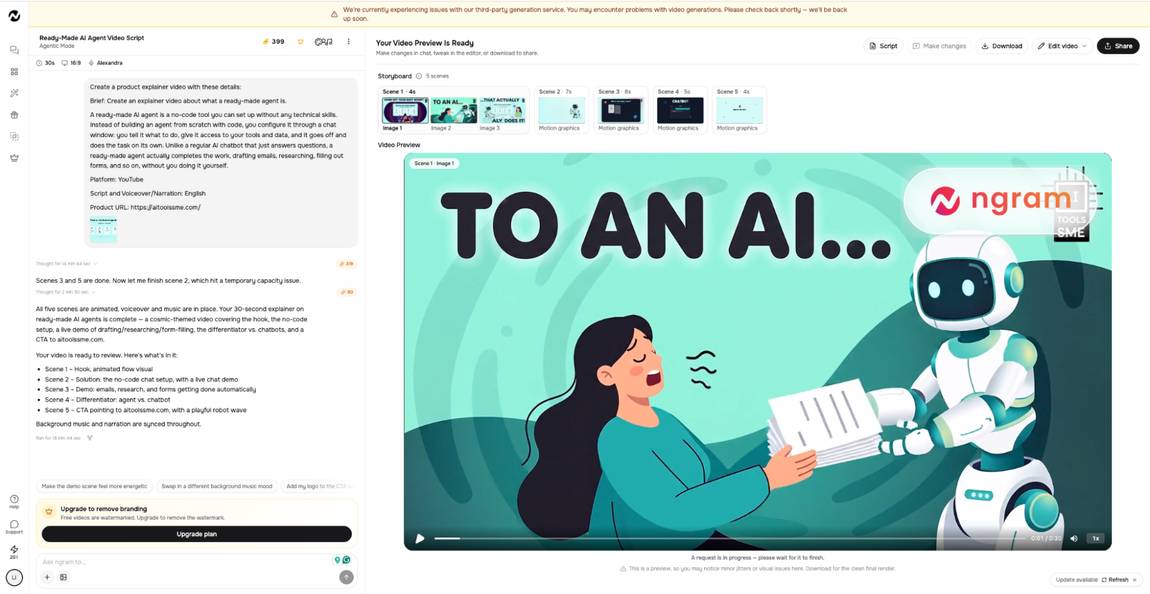


The flow is engaging too. It pulls you through the explanation at a pace that feels natural, nothing rushed and nothing dragging.
Visually, my ngram video was genuinely pleasant to watch. I can see my own brand reflected throughout, the colors, the style. It all feels like something that belongs on my channels, not a generic template with my logo slapped on top. The animations are a nice touch as well, smooth and purposeful rather than just movement for its own sake.
For a first output, straight from a prompt and one uploaded slide, with zero manual editing on my end, this is a strong result.
The generation itself takes a bit of time, but honestly, who's going to complain about that for a free video?
What positively surprised me is that ngram lets you download the generated clip for free. Sure, the ngram watermark sits big and layered right above my own logo, but that's fair enough for a free result. Once it's ready, the actual rendering takes less than a minute, and it’s done.

- I'm really positively surprised by how well my input was interpreted and turned into video form
- It is engaging and interesting, and looks really professional
- The free plan lets me create and download a 33-second video with an ngram watermark.
- I didn't have to input my brand information myself, ngram scraped my website and pulled it all together on its own
- I had hardly any work with this and still received a finished explainer video
Cons:
- The workflow is a bit bumpy and asks you to input things twice (style/art direction gets picked twice, and the flow sends you back to the start screen if you reselect explainer, wiping your entered data)
- Some elements overlap within the frame, like the chat window and the cyborg/chatbot, though in the paid version, you could prompt your way around this
For a tool that promises to turn a prompt, a screenshot, or a screen recording into a finished video, ngram delivers. I went in with a fairly boring test brief, an explainer video about AI agents, and came out with something genuinely usable, styled the way I asked, pulled from my own brand assets without doing much myself.
The workflow has a few rough edges: some steps ask you to choose the same thing twice, and I ran into elements overlapping in my free generation, but nothing that would stop me from using it again.
If you're a SaaS team, founder, product marketer, or growth team that needs product demos, tutorials, onboarding, or launch videos regularly, ngram is worth trying. It won't replace an editor for your one flagship launch video, but for the constant stream of smaller videos every product team needs, it's a genuinely fast way to get there.
What is ngram?
ngram is an AI video creation platform for product and marketing teams. You can turn a prompt, a doc, a screenshot, a screen recording, or existing product assets into a polished, on-brand clip.
Who is ngram best for?
SaaS teams, founders, product marketers, and growth teams who regularly need product demos, tutorials, onboarding videos, or launch videos.
Does ngram have a free plan?
Yes. I generated a full video for free and was able to download it, with an ngram watermark placed above my own logo.
How long does video generation take?
On the free plan, generation took a while, but the actual rendering, once ready, was done in under a minute.
Can ngram use my existing brand assets?
Yes. I only had to enter my website URL, and ngram pulled my brand style and logo on its own, no manual upload needed.
What animation modes does ngram offer?
AI Motion Graphics, Avatar video, Screencast, and Screencast + Avatar.
Can I choose a specific style for my video?
Yes, styles like illustration, 3D pop, papercut, and cosmic are available, along with story flow options like Problem → Solution → CTA or Hook → Explain → Recap.
Is ngram easy to use without video editing experience?
Yes. The whole flow is prompt and click-based, no editing skills needed, though the step order can feel a bit repetitive in a couple of spots.