
Why you can trust us: Testing Methodology & Editorial policy

AI Tools for SMEs

Your honest AI Tool Reviews:  user-friendly, non-technical and unbiased.
Curated by Lili
Welcome to my AI universe
Motion
Productivity Tools
AI productivity assistant that lets you automate repetitive tasks with intelligent AI employees.

Motion

Score 
4.75
/
5
Best Tool for :
Tool performance:
4
/
5
Setup/Onboarding:
5
/
5
User Experience:
5
/
5
Prompt coherence:
0
/
5
AI capabilities:
5
/
5
Voice quality:
0
/
5
Lip sync & motion:
0
/
5
Music quality:
0
/
5
Image quality:
0
/
5
Design capabilities:
0
/
5
Arrow previous
Arrow next
Pros:
Great onboarding with videos
AI employees with unique skill sets
Excellent for repetitive task automation
Cons:
Some connections between meetings and emails don't make sense initially
Requires fine-tuning for optimal performance
Coin icon
Monthly price starting from: $19
User icon
For Who?
Design
Key features:
AI-powered automatic scheduling
Intelligent task management and prioritization
Project management with real-time tracking
Meeting scheduling and coordination
Dynamic calendar optimization
Tested Model:
Last test:
November 11, 2025

How Motion AI Fuels Your SME

Automation is no longer for the tech savvy with Motion AI!

AI agents were the hype of 2025, but Motion AI has rebranded the function to AI Employees. And then rebranded them again to 'AI workflows' I assume that they got some backlash, it's not the time to openly say that you're giving the job to AI instead...

But in reality, these AI employees, aka AI workflows, are similar to AI agents: They take over tasks autonomously, delivering results on a regular basis if they've been set up accordingly.

When I reviewed Motion AI for my big Productivity Tools Comparison, I didn't count on this company at all. I thought that Monday.com or Clickup would take first place easily. But both were struggling slightly with their AI features and didn't really deliver on their promise.

Motion AI, on the other hand, was meticulous on the second go. As long as I gave the AI employees a clear task, gave the right input and defined the required output well, it delivered on point.

I have to admit, it didn't work on the first go for the Motion AI review tasks, the daily meeting briefs. I asked it to look at my emails and brief me for the next day. But since most of my delegation happens over Clickup and I only exchange emails with clients and not employees, this wasn't helpful. My bad, because a system can only work as well as it has been setup. How would it be useful if the input material provided isn't useful itself?

So for the next test I asked it to send me regular updates on new tools within specific areas and with a clickable link.
Furthermore, I requested it to research which tools on the list offer affiliate links, which it also did really perfectly.

I think this is a great example for a new era: We have to find the right tasks for (Motion) AI instead of just blindly automating everything we come across. It will take some time for us to catch up, but on the long run, AI like Motion can really mean a huge lever for small businesses. So I'll keep reviewing Motion AI for you and me, but promise to take a look outside of its realm too!

Try for FREE
Arrow previous
Arrow next

Motion AI Features - A Breakdown

Project Management - Motions' specialties:

- AI Project Manager  - AI Gantt Chart : Visualizing projects with auto-scheduling - AI Workflows - What (they used to call AI Employee)

Time Management - Motion's strong suit

- AI Task Manager  - AI Calendar AI - Meeting Assistant

Knowledge Management

- AI Chat - Based on your own content - AI Meeting Notetaker - Writing a protocol of your meetings (transcriptions) - AI Dashboards - Track progress on tasks - AI Docs Assistant

And More

- AI Sheets  - Integrations
Try For FREE

What is Motion AI ?

Motion AI is a tasks management system and scheduling tool. Recently they have also added more AI features such as the notetaker, AI sheets or doc assistants. In our Motion AI review we focused on the AI workflow (AI employee) feature and found it to work amazingly, even compared to companies like Clickup or monday .com

What makes Motion AI different from other project management tools?

Right now (January 2026) the AI features are much ahead of the companies we've mentioned above. Especially automation simple but time consuming tasks work really well, as long as you set the workflows up well and define the in and output effectively. But the competition is also not sleeping, I saw that Clickup has just launched a new AI feature a few days ago. But last time I tested their Clickup Brain, I was quite disappointed. It couldn't answer the simplest questions, even if the answer was very obvious and based on my tasks.

Is there a free trial available? Does Motion AI offer a free plan?

Yes, there is a free plan for 7 days, first you have to signup with your Google, Microsoft, Apple or regular email address. You can test the following plans: Pro AI or Business AI, but you do have to sign up with a credit card which is quite annoying.

Can Motion AI integrate with my existing calendar?

Of course, Motion AI integrates really well with all common calendars like Google calendar, ics or Microsoft.

Does Motion AI take meeting notes automatically?

It depends, you can set it up to take meeting notes for every meeting or only specific meetings. You can even add it during an ongoing meeting if you've forgotten beforehand.

Can I track project progress across my team?

Of course, this is also one of Motion AI's strong suits, if very good in visualising progress on projects. Motion AI started out as a scheduling tool mostly, but the project management part has been a strong emphasis of the company too and they manage it really well.

How do I get started with Motion AI ?

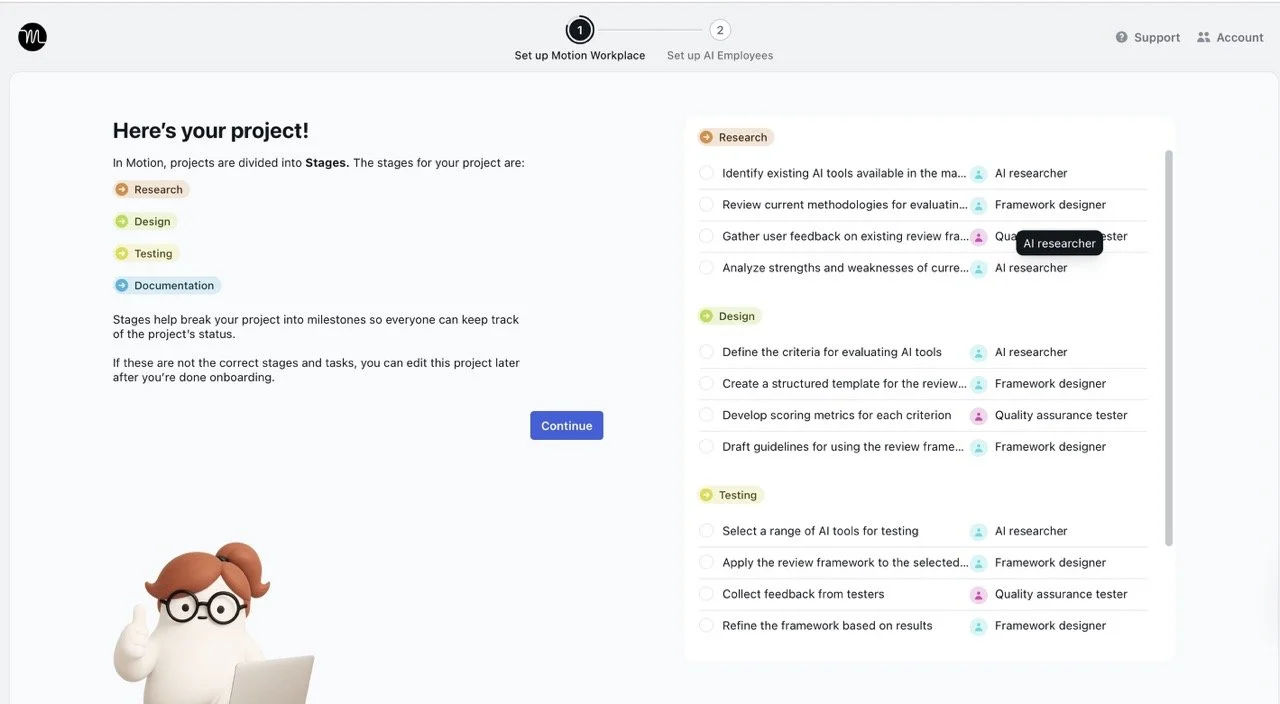
Motion AI is really easy to onboard, just start out with watching their onboarding videos which are super helpful. During our Motion AI review we didn't have any issues getting around Motion AI and gave it 5 out of 5 stars for setup/onboarding. Always start with the easiest and smallest steps first, the note taker could be a good entry point. Get acquainted to the tool before you invite team members and really give the free plan a run for the money. Once you invite your team members you're basically married to Motion AI, so test this new fiancé first.
Try For FREE
Try For FREE
Author:
Lili Marocsik
Lili remembers the excitement of discovering the internet at 14 — a true window to the world. The AI boom now feels just as thrilling. Since 2023, she's tested many AI tools, seeing the good, the bad and the ugly (especially at the beginning). Before AI, she worked as a video marketer, crafting YouTube Ads for HelloFresh and Revolut. She believes AI should empower people, leading her to build this site for SMEs. When not exploring AI, she enjoys her 30 plants and modern art.
Author Lili Marocsik

Get the best AI tool deals and newest tool reviews straight in your inbox.

By entering your email, you agree to receive occasional updates and marketing emails from us. You can unsubscribe at any time. We respect your privacy and will never share your information without your consent.
Black arrow icon