Best AI Agents for Small Business in 2026 (Tested)
I Compared 12 AI Agents With An Annoying Real Task
Why you can trust me: Testing Methodology & Editorial policy





I am looking for the No-Code, ready-made, always-on AI agents that don't require any technical expertise. Ideally, you command them through a chat window, and they easily automate annoying and repetitive business tasks.
❤️ Before we get started I'd like to thank you for using my affiliate links to sign up to free trials, LLMs are constantly stealing my content and you help me stay afloat and create more of this genuine content.❤️
The best AI agents can turn one person who knows how to set them up into a small business superpower. Or they can eat up hours of your time, cost you credits and deliver nothing useful at the end. I felt like this is where we were so far, but now, the best AI agents are ready to empower small businesses!
I tested 12 of the best AI agents so you can skip the trial and error. This is based on real experience, not feature lists.
- Find blogs that mention AI tools like Gamma or ElevenLabs
- Check that the site has a similar authority score (or DR) to mine
- Find the editor's email address
- Write a link exchange email referencing their article and my relevant review page
- Save it as a draft in my inbox ready for me to review and send manually
I also have skin in the game here. I actually want to use one of these AI agents myself, so I'm looking at each one with the same critical eye you should.
I'll be strict and transparent, because I want to tell you which tools will actually work for small businesses and which ones are not worth your money yet.
Security: Agents run in a secure cloud environment, not on your local machine.
Integrations: Connecting AI agents to other apps via Zapier or Make.com is possible but can be brittle. These integrations break, and when they do the whole workflow stops.
Multiple Agents: You can also build multi-agent systems where different AI agents talk to each other and hand off tasks. One agent researches, another writes, another sends.
Invocation: Is how you wake an agent up. That can be a Slack message, a scheduled time, an email trigger or a manual run. Each workflow has its own settings and its own custom prompt.
Barriers: HITL Stands for Human in the Loop. It just means you build in a checkpoint where you review before the agent continues. In my test, saving the email as a draft rather than sending automatically was my HITL step.
Models: Most AI agent platforms let you choose which AI model powers the agent. Some use Claude, some use GPT-4, some let you mix models across different steps.
- Filtering out competitor blogs was genuinely difficult for them. I could have defined that part of the task more clearly upfront.
- The DR lookup was a real hurdle since most tools sit behind a paywall, but some handled it better than expected. Hyperagent & Hermes Agent stood out here.
- How you set up your agentic workflow matters as much as which tool you pick.
- A vague prompt will burn through your credits fast.
- Add feedback loops to make sure the agent doesn't go too much astray.
- Work out your workflow logic before you let it run. In my case, getting the URLs first and filtering competitors manually would have saved a lot of wasted steps.
Typical use cases include lead generation, evaluating and answering incoming leads and outreach automation. Hyperagent has an image and video generator integration, so it can also create social media content for you. The difference is that an AI agent acts. It doesn't wait for you to copy and paste its output somewhere else.



When Hyperagent was not quite on the market yet, I was invited to test it while it was still in development.
First I created my agent and gave it its own custom instructions in form of my test prompt with the backlink research task. From now on I can use this custom agent in different sessions, schedule or trigger it via slack (invocations).
Within the settings for the agent I can set individual integrations, I connect my Gmail address here.
Once we get started I feel like Hyperagent is what ChatGPT had promised to us about 1 year ago: an autonomous agent that can work within its own browser environment. I can watch how it opens Ahrefs, queries a few of the websites it researched and then hits a captcha hurdle.
Hyperagent then moves on to another backlink checker website.
Only at one point it stops working and I have to prompt it again to continue.
But what it comes up with then is really impressive: by far the best list of websites I can ask about backlinks because they are not my direct competitors. The draft emails are perfectly formulated and all links are correct.
It wasn't able to send out emails directly from my inbox, but none of the tools were honestly, so maybe it's some issue on my side with Google workspace.
I'm already coming up with a million use cases for this tool, I'm really excited and sad at the same time because my next employee will not be human anymore.

Hermes Agent handled the research side of the task well. It pulled the DR on my site and the competitors without issues, found relevant pages, and even created its own skill for link building outreach that it can reuse next time. That's a nice touch.
Where it stumbled was the email drafting piece. Getting it to write straight into my Gmail inbox meant going through OAuth setup in Google Cloud Console, which is exactly the kind of technical detour I try to avoid. On top of that, there was no real free plan without connecting OpenRouter, I had to top up with a credit card just to get started, and the interface felt cramped on screen.
Overall, Hermes Agent is a solid, capable agent with a lot going on under the hood. It just asks a bit more technical patience from you than I like without a caveat. But if you don't mind a bit of connecting here, Google Cloud console there, you might actually love Hermes Agent!
Gumloop overwhelms me a bit in the beginning by wanting to connect my apps already at the free trial signup. I feel like a modern girl on a second date receiving a wedding proposal. Chill out.
And after the first steps it get stuck at the point where it's supposed to research the Domain Ratings. Instead of just asking for mine, it rates me way lower than it actually is (currently at 57), Gumloop classifies me at 26. It also can't find the DR of the other websites.
Next I'm asked to connect my Gmail account via connectors, which works surprisingly well. Until I'm actually trying to use it, again Gumloop is a bit stuck in desparation of not being able to access my gmail account. In the end we manage, it can create 3 draft emails after I let it mumble a bit to itself (it's kind of funny to watch its thought process but not actually understand it).
Love the ambition! Until everything else works properly, I will skip it but keep an eye on Gumloop, I think eventually they'll get there :)

First of all, there was a lot of fuss around Manus getting bought by Meta, and in August the unwind by Chinese regulators. Manus had to delete data generated after December, not the best starting point with an agent.
In other news: you can only set Manus up via an integration in Telegram, LINE or Slack. Scanning the QR code with your phone will link both accounts, in my case Telegram with Manus. I personally find this distracting, because I typically separate phone time from work time. After a while I realized that I can work on desktop too, if I download the app.
Manus is right away frank about its limitations and that it won't be able to write emails for me. And Domain Ratings will be based on its estimations.
It also tells me that this ask is a fairly intense research task and that I should expect 15-20 minutes, but will update me.
Manus also determines my Domain Rating 20 points off on Ahrefs, which establishes a wonky base already because it will match pages with lower domain rating to mine now.
Blog link quality is very low, it basically output ONLY competitors.
Drafted emails are good, but again the files are on my phone and I have to first send them to my desktop to copy and paste the requests to my emails.
I also ask Manus if it can make changes to the sheets it provides to me, but it can't and will output a new file for me every time. Kind of like in the middle ages, when we had so many files we completely lost the overview.
So overall I would love to work with Manus because it would be a great free alternative but this AI agent is just not useful enough yet.
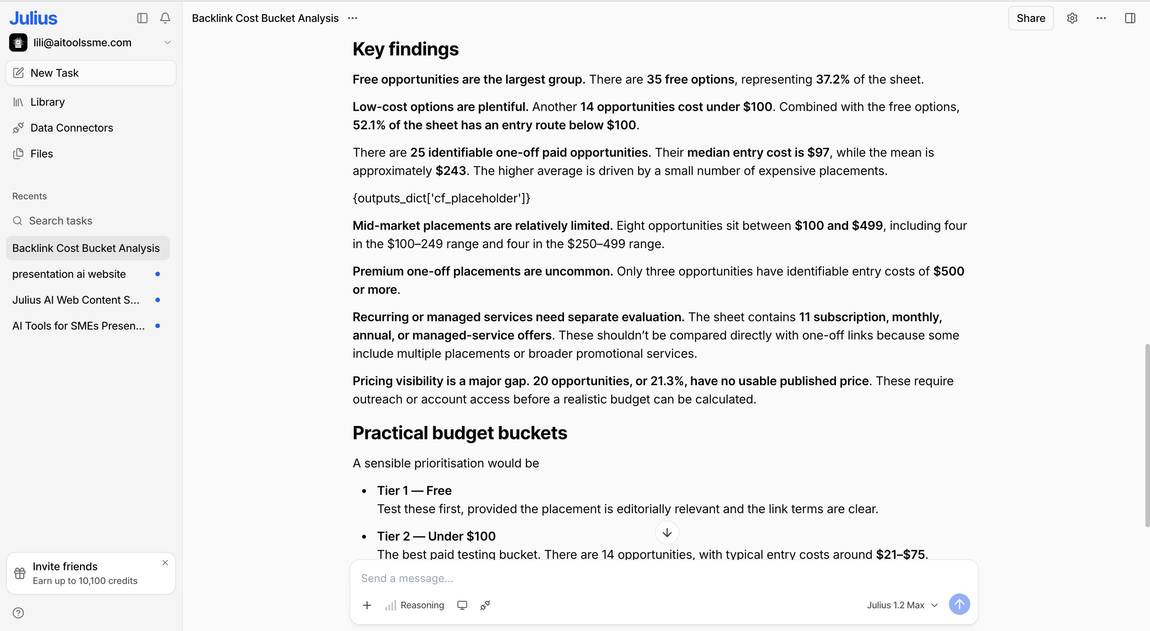
Julius AI is a different type of AI agent, it's a highly capable specialist you direct, rather than an agent that independently executes multi-step tasks in the background like in my usual trial task for agent, the backlink researcher.
I tested it across three areas: data analysis, presentation AI and website creation. And across all three, it held up impressively well. I used my backlink task differently here: instead of letting it create outreach emails on my behalf, I asked it to analyze my backlink pricing sheet and explain the different price buckets it produced. This is a super easy task for Julius AI, which, after all, started out as a data analysis tool. Julius AI explained the findings in plain language, easily understandable for someone like me who easily gets lost in numbers.
Julius AI also built a presentation with genuine content depth rather than generic filler, and put together a full website, asking qualifying questions before it started building. Most tools annoy me in this instance, they build first, waste credits, and work backward from there.
If you're looking for an agent that can analyze your data, build your slides and put together your website, all from natural language prompts, it's one of the more capable all-rounders I've tested.

After signing up, Lindy right away threatens to label my emails, draft replies for me, and take notes in my meetings. No warm up phase, no hi how are you? I didn't even allow Claude yet to take over these things, despite our mutual love for each other.
I connected it to my former virtual assistant's inbox where we used to do backlink outreach. I can also just ask Lindy to look through my messages and get me specific information. So I tested this and asked how many backlink requests we've received in the last 2 months, and Lindy determined it was only 8 to this email address, which is possible.
Next I copied the full 5-step task into the Lindy chat window. It thought for a while and I wondered if I was in the right place. Lindy keeps showing these escalated windows with scripts and I'm unsure why I have to even see them when I only have read access and can't change them.
As expected, Lindy has issues with figuring out the DR (domain ratings) of the pages and determines mine way too low instead of just asking me.
Next it researches potential partner pages and also sorts out lots of competitor pages, but in the end 2 out of 3 email suggestions are direct competitors still. I scold it and it continues to research non-competitors and drafts relevant emails.
In the same flow it also deletes an event it never created, which Lindy catches itself, but still, this is stealing my attention for an unnecessary moment.
Also I wish Lindy would just share the email draft text with me before creating the emails in my inbox right away. This just wastes credits and I'm unhappy with the formulation for 2 more times because it just doesn't understand me well (Claude understood my instructions right away, so I'm not the problem here).
Overall I don't think Lindy is helpful enough yet to really outsource big chunks of work to it. It still needs too much manual review and often wastes credits for no good reason.

Ok, sheepishly I have to admit: At first I'm a little bit in love with Relevance AI. It just looks so cool.
The interface is so clean and easy to get around right away, and the free credits are really generous.
My Outreach agent gets right to work and correctly identifies the competitors. It only outputs one address at first, but that one is on point. Even though I connect it to my Ahrefs account, it later is unable to fetch the correct data for me.
I get so excited that I right away connect it to my Gmail address, sadly I can't find the draft email it created there for me. Relevance AI doesn't really explain it, but I still trust it enough to consider connecting it to my Airtable for a moment. Mmmh, maybe we need a longer runway.
It wants me to manually copy and paste my outreach emails, which of course is a pity, but bearable if the output generally is good.
Next I throw in another challenge: Create a sheet for me where you document all the addresses and status. It thinks about it for a very long time, even though I give it the playground with a link to an existing sheet.
After 5 minutes of thinking (Relevance), I have to admit that not all that glitters is gold.

I've tested Genspark on the workflow function because Claw required me to sign up to a plan.
The AI Agent takes a bit longer than other agents, but the output is solid. Genspark creates a workflow for me with details that absolutely make sense:
The thought process regarding DRs is solid. The email draft is good. I'm able to set a trigger. It flags that Gmail is not connected yet.
I can't determine where Genspark will check the DR, though, because I ran out of credits to actually run the tool. So to be fair I'll rank it in the middle somewhere.

It's a bit harder to determine the quality of Enso's output because it hits the credit limit at step 2 of 10. It ran out of credits so fast because it had collected 100 addresses and quite some data on all of them.
The output is more or less relevant because the pages aren't AI review pages but mostly (and ironically) AI agent companies. Which is fair, as long as they wrote about the topics I had provided.
The DRs are correct, which impresses me because hardly any other tool was able to research them properly.
I had just connected my email address when I ran out of the 2000 free credits - the tool simply used too many by running 17 tools. What a waste! This is also concerning because the next tier only gives you 3000 credits for $49, which means Enso might waste a lot of your paid credits too.
Because it was able to pull the DR data I gave enso a good for performance but a bad rating for value for money. The rest is neutral because I couldn't evaluate them.
First I'm asked if I want to use my own API keys or get billed directly from MindStudio. This already makes me think that MindStudio is a bit more technical than the solution I'm searching for here for busy business owners.
And honestly, if getting started with your tool requires watching a Youtube video, I'm usually not your target audience.
I honestly tried setting up the Sales prospector agent with MindStudio, but I didn't quite get how to do the Domain Rating check and eventually gave up. I'm sure MindStudio is generally a great tool visual builder agent, but I am looking here for something even easier.
I gave the tool an average rating for Tool Performance & AI Capabilities, simply because I can't determine it.

It might not really be fair to measure i10x against the other tools in this category, because it's not a full-grown agent. It can't connect to other tools or external services like inboxes, but it's eager to help anyway.
I was a bit annoyed with how generous i10x was throwing my credits around. I didn't feel like it should repeat every instruction over and over again - just get to work!
So for this multistep setup with Gmail integration, this is definitely not the tool for you.
I'm quite baffled after testing AgentGPT and honestly I have no idea who could use a tool like this and why it's mentioned all over the net. Just look at my cons for this AI agent, it's a chain of failures of AgentGPT.
It started out by fabricating the websites, which miraculously all have exactly Gamma & Elevenlabs content (both together even! wow). I should have been suspicious that the DR and contact address was output right in the first step as well, even though AgentGPT has defined these as next steps. Oh well, if we're already making stuff up, let's go all the way...
It's almost funny to watch how it checks and verifies its information, because it does it based on the information it had provided itself. So e.g. it will make sure that the domain fits to the website, the Syntax is correct but of course if it makes them up, it will do that in a correct way.
So dear business owners, don't even waste your time with this tool, it would take too much effort to check for mistakes and you don't want your name on anything that's sent out by AgentGPT.

Cassidy AI is really weird: it tells me it can't browse the web to research the blogs, but at the same time it was able to pull the data of my pages I want the backlinks for. Make it make sense.
It literally wants me (or a VA haha) to make a google search and copy screenshots so it can take a look. It provides me with the keywords for this search, which are the same keywords I had given in my prompt.
I don't know what I would need Cassidy for then?
Not ready to waste any more time with this tool and you shouldn't either at this point.